Penny Sliding Card by Christine

Monday came way too early for me and I was not prepared to show you all the beautiful Creative Team projects. I would like to make it up to you today and share with you this beauty with you. Take it away Christine… Lisa
One of the things that Lori does best is create fun interactive cards and I have found that I love making them!  So today I am going to show you a brand new interactive card in the store called the Penny Slider Card Circle.  I also needed to have a special envelope to put it in because of the weight and height so I also cut out the Sliding Box for it.
 
The card was a lot of fun to make and I can see all kinds of potential for this one.  The directions and tips that Lori gives on her YouTube video are definitely worth watching.  You can see it here.  I used some fun paper, chipboard and sticker gears and brads from Lori’s All About A Boy paper collection for Echo Park.
When you swing the card around the penny makes the little gear more in a circle and around the card at the same time.  Pretty cool, huh?  Here’s a closeup.  I used a Papertrey Ink stamp for the center image.  I loved how the little 3D star embellishment fit right inside the middle.

The slider box is going to see a lot of use in the future.  This box can be used with or without the inside box.  It’s fun to decorate and I love the bracket shape on the front flap.  I created a mat for the flap by using the Internal Offset feature and also enlarged the file to fit my card.  The chipboard gear and sticker ribbon on the front is acting as my closure.  I  attached it to the box with some foam adhesive and then attached the smaller circle and brad on the bottom part of the box, then wrapped a cotton string, up and around both pieces to hold it closed.

Here is a closeup of the card in the sliding part of the box.  You can see how the foam adhesive under the blue circle helps to lift it up so that the pennies can slide underneath it.
I hope you have enjoyed my project today.  Be sure to check out the other slider card,  Penny Slider Card Straight, as well as the some of the other interactive cards in Lori’s shop!

Lori Whitlock Supplies Used:
Other Supplies Used:
All About a Boy Paper Collection and Embellishments by Lori Whitlock for Echo Park
Papertrey Ink 2012 Birthday Tags stamp set
Stampin Up! Ink in Pumpkin Pie
Foam Adhesive from Imaginisce
Cotton string, Joann’s

Cupcake Set by Brigit

Welcome back. Today we have a beautiful project to share with you. Check out Brigit’s cupcake set. 
Here’s a cute cupcake set using Lori’s files, perfect for a birthday or just to let someone special know how sweet they are!

The paper collection I used is Echo Parks Here and Now designed by Lori.  It’s such beautiful paper, I really loved working with it.  Both the card and box are decorated with elements from the collection and some stamp sentiments from Jaded Blossom’s set Hey Cupcake.

Here’s a closeup of the cupcake easel card, the holes lined up perfectly to the base, I love how it looks.  The decorative liner for the inside added such a nice touch also.

The cupcake shaped box is so sweet, you could put treats inside or a small gift like jewelry or even a cupcake.  The flower and leaves are from Lori’s 3D Flower Set 3.

Thanks for stopping by, hope you enjoyed these scrumptious cupcakes!!

Squash Album by Traci and Summer Cards by Mendi

Hi everyone! Traci here. For today’s project I used Lori’s adorable Squash Album.  I have been wanting to create a small keepsake for a few of my favorite photos from the Susan G. Komen 3-day walk I did a few years ago.  The squash album is fun to put together, small enough to carry in your purse, and would even make a great little card for the top of a gift!
 
When you are creating this cute little pop-open album, you can place a piece of twine or ribbon between the back paper and chipboard so that it wraps around, ties in the front, and keeps your album closed.
The paper and stickers I used in this album were also designed by Lori for Echo Park — Here & Now is a beautiful new collection full of pinks, blues, butterflies and fun phrases.  Love it!
Fully opened, the album has lots of space to be creative!  You can add photos and stickers as I’ve done here, or you can write notes, add card sentiments, or even make the triangle pieces into little pockets for tucking in a surprise.  You’ll have fun with this one!
Please stop by my blog and say hi!  I would love to hear your creative ideas for this project!
Mendi here today sharing some fun Spring and Summer themed cards that I’ve made in recent months using Lori’s fun cutting files and various paper collections!
This first one uses one of my favorite papers from Lori’s older Summer Days Collection which she designed for Echo Park. I also utilized her SVG Cutting Files Spring Is Here Title, 6 Clouds & 9 Starburst Seal Set (for the sun).
For my second card I turned to Echo Parks Dots and Stripes Neapolitan Collection and Lori’s adorable Ice Cream Cone cutting image. I spelled out the word “cool” using her Happy Font.
My last card uses Lori’s Hello Summer collection which she also designed for Echo Park (and just so happens to be the theme of my blog). 😉 I paired her Summer Fun Titles and 6 Clouds with a fun sunshine sticker from the collection pack.
I hope I’ve succeeded in spreading a little sunshine your way!

Tutorial: Stitching with your Silhouette

I love all the tutorials our Creative Team has been making! It’s fun to learn new things! Check out how easy it is to make faux stitching lines on your die cuts. Take it away Brigit…

I love stitching but sometimes I just don’t have the time to pull out my sewing machine so I’ll create it in Silhouette Studio and do a print & cut.

For this project I used Lori’s Bracket Shaped card and the pinwheel from the Layered Shapes along with Lori’s Patriotic Picnic digital collection, which I love!!

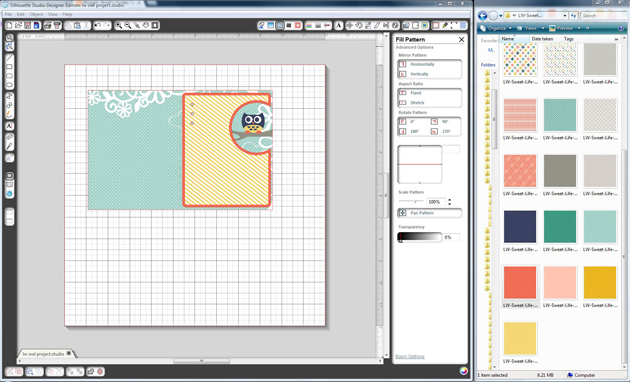
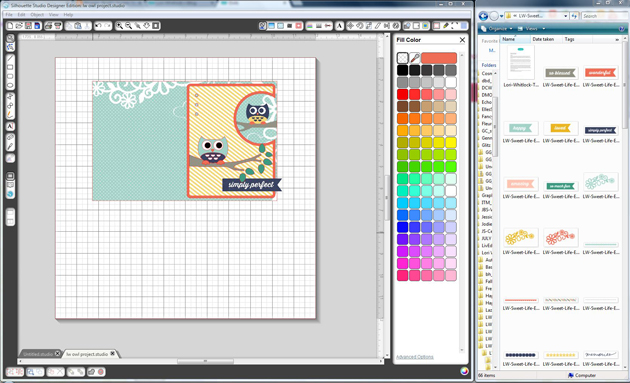
First place your card on the mat and ungroup, fill the top layer with your digital paper.  Select all, go to Line Color and click none.

Select your top layer, go to the Offset Window, select Internal Offset and set your offset distance, I used .075.

Now the internal offset you just created should be selected, go to the Line Color and select the color you want for your stitching.

Next go to the Line Style Window, select your dash line and I like to change my line thickness to 1.25pt.  Check the Print Lines of Selected Shapes box.

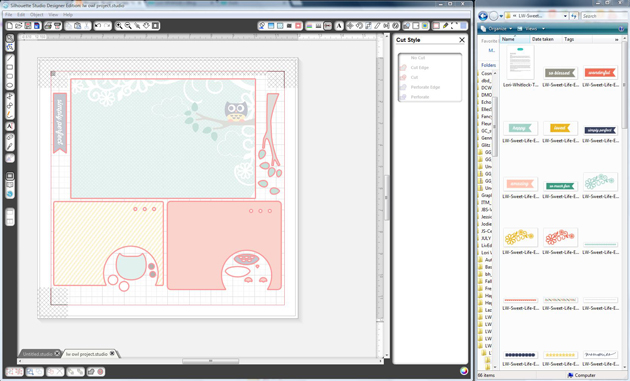
This is important, with the stitching still selected go to the Cut Style Window and choose No Cut, you only want the stitching to print and to cut around the top layer piece.

After that’s complete I like to group the top and stitched layers together.

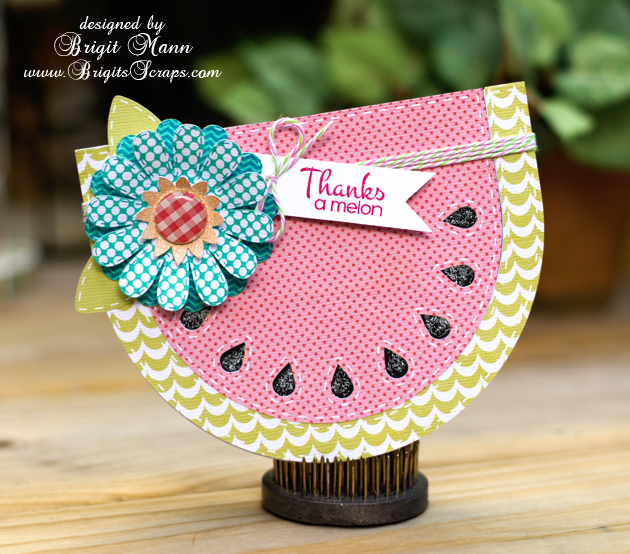
Here’s a closer look, I used the same steps on the pinwheel, you only need to do one of each color and duplicate to make it easier.  I added some stars to the blue to make it look like the American flag.

I loved the pinwheel so much I created a larger one on a barber straw and placed it in a glass jar.  I added some Stars and Stripes Trendy Twine and a couple of flower elements from the Patriotic Picnic collection.

I hope this tutorial has helped and you get to make some faux stitching on your projects too!!