Modifying Print and Cut Sentiments: A Silhouette Cameo Tutorial by Michelle

Hello Crafty Friends! Michelle here, to share a quick and easy tutorial for changing your print and cut sentiments. Have you seen all of the recent Valentine’s Day cards that Lori Whitlock has designed? With so many fun interactive styles, you can make a card for everyone. I’ll be sending cards to the people that I love, but I also want to give cards to the people that I like. Sending coworkers cards that say, “I Love You” would make everyone feel a little awkward, so I’m going to change the print and cut sentiments with my Silhouette Cameo.
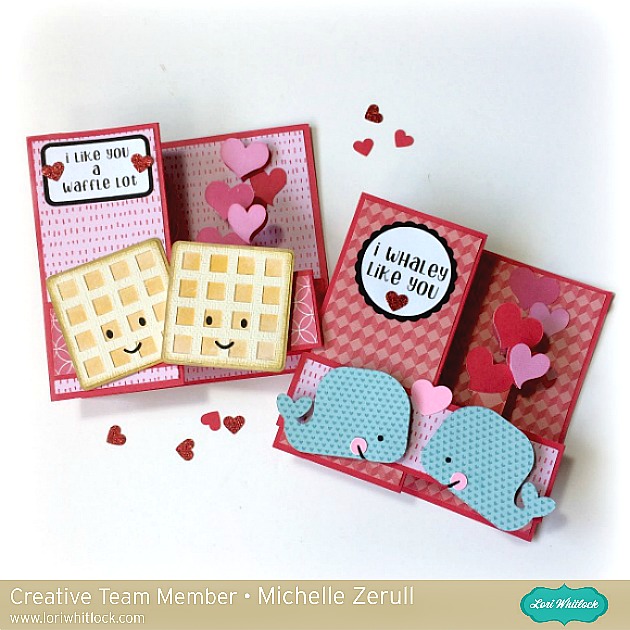
Today, I’m going to change the sentiments in two pop up box cards. I made the Pop Up Box Card Valentine Whale from the Lori Whitlock SVG Shop. You can also purchase it from the Silhouette Design Store. I also made the Pop Up Box Card Valentine Waffle card from the Lori Whitlock SVG Shop and at the Silhouette Design Store. Both of these adorable designs contain sentiments that say, “love.” We are going to change that in three easy steps with my Silhouette Cameo.
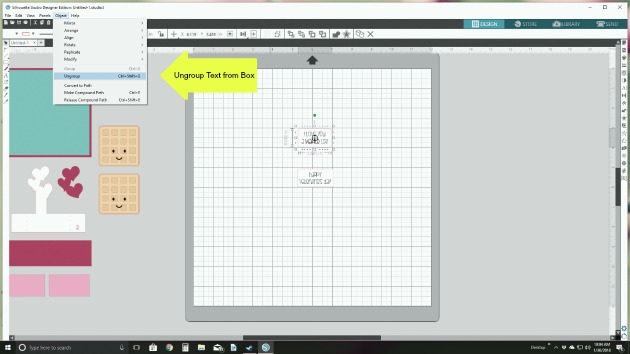
1. Prepare the sentiments to be changed. Ungroup and move all of the design elements off of the mat and on to the grey area. Leave the two print and cut designs on the mat. I’m going to change both print elements at the same time so the fonts match. Ungroup the text from the box and delete the sentiment. Leave the rectangular box piece on the mat. Our new sentiment will fit inside.
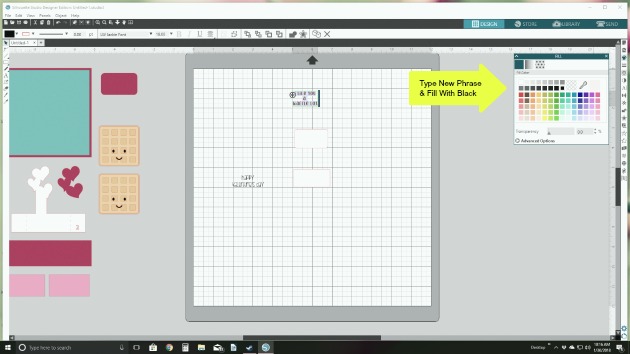
2. Design your NEW sentiment. Create a text box by clicking on the left hand side. Type your new sentiment. You will need to resize your sentiment to fit the text box by using the text icon on the far right side. You can also change your font at this time too. Lori has a lot of great fonts to choose from. I changed my font to Jackie Font that I downloaded from the Lori Whitlock SVG Shop. You an also find it here at the Silhouette Design Store. Important: You need to fill the sentiment with black in order for it to print. You can do this by clicking on the new text and then click on the art palette icon the the right side menu. Technically, you can choose any color, but we are sticking with black for this project. Make sure your new text fits in the old text box piece.
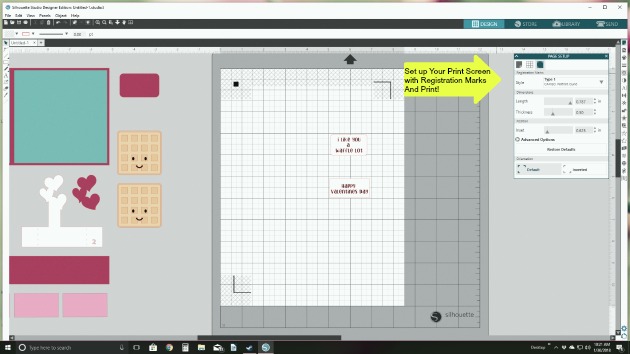
3. Prepare your new sentiment for printing. Now that you have your new text in the old text box piece, you will need to make sure that it will print instead of cut. To do this click on the blue “send” tab on the top right. This screen will show you what cuts by placing read lines around it. Leave the red lines around the box, but remove the red lines from the sentiment by clicking the “No Cut” on the send screen. Now flip back to the “Design” tab. Here, you can group your sentiment and box so that you can move them around together. Set up your page to print as usual.
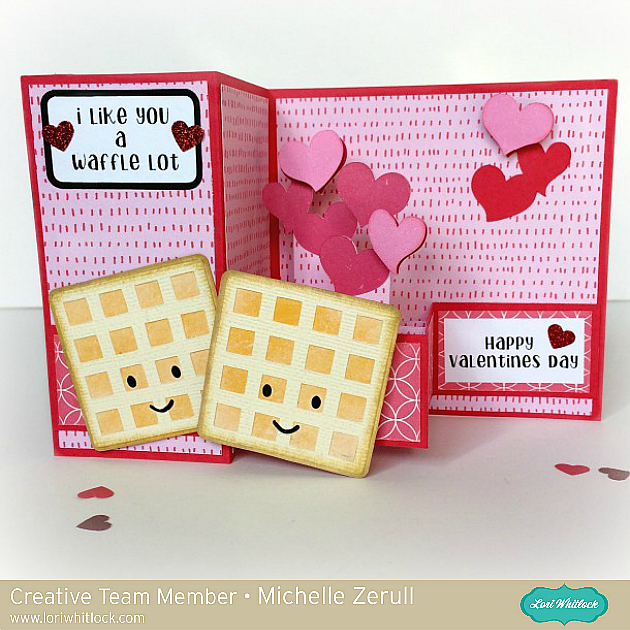
As you can see from the card, the original sentiment has now been replaced with, “I Like You a Waffle Lot,” instead of “I Love you a Waffle Lot.” It’s just as cute, and now I can give this card to anyone!
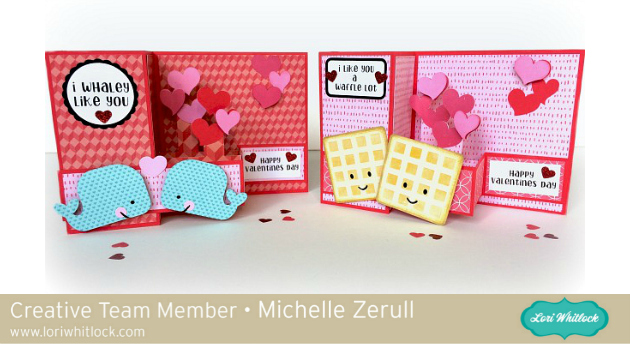
I love that all of Lori’s designs are so versatile. And so very, very cute! Thank you for visiting, and have a crafty day!

Michelle


Sweet Little Valentine Chocolate Box

Hello, Crafty Friends!! Mitsyana Wright here… and I’m ready to toss out my winter snowflakes for some heart filled skies because Valentine’s Day is around the corner and February is the month of love.  So what better way to celebrate than with sweet for your sweetie… or sweeties. I have 4 kiddos and a Hunny bunny that would love to receive this sweet little Valentine.For this romantic shabby chic heart box, I used Lori Whitlock’s Valentine Nuggets Heart Box.

You can find this cut file in Lori’s SVG Shop, hereOr in the Silhouette Storehere.

I started by downloading the file onto my computer and extracting the contents of the file.  I opened my Sizzix eclips software and loaded the file. I clicked the “Import” button to open the file into my software.

Once I opened up the file I grouped the images by like shapes and colors. (ex. all the red shapes together, all the scalloped hearts together) and moved them around to fit my virtual mat.

Then, I grouped my “like” items together so I could cut all the shapes of the same paper all at once. I used the gorgeous floral paper to cut the box panels and the basic heart shapes.

Then, I “hid” those box panels and basic hearts…

and die cut just the scalloped hearts from this beautiful fleur de lis paper. Once, the scalloped hearts were cut  I inked the edges using Walnut Stain Distress Ink.

To assemble the TOP box, I folded the panels along the dotted crease lines and folded each piece to form a rectangular shape. Then added glue to the small tab at the end and adhered it to the opposite end.  I pinched the ends together till the glue set and then added more glue to the bottom flaps directly to the bottom or “underside” of one of the scalloped hearts. If you look very closely at the cut, you’ll notice that there are tiny markers cut into it to mark where you need to adhere the boxes… so there’s no guessing where the center of the cut is and your box is properly aligned. I added glue to the box panels bottom flaps and adhered my box in between these markers.

For the Bottom box, I took the other scalloped heart and left it faced up and added glue to the remainder box’s bottom panels… but before attaching it I ran both basic heart shapes through my Xyron Sticker Maker and adhered one the hearts to the remaining scallop heart. Then I attached the remaining box over that.

For the inside panels of the box, the file has these separators. I just folded along the dotted lines and add glue to the small tab and attach to the opposite end so that it resembled a rectangle. Once the glue dried, I inserted all three into the bottom box.

Here is what both the bottom and top pieces should look like…

The top lid should fit snuggly over the bottom box.  I just simply added a sprig of leaves and flower buds onto the cover and topped with a single rose.

Here is my finished box…

This little Valentine treat box is absolutely darling!!

And these delicious Hershey’s Chocolate Nuggets fit perfectly!! But don’t let the name of the file fool you because…

hey, look… these Dove Chocolate hearts fit perfectly too!!

I’m sure you can fit lots of other goodies in here as well. So give it try!!  I love this cute treat box… makes my heart aflutter!!  I hope it makes yours too!!  Thanks for joining me today & I hope you enjoyed my project!!

~Mitsyana Wright

Valentine Kisses Heart Box Tutorial with Kathy

Hi Everyone,  it’s Kathy today with a tutorial showing how to assemble the new Valentine Kisses Heart Boxes!  As soon as I saw this box, I had to make it, it’s such a cute little gift for someone special!  I made the Small box which holds four kisses, but it also comes in a larger size.  I’ve added links to both at the end of this post.

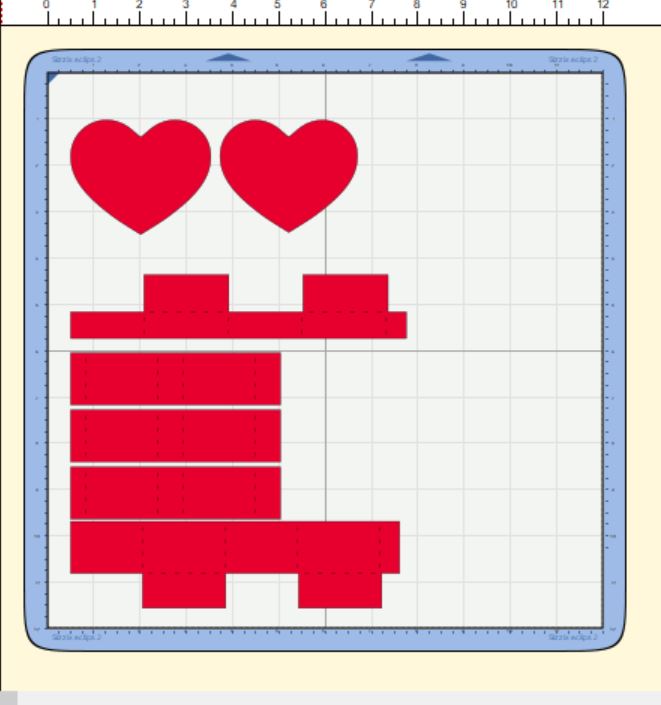
The boxes are really pretty simple to assemble.  These are the pieces that come with the small box.

I started by assembling the box pieces that are attached to each of the hearts to form the bottom box and cover.  The bottom box has slightly higher sides when glued together.

For both the top and bottom, layer the hearts and glue together.

You will notice on each of the scalloped hearts small notches have been cut.  These are there to help guide the placement of the triangle boxes.  The two scalloped hearts are different, one has a slightly larger area designated by the notches.  This is the piece for the cover.  Glue the box with the shorter sides to this heart, and the taller sides to the other heart.

The next step is to assemble the insert pieces that will hold the kisses.  Glue these strips into little triangles.  I glued the tab on the outside.

Glue the little triangle pieces together so that the form the shape of the box bottom, then slide them into the box bottom.

All that is left is to add some kisses!

You can customize the top of your box with stickers, and other embellishments to make a one of a kind treat for someone special!

Here are the links to all of the Valentine’s Heart Boxes.  There is also a Valentine’s Nugget Box which I’ve included below.  The assembly is very similar, the difference is that the box pieces and inserts are square to fit a Nugget Candy.  The guiding notches on the scalloped hearts form a square.

Valentine Kisses Heart Box Small (In Silhouette Store here)  Holds 4 Kisses
Valentine Kisses Heart Box Large (In Silhouette Store here)  Holds 9 Kisses
Valentine Nuggets Heart Box (In Silhouette Store here)  Holds 3 Nuggets

That’s it for me today, thank you for stopping by to peek!


Be Mine by Lezlye

Welcome and Happy New Year 2017! I decided to skip right to Valentine’s Cards. They are among my favorite to make. These box card files can be done up so many ways! You can add other files like I did here.

I decided to weld my sentiment, You simply Ungroup the image in Cricut Design Space then move the letter so they are touching and Highlight all the letters and hit the weld button! Voila the letters are connected!

I did a little double embossing trick dry emboss then using distress ink on raised area and clear embossing powder on the outside rectangles. I added and inside layer by hand-cutting that layer to fit inside.

I also stamped the red layers with a music note background stamp. Using stamps with cuts is a  great way to dress them up.

I dipped my sentiment into my versamark pad then added clear embossing powder and heated it to make it shiny.

Hope you enjoy my mini tutorial.  Happy New Year!

Here are the files I used:

A2 Box Card Valentine

4 Valentine Titles

Heart Cluster

Do You Want to Build a Box Card?

20160126-_MG_5092

For my first project as a member of Lori Whitlock’s incredibly talented creative team, I am going to walk you through making a box card using the brand new All Occasion Box Cards Cricut cartridge.

In the video tutorial below, I am going to cover importing digital papers for use as patterns on cutting files, importing digital elements to be used as design elements that will be printed and cut out, and sizing box cards using two methods.

Below are closeups of the box card that show the papers and elements used.

20160126-IMG_5095-Edit

20160126-IMG_5093-Edit-2

The papers and elements I used in this project are from Lori’s Be My Valentine digital collection.

LW_Be_My_Valentine_Elements_PREVIEW__39850.1421453867.450.450 LW_Be_My_Valentine_Paper_PREVIEW__93466.1421453474.450.450

The video below is a step-by-step tutorial on how I put this card together in Cricut Design Space and cut all the elements with my Gold Explore Air available on HSN.

You can see the document with sizes for all of the box cards HERE.

List of products used:

Note that this blog post contains affiliate links. 

Please subscribe to my YouTube channel and follow my blog.

Thanks so much for watching!