Digital Inspiration with Ashley

Our family had a magical vacation in June. Please excuse if I over share here with all the layouts. I am just getting started. Here is the first page!


I used Go, See, Explore Collection from Echo Park designed by Lori.  This collection has so many great elements to use for any travel album or project. You will love it!  I also used a Life Template and Lori’s Perfect Print Font and Swirl Font.  I hope you are having a terrific summer, and I hope that you take a few moments to document your memories.

Baby Insta-Cube Card

Anita here with a card that Lori created that is just so easy to put together and will have the recipients saying, “oooh and aaaah.”  I used Lori’s new cut file called Insta-Cube Card Baby which you can find here in the Lori Whitlock SVG Shop and here in the Silhouette Store.  She has other designs of this adorable box card and  a fabulous tutorial which shows you how easily assemble the files.  Here is the link to the tutorial on Lori’s YouTube Channel.  For papers,  I used Lori’s new Echo Park Collection called Perfect Princess.

Here is the box with the card most of the way out.

When you pull the card all the way out of the box it pops into a cube.  You will have to watch the tutorial to see the secret on how this pops open on its own.

Here is the second side of the cube.

That’s it for me today.  Thanks for looking and have a great week.

Hugs,

Anita

4th of July Firecracker with Anita

Anita here today with a tutorial on how to make Lori’s 3D Firecracker.  You can find this file in her SVG shop here and here in the Silhouette Store.  I also used some parts of the 5X7 Box Card July 4th to add to the embellishments of my project.  You can find that file  here in Lori’s store and here in the Silhouette Store.  I love to mix and match Lori’s Echo Park collections on my projects and used I Love Winter and Go See Explore.

Here are the materials that I used for my project.

The firecracker wick is perforated so that you can fold the wick into a small square and then put it through the hole.

Next you are going to fold the tabs back and glue them to the inside of the cover of the tube.

Here is what is looks like from the front.

Next, fold down the tabs on the cover piece and glue them to one of the circles.  One of the extra red circles gets glued to the inside of the top to hide the tabs and glue.

Here is a photo of the Stickles that I put on the edges of the wick.

Repeat the process for the tube body.  This photo shows the red circle inside and I love the finished look.

Here is a close up photo of the embellishments.  I used the 4th of July circle from the box card.

That’s it for me today.  This is so cute and you can fill it with candy or leave it empty and on your table for a holiday centerpiece.

Hugs,

Anita


Summer Pinwheel

Hi:

Anita here with a fun and really easy tutorial to make this giant pinwheel.  It is part of a whole set of goodies that I made for my nieces to have a lemonade stand.  I used Lori’s Echo Park Collections called Celebrate Spring and Celebrate Easter.  The cut file that I used for the pinwheel is called 3D Double Pinwheel and you can find it here in Lori’s store and here in the Silhouette Design store.

Here is what the cut file looks like when you it open it in the Silhouette program.  You have to ungroup it as the pinwheels will only fit one to a page.

Here are the supplies that I used for the pinwheel.  You will need a hole punch that can go through the paper straw and a brad that has a long enough shank to make it through all the layers.  I used one of Lori’s Echo park I Love Christmas Decorative Brads.  I placed the sides of the paper that I wanted to see most of  facing up.  Two sided papers work beautifully with this project as you can see some of the other side when it is put together.

I used a paper straw and punched a small hole near the top of the straw.  Paper straws come in many different colors and look so cute with the pinwheel!

The first step in putting together your pinwheel is to put the brad through the two center pieces of the pinwheel.

You put it all together by pulling gently on the center piece that has the hole in it and pushing the brad through the hole.  Keep going until you have all the holes connected through the center brad.  Then push the brad through the straw.  Depending on how thick your paper is and how long your brad shank is you may have to fuss with this a bit.  I pushed it through with the assistance of my Tim Holtz pick and then bent the shank pieces down with a knife.

You can only see one tab of the brad but they are both there just underneath one another.  Turn the pinwheel over and you should be able to separate the two pieces to fan them out and show a bit more of the paper designs.

Here is a close up of the pinwheel.

I used a whole lot of Lori’s files to create this set and just love that huge pinwheel.  Have a great day and hope you have a chance to make something pretty today.

Hugs,

Anita



Flower Pot Spring Cards

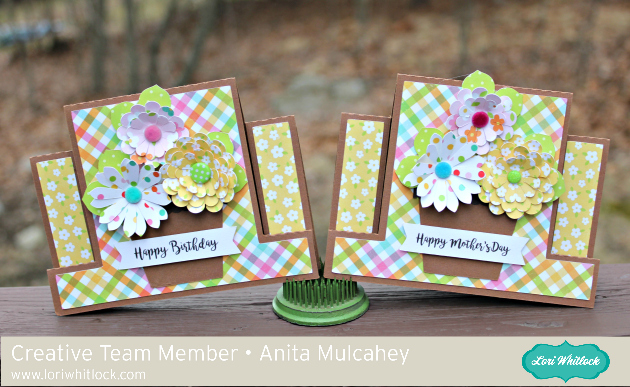
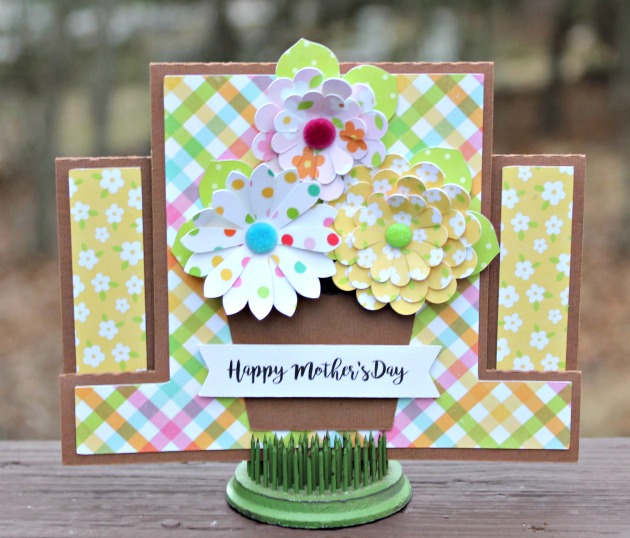
Anita here today with some lovely spring cards that Lori designed recently.  They are called A2 Center Step Card Flower Pot and you can find the cut files here in her store and here in the Silhouette Store.  This set comes with four different sentiments.  I made two and they are so easy to put together.  I used Lori Whitlock’s Celebrate Easter collection from Echo Park for this set.


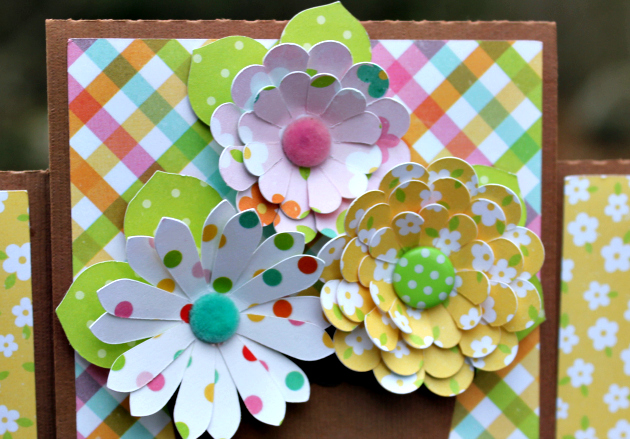
Here are some close ups of the cards.  That’s it for me today.  Hope you have a chance to make something pretty today.

Hugs,

Anita