Lovebug Box with Corri

Hi everyone!  Corri here today sharing my take on Lori’s ladybug slip lid box.

To turn my ladybug into a “love”bug,  I  used the “release compound path” feature to remove the polka dots and replace them with hearts.

This little box would be great for classroom Valentine’s Day treats.  It’s  adorable on it’s own so I added just a couple of embellishments.  I cut a pieces of glitter cardstock to fit behind my hearts for a little sparkle and added a sticker from the Doodlebug – Sweet Things Collection and a twine bow.

Head over to the Lori’s SVG Shop to find more adorable treat bags and cards for Valentine’s Day.

Swing Through Assembly Tutorial with Corri

Hi everyone! Corri here today sharing an assembly tutuorial for the new swing through cards. These cards feature a cool swing through motion when opened….your friends and family would love to receive one.

When you cut the file this is what you will have.

I decided to cut an extra one of the red panels so I could have a different pattern paper on the front of my card.

First, apply your panels to the interior of the card.

 Apply the tree cut outs to the interior of the card.  Everything is laying flat on your desk right now.  Do not twist anything yet.

Next, apply the panel on the front of your card.  You’ll notice you can’t see the die cut tree that you adhered.

Now you’re ready to flip your trees.  You can see that they are scored.  With your card open flip the tree on the left side of the card to the left.

Flip the tree on the right to the right.

There is small glue tab on the left side tree.  Fold on the score line and apply glue.   Adhere the tab to the back side of tree on the right.

There you have it! Such a fun and interactive card!

Be sure to check out the big sale happening now in Lori’s SVG Shop.  Save 50% off your order of $20 or more!  What a great deal!

Silhouette Tutorial Bending Text by Traci

Hi everyone!  I’m excited to share a fun and easy tutorial with you today!  These steps will show you how to bend lines of text, either to create a phrase that wraps around an object, or to fit inside a curved shape as I have done on Lori’s adorable hot air balloon.
Here is the card I created with a curved “Thank You” cut out of the band.
First, pull up the shape you want to place your text in and resize it if necessary.
If there are multiple pieces to your shape, ungroup them and move everything to the side except the piece you want the word in.  Zoom in on your shape a bit, and chose the text option on the left tool bar.  As you type your word or phrase, a green box will appear.  Note that there will also be a little circle, with a cross in it, along the green line.
If you place your curser over this circle and click, you are able to drag your word into your shape.  When you hover the word over a line, the letters snap to the shape of the line.  To move your word up into the center of your shape, you will use the grey sliding bar that appears through your letters.  If you place your curser along that bar and slide upwards, your letters will move up.  However, in some cases, the spacing on your letters will also move in and start overlapping.
To prevent this, move your word over to the left so that you can see how much room you will have to increase your character spacing.
Play with the character spacing (found toward the bottom of your text style window) until you like the way the word looks.


Now you should be able to go back to the sliding grey line and move your word up into the center of your shape without the letters bunching up together.  You will notice once you’ve done this however, that your original shape line is now grey (no cut line).  This would be okay if you just wanted to cut out the bent word.

But, for this tutorial, we want to cut out the banner shape for the front of my balloon, so I will need to make this a cut line (red) again.  Highlight your shape and click on the Cut Style icon at the top.  In the Cut Style window, click the button that says “Enable Cut Style”.

Now your entire image is red and will be cut.


This is also a fun technique to use for cutting a phrase to wrap around a circle.  You would just snap your phrase on the outside line of the circle, rather than inside the shape.  I will post another project showing an example of this on my blog today, so I invite you to stop by Artsy Albums to check it out!
Thanks! Traci

Favor + Invite from Brigit

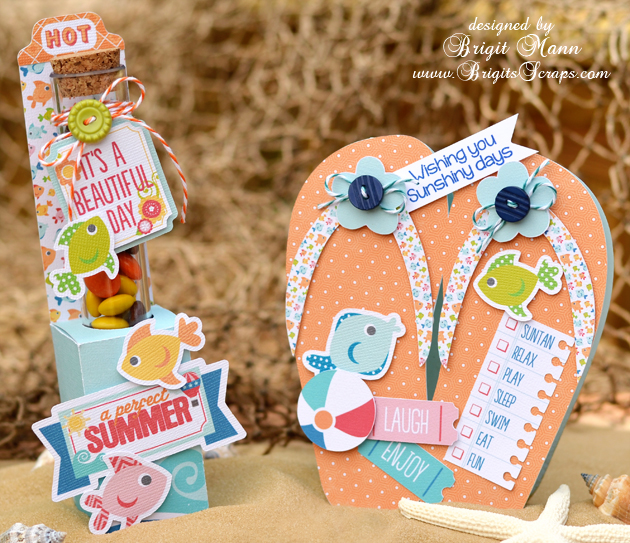
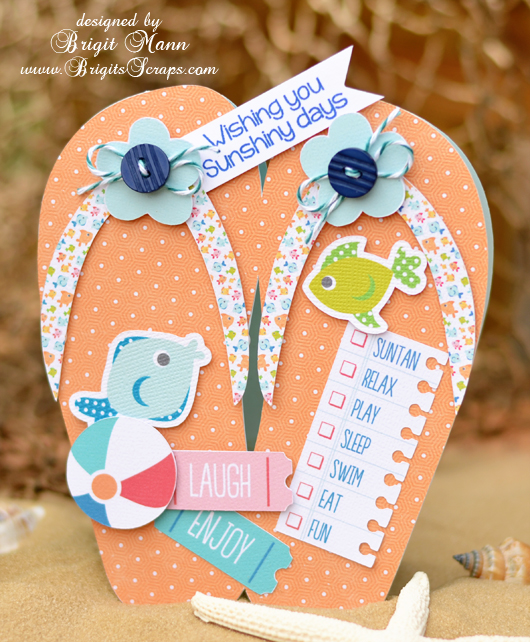
Here’s a cute matching set, perfect for a barbecue invite and favor or a summer birthday party.

The paper and elements are from Echo Park’s A Perfect Summer collection designed by Lori, I absolutely love it, so bright and cheery!

For the card I welded the flipflops together from Lori’s Don’t Bother Me set, Corri has a great tutorial on how to create a shaped card in Silhouette Studio, you can find it here.

The stamped sentiment is from Jaded Blossom’s Happy Summer set and the Trendy Twine is Tickled With Teal.

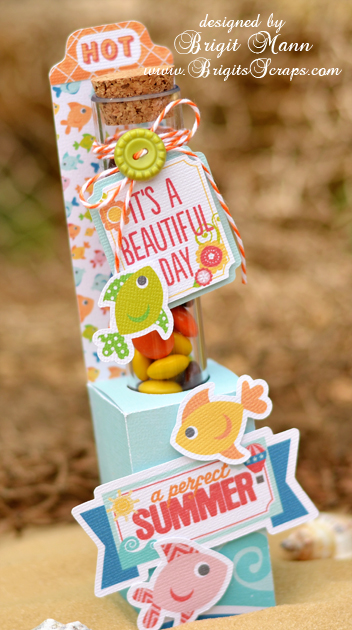
The candy tube holder was so easy to make, I used Lori’s Firecracker Box and sized the whole thing to 13.25w (check lock aspect ratio).

I ungrouped and deleted the other pieces, select all and grouped the box and score marks together again, (it should measure 5.9h x 6.410w.)  Then I centered a 1″ circle on the top flap of the box for the cutout, (depending on the tube you use you may have to make the hole slightly larger.)

The back piece is just a rectangle cut at 1.535w x 6.75h and glued onto the back.  The two top inside flaps have to be trimmed a little so they don’t block the hole.

I used some Orangesicle Trendy Twine on the tube and filled with some Reese’s Pieces.

Thanks for stopping by, I hope you enjoyed my summery project!!

Stationary Set by Traci and Centerpiece by Corri

Today we have some fabulous projects by Traci and Corri
Hi Lori fans!
I’m so excited to be on the blog today sharing a really fun, and pretty quick, project with you.  As many of you may know, I’m a mini album girl.  They are my all-time favorite project.  Despite my mini love, I also love giving fun gifts with cute packaging.  So today I decided to share my love of little gift notes.  A 3×3 gift note is the perfect little “accessory” to a perfectly wrapped present.  I make several at a time so that when I have a birthday, wedding, or new baby gift to wrap, I already have a cute little hand-made gift enclosure to go with it.
Here is some gift note inspiration for you — complete with Lori’s adorable 3×3 stationary box to keep the cards in until you need them.
I love all of Lori’s digital cutting files, so it’s never hard to find the perfect addition to any card or project.  For this one, my favorite part of each card are the sentiments.  Lori designed the “Happy Birthday”, “Thank You’ and “Hello” pieces with an adorable font and a great background piece.  The ability to cut a white background allowed each of my sentiments to “pop” off any pattern paper I layered it onto.  I also love the cupcake for this card…especially with the little heart cut out.
I have always been a fan of Echo Park…especially the paper and embellishments that Lori designs for them.  Most of the papers I’ve used in this card set are from the “My Girl” Collection.  For the card below, I added a fun little branch from the sticker sheet and set an adorable bird up on pop dots for dimension.
For the “Thank You” card, I found Lori’s mason jar cutting file
This design can be used for so many things — I cut the design and then added a flower sticker and brad from the “My Girl” collection and finished it off with a knot of twine.
For the 3×3 box, I cut the file and also created an “inset” shape for each side.  After adding the inset accent pieces, I cut one of Lori’s new 3D flower designs for the front.  The flower also serves as a little accent to tuck the tab behind so that the lid stays closed 🙂  So, so, cute!
Thanks so much for visiting today!  Please stop by my personal blog, Artsy Albums, to say hello!
Traci
Next we have this adorable center piece by Corri.
I have a fun project for you today that would be great for a Memorial Day or July 4th table decoration.
I cut Lori’s Octagon Flower Pot as sized in the file from some kraft card stock.
For the rim of the pot, I used the red wood grain paper from Echo Park’s “Perfect Summer” collection which Lori designed.
I cut 3 of the Spiral Stars (size reduced to 2.795″h) and 2 Spiral Flower 1 from some navy card stock and some pattern paper from the “Perfect Summer” collection.  I cut an extra base layer for each flower, then hot glued a wooden skewer to one of the base layers and mounted the assemble flower to that with foam dots.
To add some stability, put something with a little weight in the bottom of the flower pot.  I used a few tokens from Chuck E. Cheese!   I used some more hot glue to glue a 4″ foam ball in the pot and then arranged my flowers and covered with some paper shreds.
You could change up this cute project for all kinds of summer parties.  Add some graduation caps and 2013 on your sticks for a cute graduation party center piece. Corri