Hey everyone, Michelle Gallant here today sharing a quick and easy Thanksgiving project using the 3D Turkey (SVG, Silhouette) the 3D Small Pumpkin (SVG, Silhouette) and papers from the Happy Fall collection from Echo Park Paper.
Fox Tuxedo Box Card Tutorial
Hi there friends! Brandie here sharing an assembly tutorial for the Tuxedo Box Cards (SVG Bundle). I made the Tuxedo Box Card Fox (SVG, Silhouette). I love this fun twist on the standard box card.
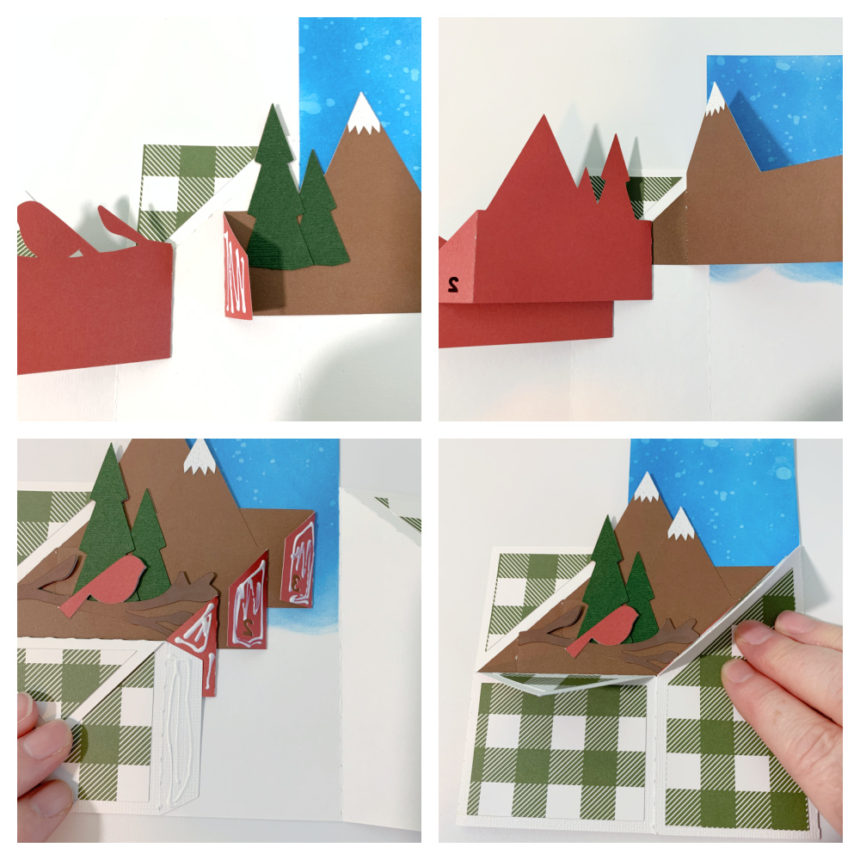
First assemble the decorative elements. Two trees, a fox, leaf, and berries. Then fold the card base on the score lines. Most of the score lines are valley folds. The two mountain folds are for the flaps. Next glue in the inside decorative panels. I ran my inside panels through a Fall leaf embossing folder. Once the panels are secure fold the left side over and add glue to the outside of the tab and fold right side over and press and hold until glue is set.

Then glue the outside decorative panels in place. Fold down the flaps and glue those panels in place. For the insert that the fox is glued on fold the tabs in and apply glue to the outside of the tabs.

While the card is laying flat slide the insert into the card base while holding the glue tab down lining it up to the center fold line. Press down on the card where the tabs are to help secure them. The tabs will be glued to the inside front of the card base. When the card is standing upright the inside tab forms a u shape. Glue the fox into place on the center of the tab. Then glue in the trees and cloud and decorate the front of the box with remaining elements.

I used papers and a couple of stickers from the My Favorite Fall collection by Echo Park Paper.

Sticky Note Calendar 2021 Tutorial
Hi there paper crafting friends! It’s Michelle Starcher, aka the Bookish Designer, popping in on the blog to walk you through the steps to create Lori’s Sticky Note Calendar 2021 (SVG, Silhouette- coming soon). In this photo tutorial, I will break down the steps to create this super cute project to keep you on track in 2021. I used papers from the Magical Adventure collection from Echo Park Paper Co. The calendar goes perfectly with the organizers I made a few weeks ago.

After uploading the SVG file to the Cricut Design Studio, I needed to make a few changes, so that it would cut correctly with my Cricut Maker. Below you will find the steps I took to prepare the file for cutting. I opened the “solid” version of the SVG in Cricut so I could use my score tool.
Ungroup the SVG file. Change the Linetype of the fold lines on the calendar base and sticky note holder to score marks. Attach the score lines to calendar base and sticky note holder pieces. For help on this process, see this video on Lori’s YouTube Channel.

Next, change the Fill calendar pieces to Print. You can save yourself some time by holding the control (PC) or command (Mac) key and clicking each month’s calendar. Then change the Fill to Print for all 12 months at the same time.

The final step is to Flatten each calendar piece to the white rectangle below. Unfortunately, you will need to do this 12 times. Don’t forget to hide or delete the size note (9.5343 in =width).

You are ready to print and cut your project pieces. Toggle off the Add Bleed option in the print window. It will be grayed out when in the off position. When I sent mine to the printer, it printed both pages. After printing, it was time to cut all the pieces using my Cricut Maker.

After cutting all of the project pieces, I folded all the pieces with score marks and added adhesive to the joining tabs.

Then I adhered the calendar back (the red polka dot piece) to the front of the sticky note holder and added adhesive tape to the back of the sticky note holder. Next, I assembled the stand and attached the sticky note holder to the stand.

I chose to attach the January 2021 calendar piece to the front of the sticky not holder and tucked the rest of the pieces behind my sticky notes. I will add the new months to the front of the sticky note holder as the year progresses. You can also staple the months together in a stack and add as a group to the front.

I hope you enjoyed making the Sticky Note Calendar 2021 (SVG, Silhouette) as much as I did! Looking forward to 2021 and using my sticky note calendar.
Until next time,
Michelle
Halloween Card & Box Set


Sympathy Cards
Happy Columbus Day Everyone:
Anita here with a set of sympathy cards that I made for a dear friend who lost her uncle recently and he was a significant person in her life. I love how elegant these are. I used Lori’s file called Sympathy Card Thoughts Prayers which you can find here in Lori’s SVG Shop and here in the Silhouette Design store. The second card is called Sympathy Card Comfort Strength Hope and you can find that one here in Lori’s SVG store and here in the Silhouette Design store. I used one of Lori’s new Echo Park Paper collections called Our Wedding. The card file comes with an insert that you can put behind the card front but I liked the colors showing through the designs.
Lori has cards for every occasion and in these times when you may be choosing to stay closer to home, you can still keep in touch with your family and friends.
Hugs,
Anita