Crayon Box Mini Album

Hi friends! Traci here and today, I have a new shaped mini album to share with you. I found a super cute card cutting file of Lori’s called Box Card Back To School Crayons (SVGSilhouette) and thought it would make a fun scrapbook for new school memories! Take a look …


To make it, I used the card file to
 cut out 2 white acrylic album covers (5.25″ x 6.75″) in the shape of the box. You could also use cardstock for these instead. 


Then, I decorated the front cover with yellow and green paper and Doodlebug’s 6×6 
petite prints in gingham and linen for the crayons. How cute!


The
Back To School title is a print and cut design that comes with the file. Perfect! And the enamel stars are sprinkles from Doodlebug’s Hey Pumpkin Collection (all product links below).


For the inside, I cut 4 white cardstock pages (giving me 8 scrapbook layouts) and filled them with the Bella Blvd, School Is Cool Collection. I added 12×12 pattern papers, photo mats, and lots of fun embellishments.  


On this page, I created a cute shaped photo mat using a 3 inch scallop circle punch and a 2.5 inch circle punch. Then, I added some die cut pieces from the Ephemera Icons and Words.


I love adding interactive elements to my minis. Here I created a mega flippie using one of the 3×4 cards. 


See? It has a few layers with space inside for 4 photos, so … it’s a mega flippie! 😉


This album would be great filled with your child’s or grandchild’s “big memories”. Add pictures of their first day, best friends, teacher, official school photo, classroom, and school bus. 


And don’t forget the fun stuff like … class parties, field trips, sports activities, awards, art projects, school plays, lunch time, their science fair project, and recess shenanigans!   


Need a gift idea for another student, a teacher, tutor, or the class room mom? This album is a great idea!


The mini album looks so cute displayed on my clear Acrylic Display Stand. Set it out in your child’s room, or … add one to the teacher’s gift so she can feature it in her classroom! 

Here is Lori’s Box Card Back To School Crayons cutting file …


I hope this project inspires you create something fun with Lori’s amazing SVG file called Box Card Back To School Crayons (SVGSilhouette). Thanks for stopping by the blog today and happy scrapping! 😊

Baby Bottle Mini Album

Hello everyone! Traci here and today, I’m sharing a fun baby bottle shaped mini album that I made using one of Lori’s brand new cutting files called Hidden Binding Mini Album Baby Bottle (SVG, Silhouette). It’s perfect for some favorite photos of your little sweetie, or … can be given it as a cute handmade gift.


You could use ANY paper collection and customize this album for a boy, a girl, or keep it gender neutral. For mine, I cut the base out of solid card stock in bubble blue, white, and lemon yellow. Then, I decorated it with a mix of pattern papers and embellishments from Doodlebug Design.


Just inside the cover, I added a little pocket that’s perfect for photos or … a gift card! I thought this mini album would make an adorable alternative to a greeting card and be a fun way to present a baby shower gift!

The album has 10 scrapbook pages (5 double-sided) and uses Lori’s hidden binding technique to secure the pages. It’s designed with plenty of space in between for layering papers, pop dots, and embellishments. 

This would make such a sweet little brag book for mom, grandma, auntie, or an older sibling. What a fun way to share and celebrate your baby’s milestones and memories. I made my album approx. 4×5 inches so it’s the perfect small size.

Lori has designed many of these cute hidden binding shaped albums and I love them all! I’ve made the oven, suitcase, rectangle, apple, house, flower, telephone, and tag shape. So be sure to check those out for more fun project ideas.

To watch a video tutorial on how to assembly a hidden binding mini album, hop over to Lori’s YouTube Channel here

I hope you’ll try Lori’s new Hidden Binding Mini Album Baby Bottle, and … have a great day! 😊


Blog * Shop * Facebook * Instagram * Pinterest

Suitcase Mini Album Tutorial

Hi friends! Traci here and today, I’m sharing a cute travel mini album that I made using Lori’s NEW cutting file titled Hidden Binding Mini Album Suitcase. (Silhouette) The fun shape is so versatile and can be made with any paper collection for your vacation needs. Since summer is ahead, I created it with a sunny beach theme.🌞


Suitcase Shaped Travel Mini Scrapook Album for vacation photos

Lori has designed a bunch of these hidden binding shaped albums and I love them! I’ve made the rectangle, apple, house, flower, telephone, and tag shape. Today’s mini is about travel, so the suitcase shape is perfect!


Suitcase Shaped Travel Scrapbook Mini Album with a summer beach theme

For this “fun in the sun” project, I used the Doodlebug Design Seaside Summer Collection. But it would also be great for winter skiing, a visit to the lake, a cabin in the mountains, a road trip, a cruise, or any vacation.

Let’s take a quick look inside, then I’ll explain how I made it.


Suitcase Shaped Travel Scrapbook Mini Album Pages with cute summer and beach images

I decorated each page with 6×6 inch papers, fun die cuts, cute stickers, and a few enamel dots. 


Suitcase Shaped Travel Scrapbook Mini Album Pages with cute summer and beach images

Isn’t this cute? Such a colorful little scrapbook. For larger photos and details of each page, visit my blog here.

Now, for the tutorial …


Suitcase Shaped Summer Travel Scrapbook Mini Album Tutorial

1. First, I cut out the pieces. Since all of the suitcase shape pages are sandwiched using 2 pieces, I needed 10 total … 2 for the front cover, 2 for the back cover, and 6 for the 3 scrapbook pages inside.

2.  Note that the center piece is scored for the binding. The score
lines are a bit hard to see on the brown image 😊.  I folded along each
of the score lines to create “mountains” and “valleys”. 

Suitcase Shaped Summer Travel Scrapbook Mini Album Tutorial

3. Then, I added adhesive inside the “valleys” and stuck the sides together.


Suitcase Shaped Summer Travel Scrapbook Mini Album Tutorial

4.  Once the binding piece is adhered, it should look like this ^.

Suitcase Shaped Summer Travel Scrapbook Mini Album Tutorial


5.  And the back side (the spine) will look like this ^.


Suitcase Shaped Summer Travel Scrapbook Mini Album Tutorial

6. Next, the cutting file comes
with pieces for the pattern paper that goes on top of the white spine,
front and back covers, and suitcase shaped pages. I chose the blue waves print and adhered it to one side only of the exterior pieces.


Suitcase Shaped Travel Scrapbook Mini Album Tutorial

7.  Once that was done, I adhered the front cover to the front of the first
spine fold. Then, the back cover to the back of the last spine fold. When it’s opened up flat, the
album covers and spine should look like this ^ on the outside.  


Suitcase Shaped Travel Scrapbook Mini Album Tutorial

… and like this ^ on the inside.    


Suitcase Shaped Travel Scrapbook Mini Album Tutorial

8. Next, I adhered pattern paper to ONE SIDE ONLY of the 8 remaining
suitcase shapes. Since these will be stuck back to back to another suitcase page, only one
side will show. 


Suitcase Shaped Summer Travel Scrapbook Mini Album Tutorial

9.  Now it’s time to assemble the album.  I adhered one suitcase page to the inside of the front and back covers. Then, I added one to the front and back of each spine fold … sandwiching them on the
“mountain” and creating
3 double-sided pages (6 individual pages). Including the inside covers, this gives you 8 scrapbook pages in total.

Suitcase Shaped Summer Travel Scrapbook Mini Album displayed on a clear acrylic stand by Artsy Albums


I hope you’ll try this fun project made with Lori’s Hidden Binding Mini Album Suitcase  (Silhouette) cutting file. It’s perfect for your vacation photos, or … it makes a wonderful gift idea. Have a great day! 😊


Blog * Shop * Facebook * Instagram * Pinterest

12×12 Easter Bunny Page

Hello friends! Traci here and today, I have a cute 12×12 Easter scrapbook page to share with you. I made it using two of Lori’s pretty cutting files and lots of colorful papers. Since Easter is this Sunday, I thought a fun layout would be perfect for a few holiday photos of coloring eggs. Take a look …


12x12 Easter Bunny Scrapbook Page with pretty flowers, carrots, and colorful eggs

This sweet bunny rabbit is the star of this page! I just 🩷 her little flower crown. So, let’s start with her …

12x12 Easter Bunny Scrapbook Page with pretty flowers, carrots, and colorful eggs


I used Lori’s adorable 5×7 Easter Bunny Card 4 file (SVG, Silhouette) and a colorful mix of solid card stock. I assembled the pieces, then added
some enamel dots to the flowers for sparkle. 

12x12 Easter Bunny Scrapbook Page with pretty flowers, carrots, and colorful enamel dots


She’s so cute … she deserved a close-up! 


12x12 Easter Bunny Scrapbook Page with a scalloped border, pretty flowers, and enamel dots

Next, I chose another one of Lori’s cutting files called 4 Spring Borders (SVG, Silhouette) to make this pretty scalloped piece. Now … time to build the page!


12x12 Easter Bunny Scrapbook Page with pretty flowers, a scalloped journaling spot, and colorful stripes

To begin, I chose a rainbow stripe pattern paper from the Doodlebug Design Bunny Hop
Collection as the base. Then, I added bubblegum card stock at the top and the scalloped border in the middle.

In the top corner, I adhered the “coloring”, “eggs”, and flower die cuts from the Bunny Hop Collection along with some pretty enamel sprinkles. And for the journaling spot, I used 3 punches to make this … a 3″ scallop circle, a 2.5″ circle, and a 2.25″ circle then layered them all.


12x12 Easter Bunny Scrapbook Page with pretty flowers, colorful eggs, and a scalloped border

Next, were the photo mats. I cut 2 out of limeade paper and added more die cuts, dots, and the “Happy” tab.

12x12 Easter Bunny Scrapbook Page with pretty flowers, carrots, and colorful eggs

As a finishing touch, I gave the bunny 3 colorful egg die cuts to hold on to, and … she’s ready for Easter! Yep … she and her carrots are pretty cute. 🥕🐰🥕

I hope this layout gives you a little holiday inspiration. I had so much fun using the 5×7 Easter Bunny Card 4 and the 4 Spring Borders cutting files. Highly recommend! Thanks for stopping by and have a great day.


Blog * Shop * Facebook * Instagram * Pinterest

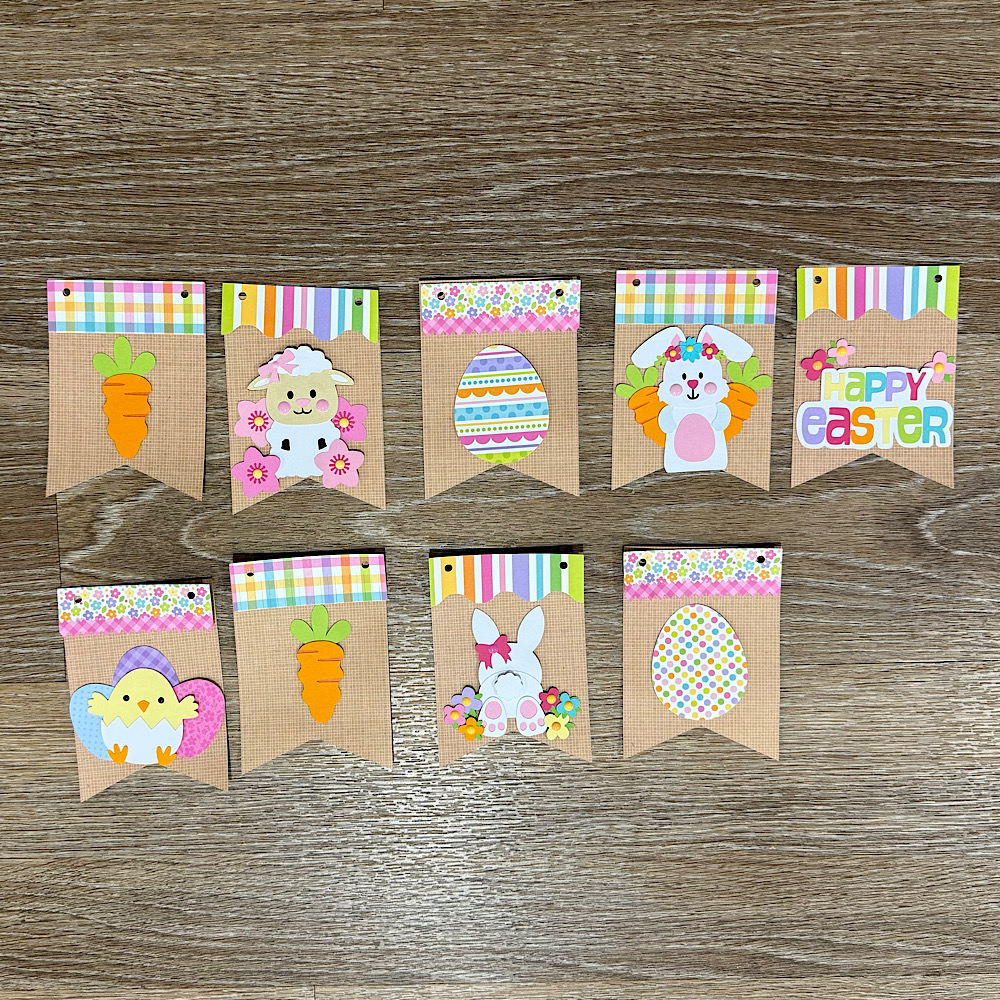
Easter Banner Tutorial

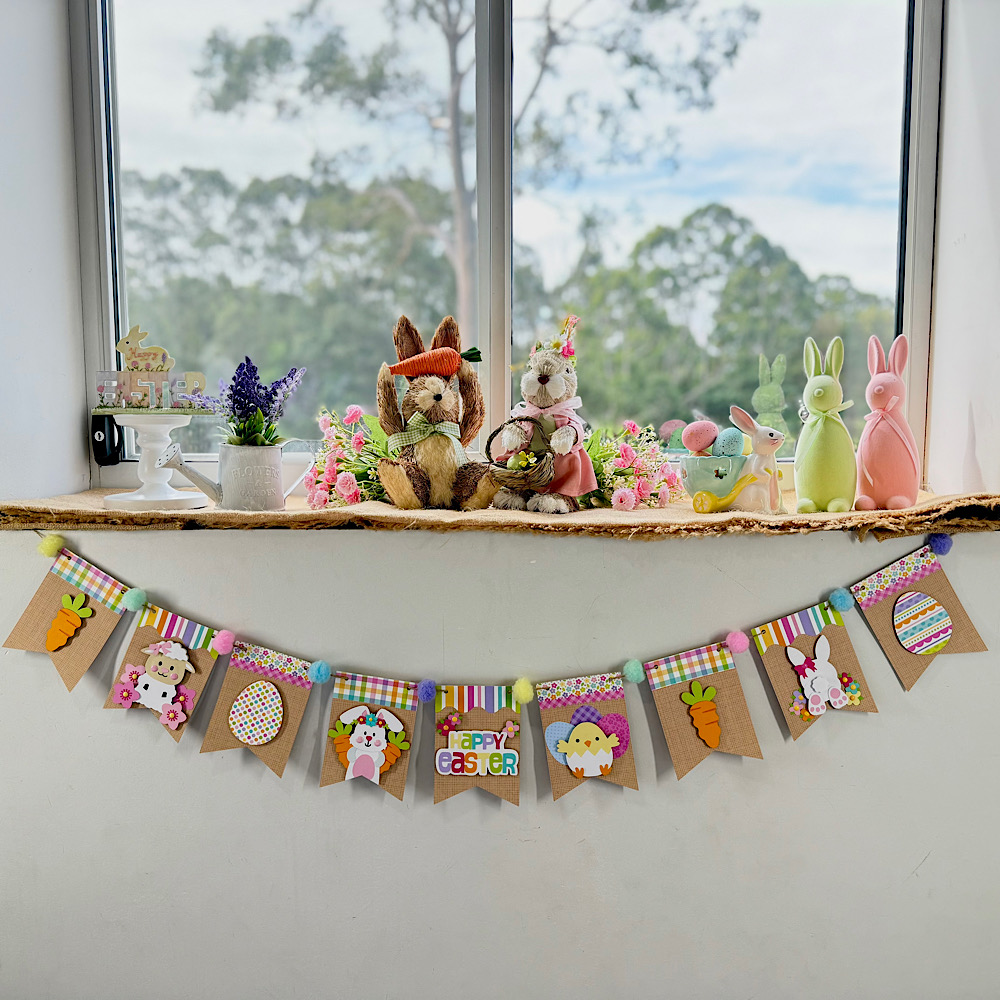
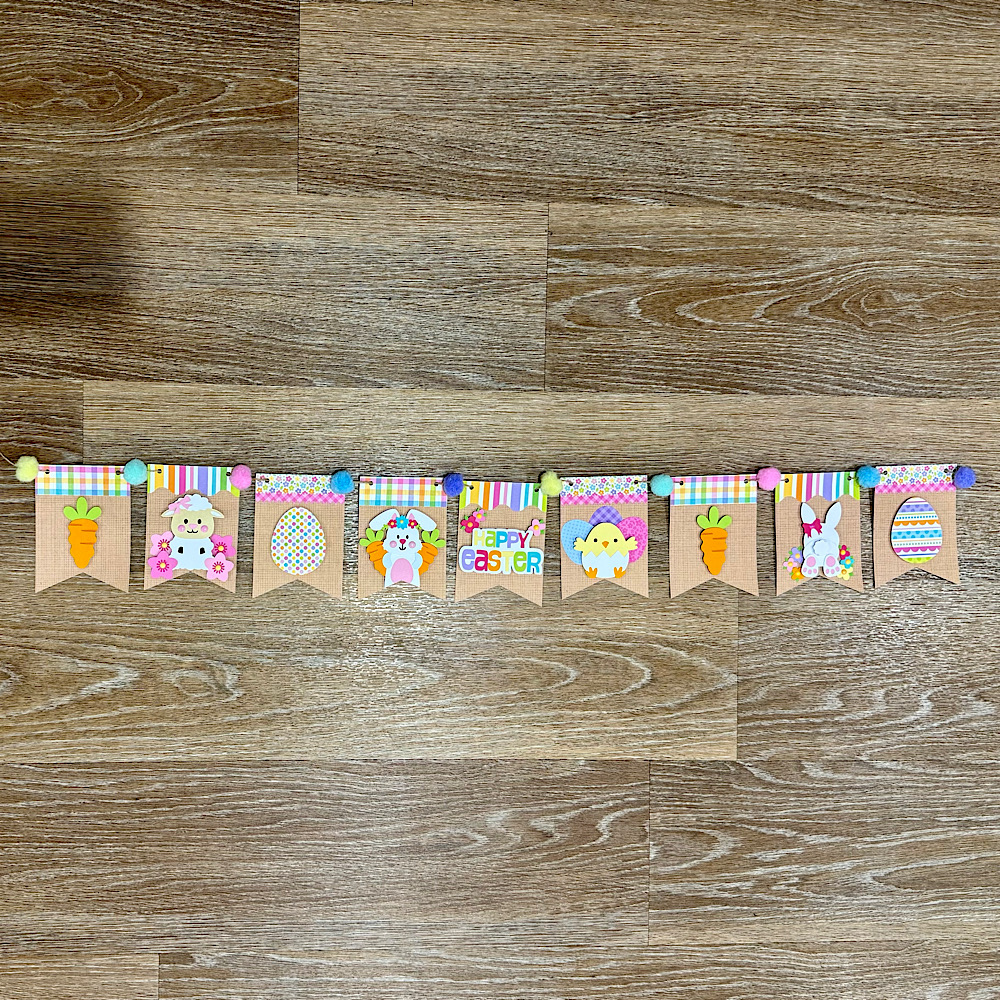
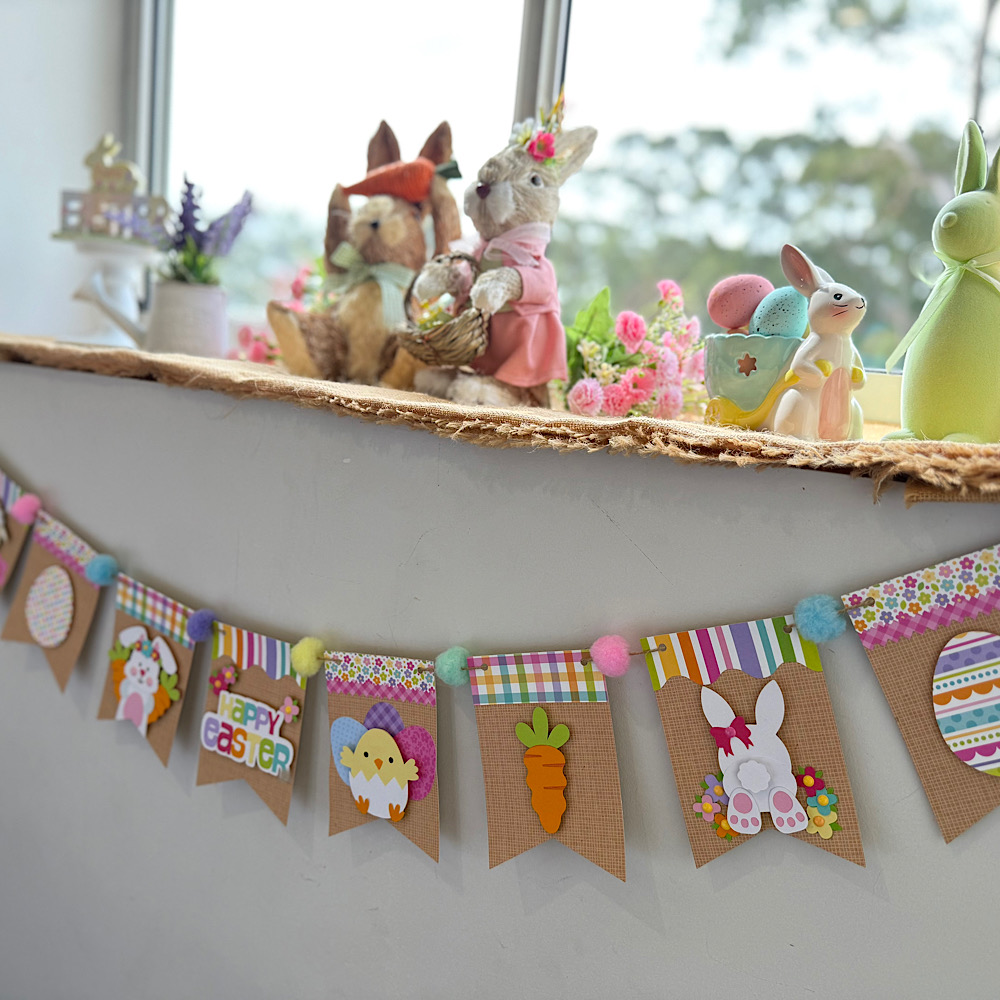
Hello crafty friends. Today I want to share with you how I made this cute Easter banner using 6 Lori Whitlocks Files:
Layered Bunting 2 (SilhouetteSVG)
Easter Purse Topper (SilhouetteSVG)
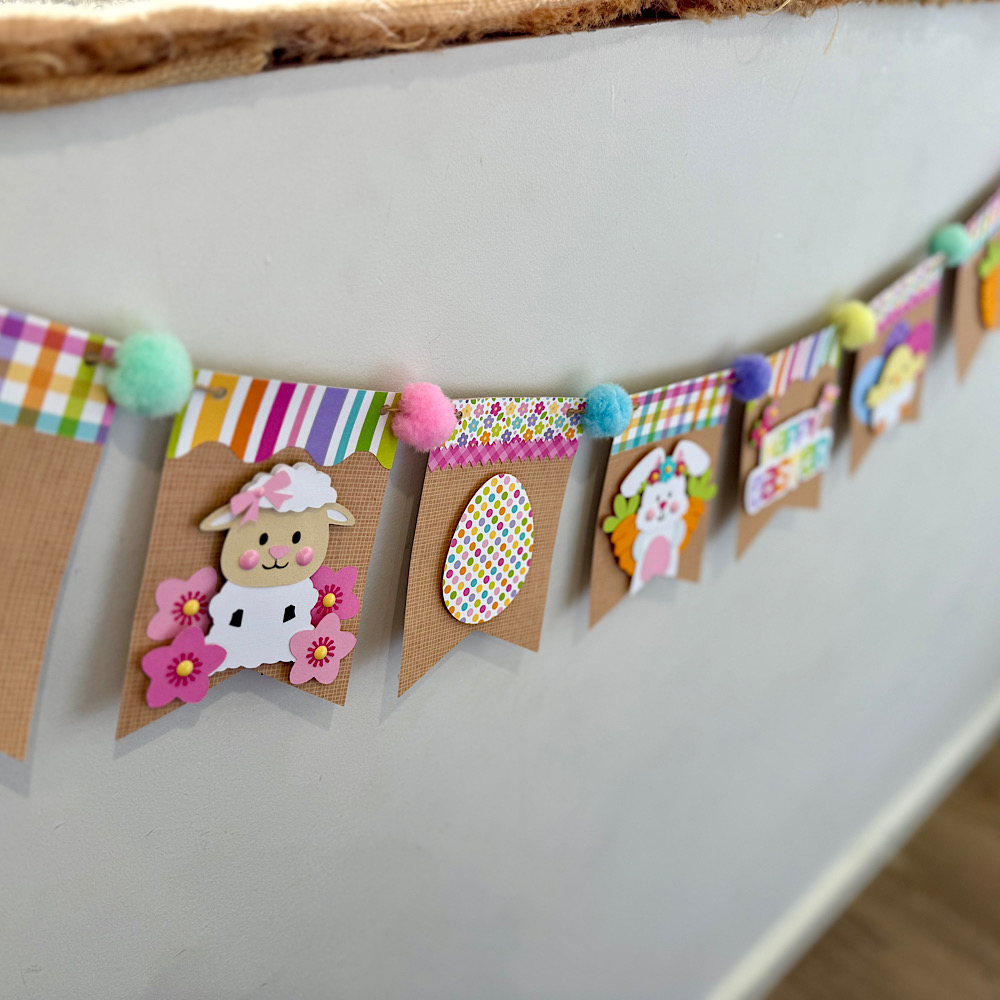
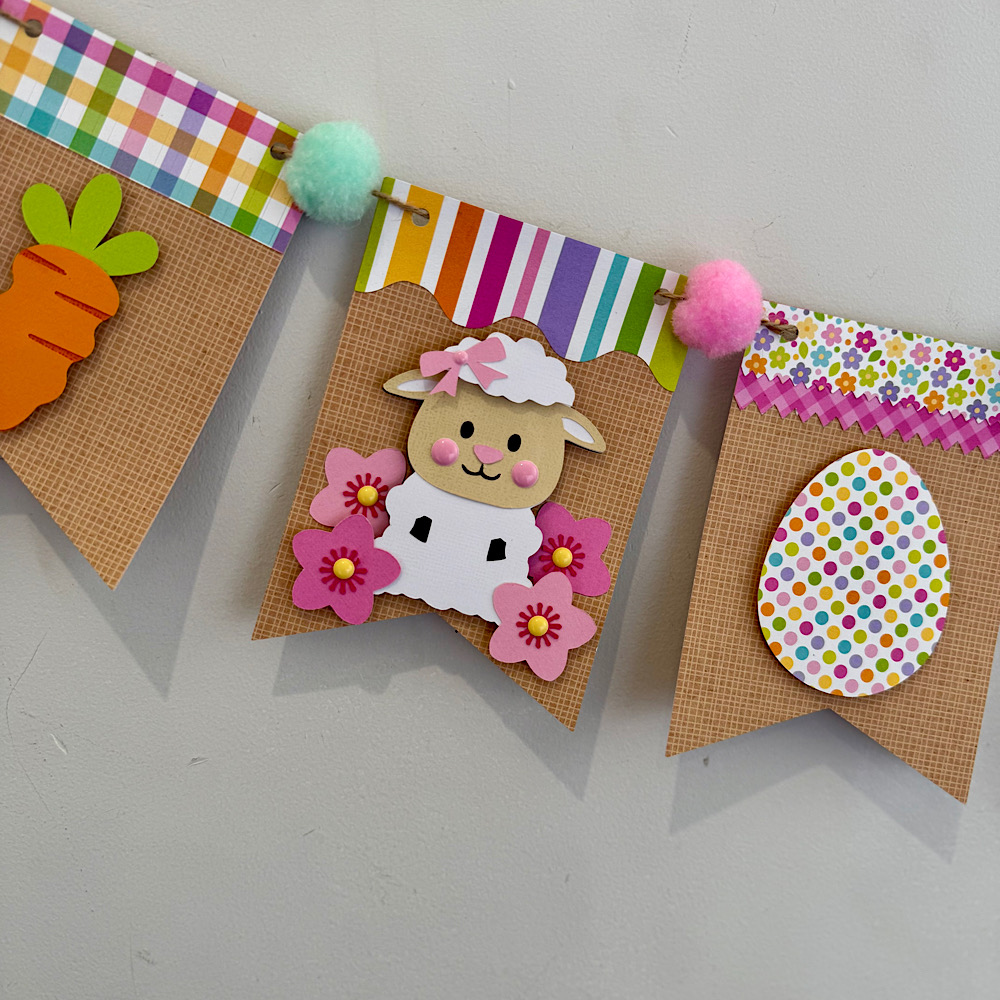
Easter Sheep Car Box Card (SilhouetteSVG)
Easter Bunny Car Box Card (SilhouetteSVG)
5×7 Easter Bunny Card (SilhouetteSVG)
Easter Basket Chick Box Card (SilhouetteSVG)
I wanted my banner to have a pastel rustic feel. I chose some Doodlebug kraft gingham cardstock for my bunting base. Then some coordinating coloured papers to match.
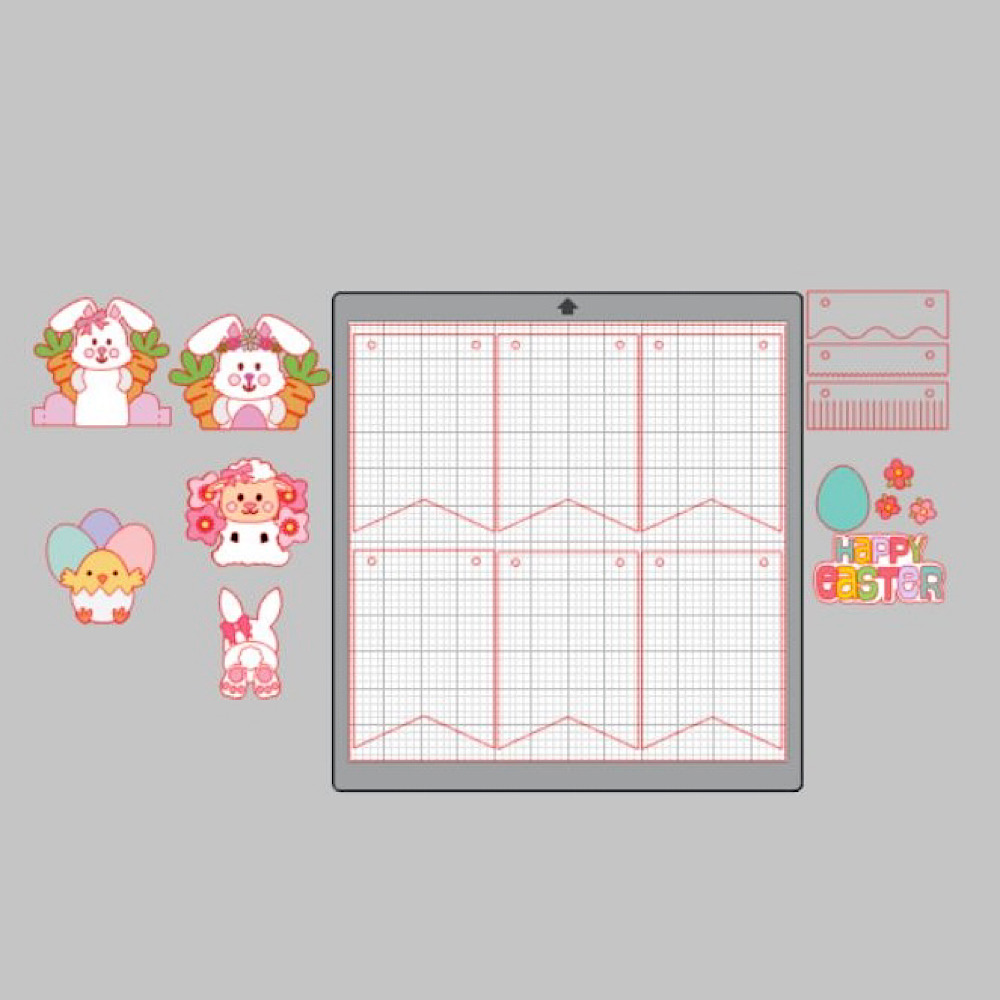
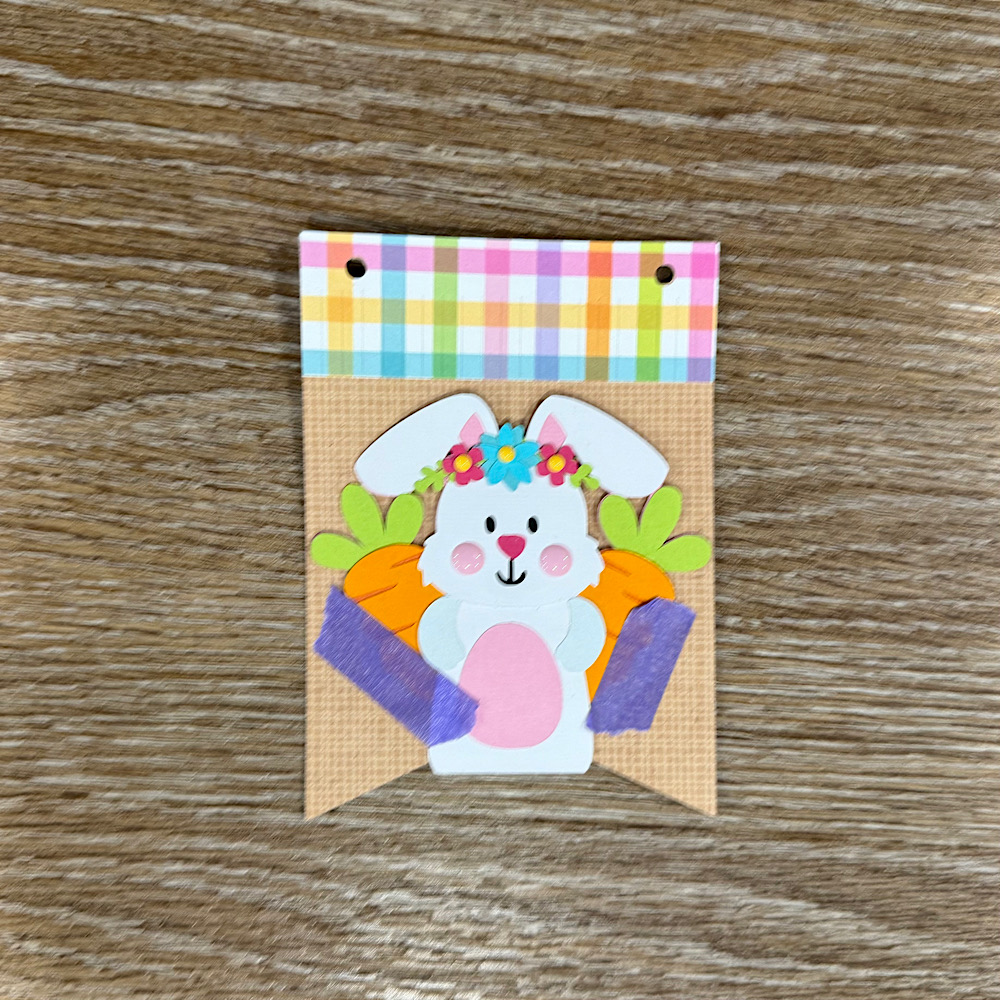
To start my project I opened all the files in Silhouette that I wanted to use.  I deleted the parts I didn’t need then I copied them onto one page with the bunting.  You will see I have used the similar bunnies from the 5×7 Easter Bunny Card & Easter Bunny Car box card. I did this because the carrots in the box card are whole carrots once you ungroup everything. Also she has more of a body. I omitted her bow & used the floral head piece from the 5×7 card. You can just use the Bunny from the Easter Bunny Car box Card if you wish. I also took the extra step of using the egg from the topper to give the bunny a belly like the one in the 5×7 card. To do this I used the same step below by sizing it onto the bunny.
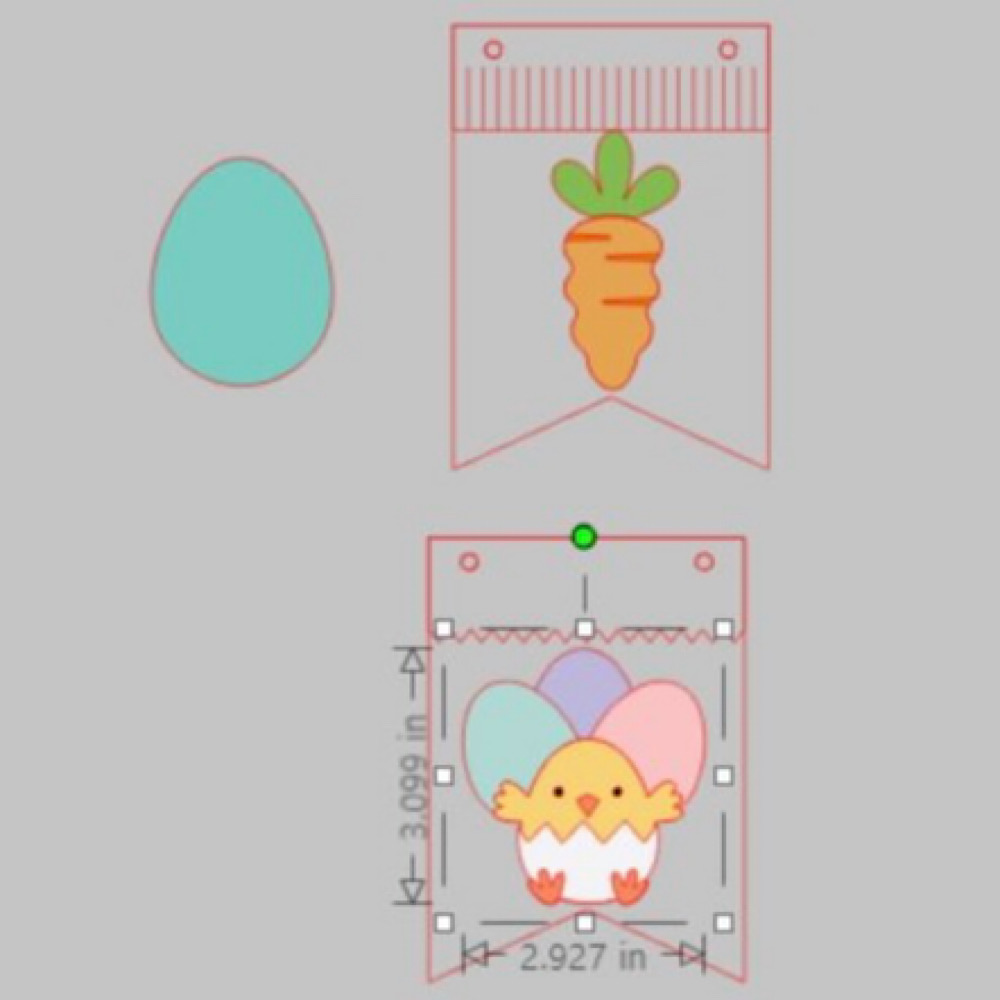
When you open the Bunting file it will have 3 bunting shapes across the page. I right clicked over all 3 & enlarged by dragging the corner just enough so that all 3 bunting pieces fit across my page. I then coppied all 3 & pasted another row. You can make yours bigger or smaller however you please. I did mine this way as it will give me the most bunting pieces, (6 in total per page), without too much scrap. I cut 9 bunting panels in total. Next I sized my images one by one. To do this I copied a bunting panel to the side of my page. I then placed my image piece inside & enlarged or reduced the size making sure it fit inside. Make sure you place the little panel across the top of the bunting as well as I did in my image below.  Do this step for all your pieces.
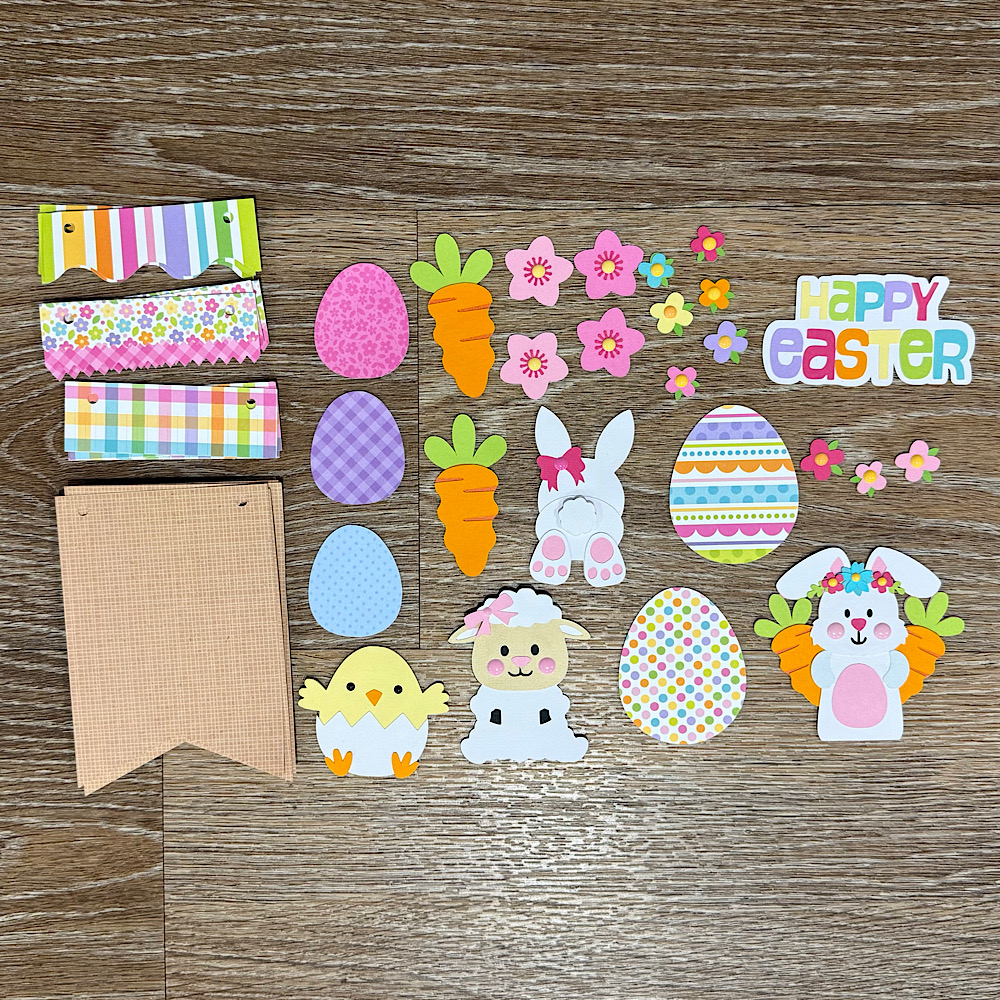
Now once you have all the sizes correctly cut out all your pieces & glue together all your image pieces.
Then just place everything onto the panels to see what order you want everything to sit. Once you are happy with it, it helps to take a photo so that you remember where to glue everything.
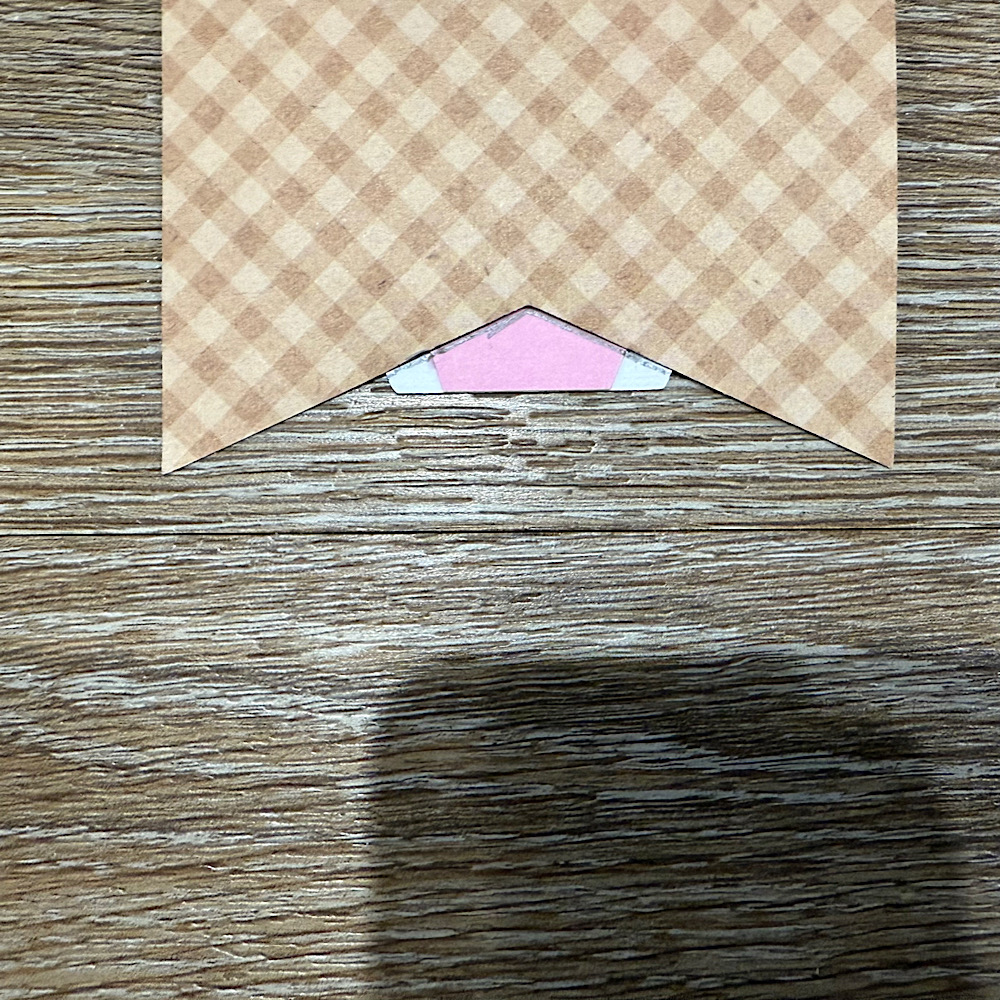
Now glue the panels onto the bunting base. You will notice that the body on the bunny is a little long. Before I stuck down the bunny I placed her onto the bunting with washi tape, then I turned the bunting over & traced the edge with pencil along the back of the bunny. I then cut along the pencil trace & proceeded to stick the bunny onto the front of the bunting.
 
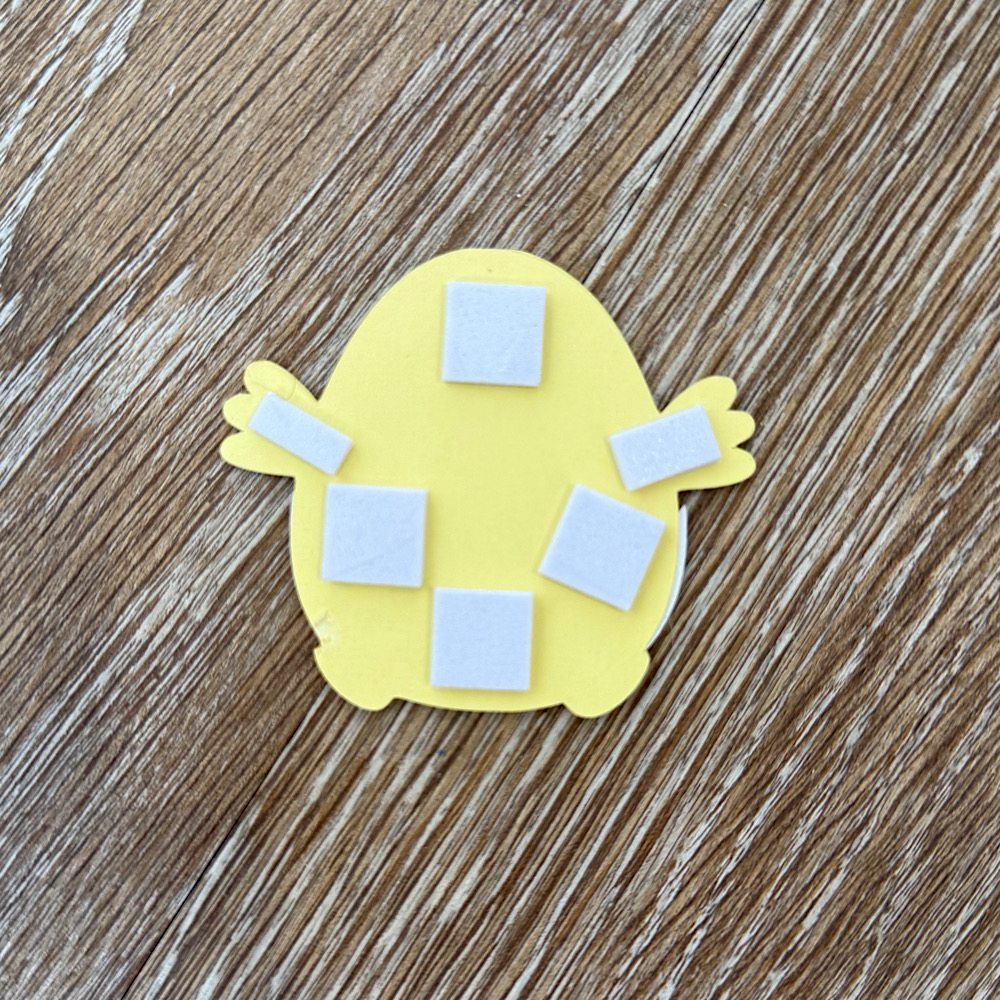
I used foam squares to stick down my image pieces. This gives them a raised look.
Once you have all the bunting pieces ready the last step is to thread some twine & pastel pom poms through to finish the banner.
You can use as little or as many files as you wish. The possibilities are endless. I just love Lori’s files & couldn’t resist the temptation.
I hope I have given you some inspiration today to create an easter bunting banner!
For more inspiration, check out my Instagram!
Thanks for stopping by!
Hugs
Noelene 🙂