Suitcase Mini Album Tutorial

Hi friends! Traci here and today, I’m sharing a cute travel mini album that I made using Lori’s NEW cutting file titled Hidden Binding Mini Album Suitcase. (Silhouette) The fun shape is so versatile and can be made with any paper collection for your vacation needs. Since summer is ahead, I created it with a sunny beach theme.🌞


Suitcase Shaped Travel Mini Scrapook Album for vacation photos

Lori has designed a bunch of these hidden binding shaped albums and I love them! I’ve made the rectangle, apple, house, flower, telephone, and tag shape. Today’s mini is about travel, so the suitcase shape is perfect!


Suitcase Shaped Travel Scrapbook Mini Album with a summer beach theme

For this “fun in the sun” project, I used the Doodlebug Design Seaside Summer Collection. But it would also be great for winter skiing, a visit to the lake, a cabin in the mountains, a road trip, a cruise, or any vacation.

Let’s take a quick look inside, then I’ll explain how I made it.


Suitcase Shaped Travel Scrapbook Mini Album Pages with cute summer and beach images

I decorated each page with 6×6 inch papers, fun die cuts, cute stickers, and a few enamel dots. 


Suitcase Shaped Travel Scrapbook Mini Album Pages with cute summer and beach images

Isn’t this cute? Such a colorful little scrapbook. For larger photos and details of each page, visit my blog here.

Now, for the tutorial …


Suitcase Shaped Summer Travel Scrapbook Mini Album Tutorial

1. First, I cut out the pieces. Since all of the suitcase shape pages are sandwiched using 2 pieces, I needed 10 total … 2 for the front cover, 2 for the back cover, and 6 for the 3 scrapbook pages inside.

2.  Note that the center piece is scored for the binding. The score
lines are a bit hard to see on the brown image 😊.  I folded along each
of the score lines to create “mountains” and “valleys”. 

Suitcase Shaped Summer Travel Scrapbook Mini Album Tutorial

3. Then, I added adhesive inside the “valleys” and stuck the sides together.


Suitcase Shaped Summer Travel Scrapbook Mini Album Tutorial

4.  Once the binding piece is adhered, it should look like this ^.

Suitcase Shaped Summer Travel Scrapbook Mini Album Tutorial


5.  And the back side (the spine) will look like this ^.


Suitcase Shaped Summer Travel Scrapbook Mini Album Tutorial

6. Next, the cutting file comes
with pieces for the pattern paper that goes on top of the white spine,
front and back covers, and suitcase shaped pages. I chose the blue waves print and adhered it to one side only of the exterior pieces.


Suitcase Shaped Travel Scrapbook Mini Album Tutorial

7.  Once that was done, I adhered the front cover to the front of the first
spine fold. Then, the back cover to the back of the last spine fold. When it’s opened up flat, the
album covers and spine should look like this ^ on the outside.  


Suitcase Shaped Travel Scrapbook Mini Album Tutorial

… and like this ^ on the inside.    


Suitcase Shaped Travel Scrapbook Mini Album Tutorial

8. Next, I adhered pattern paper to ONE SIDE ONLY of the 8 remaining
suitcase shapes. Since these will be stuck back to back to another suitcase page, only one
side will show. 


Suitcase Shaped Summer Travel Scrapbook Mini Album Tutorial

9.  Now it’s time to assemble the album.  I adhered one suitcase page to the inside of the front and back covers. Then, I added one to the front and back of each spine fold … sandwiching them on the
“mountain” and creating
3 double-sided pages (6 individual pages). Including the inside covers, this gives you 8 scrapbook pages in total.

Suitcase Shaped Summer Travel Scrapbook Mini Album displayed on a clear acrylic stand by Artsy Albums


I hope you’ll try this fun project made with Lori’s Hidden Binding Mini Album Suitcase  (Silhouette) cutting file. It’s perfect for your vacation photos, or … it makes a wonderful gift idea. Have a great day! 😊


Blog * Shop * Facebook * Instagram * Pinterest

12×12 Easter Bunny Page

Hello friends! Traci here and today, I have a cute 12×12 Easter scrapbook page to share with you. I made it using two of Lori’s pretty cutting files and lots of colorful papers. Since Easter is this Sunday, I thought a fun layout would be perfect for a few holiday photos of coloring eggs. Take a look …


12x12 Easter Bunny Scrapbook Page with pretty flowers, carrots, and colorful eggs

This sweet bunny rabbit is the star of this page! I just 🩷 her little flower crown. So, let’s start with her …

12x12 Easter Bunny Scrapbook Page with pretty flowers, carrots, and colorful eggs


I used Lori’s adorable 5×7 Easter Bunny Card 4 file (SVG, Silhouette) and a colorful mix of solid card stock. I assembled the pieces, then added
some enamel dots to the flowers for sparkle. 

12x12 Easter Bunny Scrapbook Page with pretty flowers, carrots, and colorful enamel dots


She’s so cute … she deserved a close-up! 


12x12 Easter Bunny Scrapbook Page with a scalloped border, pretty flowers, and enamel dots

Next, I chose another one of Lori’s cutting files called 4 Spring Borders (SVG, Silhouette) to make this pretty scalloped piece. Now … time to build the page!


12x12 Easter Bunny Scrapbook Page with pretty flowers, a scalloped journaling spot, and colorful stripes

To begin, I chose a rainbow stripe pattern paper from the Doodlebug Design Bunny Hop
Collection as the base. Then, I added bubblegum card stock at the top and the scalloped border in the middle.

In the top corner, I adhered the “coloring”, “eggs”, and flower die cuts from the Bunny Hop Collection along with some pretty enamel sprinkles. And for the journaling spot, I used 3 punches to make this … a 3″ scallop circle, a 2.5″ circle, and a 2.25″ circle then layered them all.


12x12 Easter Bunny Scrapbook Page with pretty flowers, colorful eggs, and a scalloped border

Next, were the photo mats. I cut 2 out of limeade paper and added more die cuts, dots, and the “Happy” tab.

12x12 Easter Bunny Scrapbook Page with pretty flowers, carrots, and colorful eggs

As a finishing touch, I gave the bunny 3 colorful egg die cuts to hold on to, and … she’s ready for Easter! Yep … she and her carrots are pretty cute. 🥕🐰🥕

I hope this layout gives you a little holiday inspiration. I had so much fun using the 5×7 Easter Bunny Card 4 and the 4 Spring Borders cutting files. Highly recommend! Thanks for stopping by and have a great day.


Blog * Shop * Facebook * Instagram * Pinterest

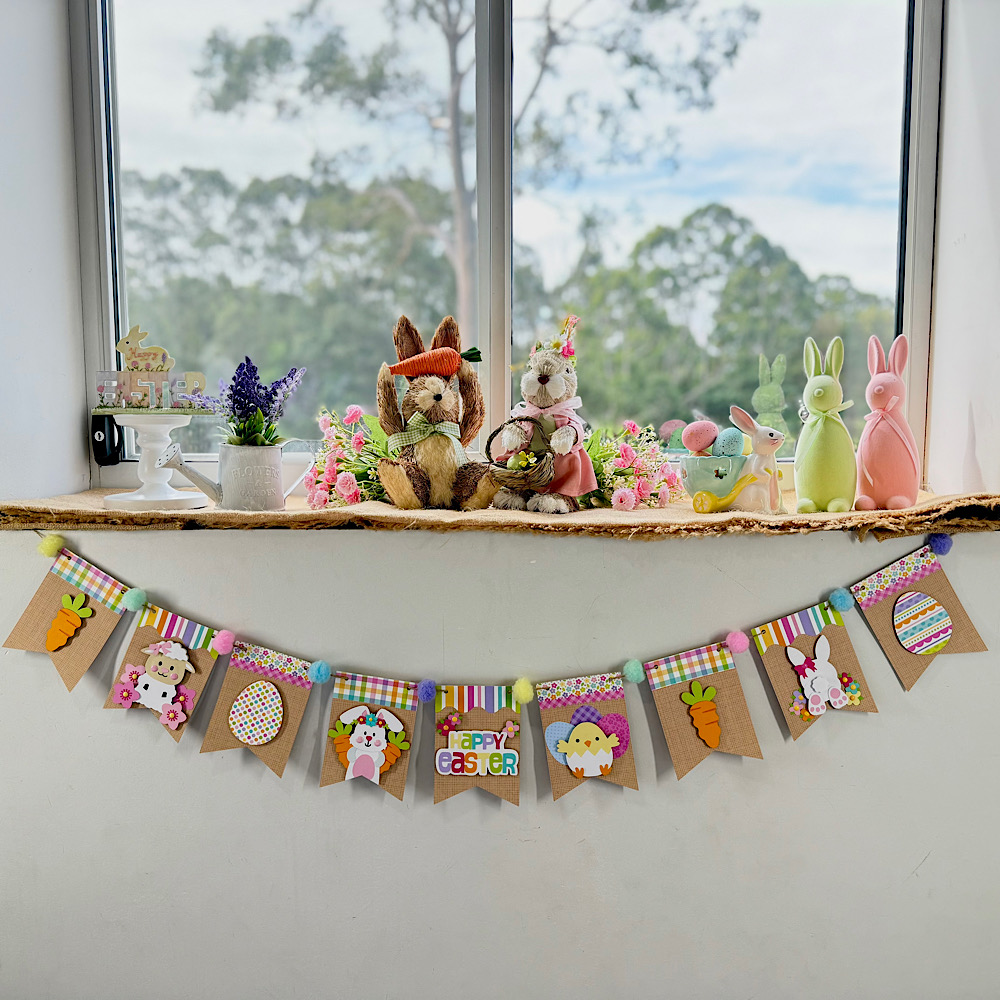
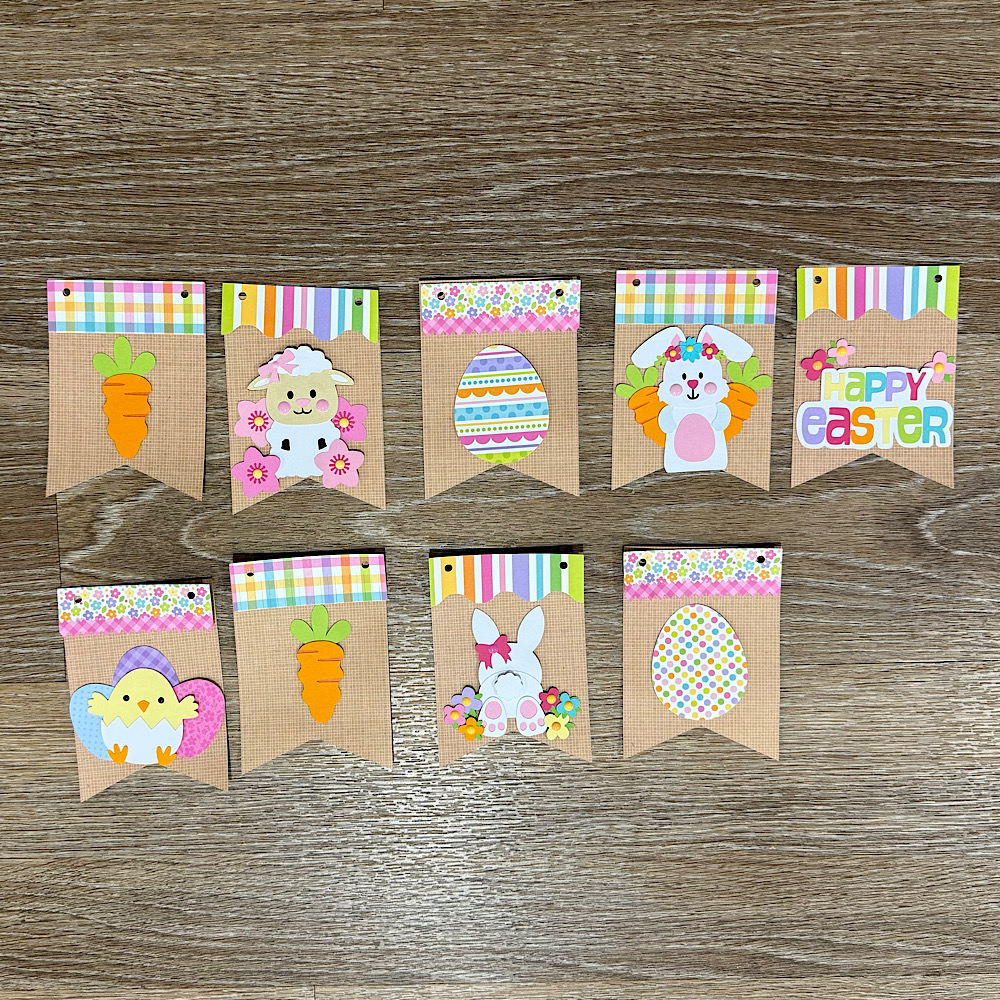
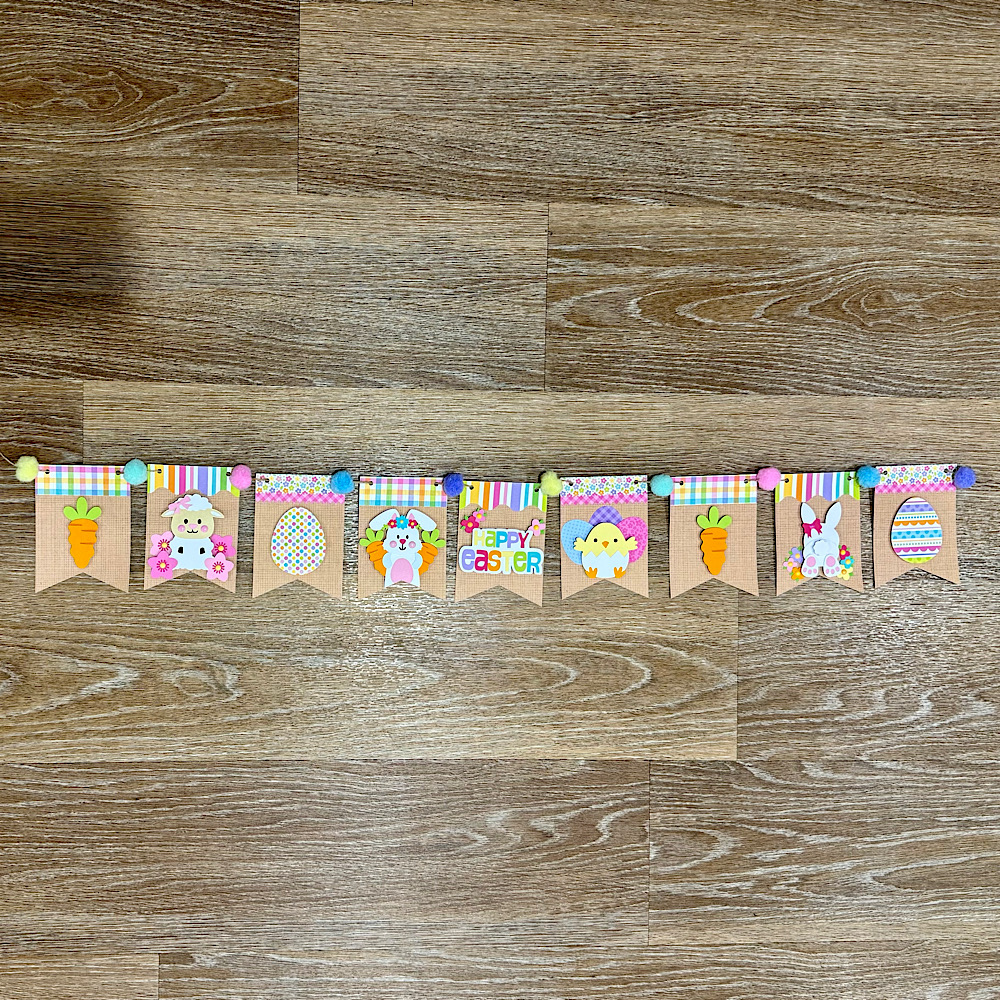
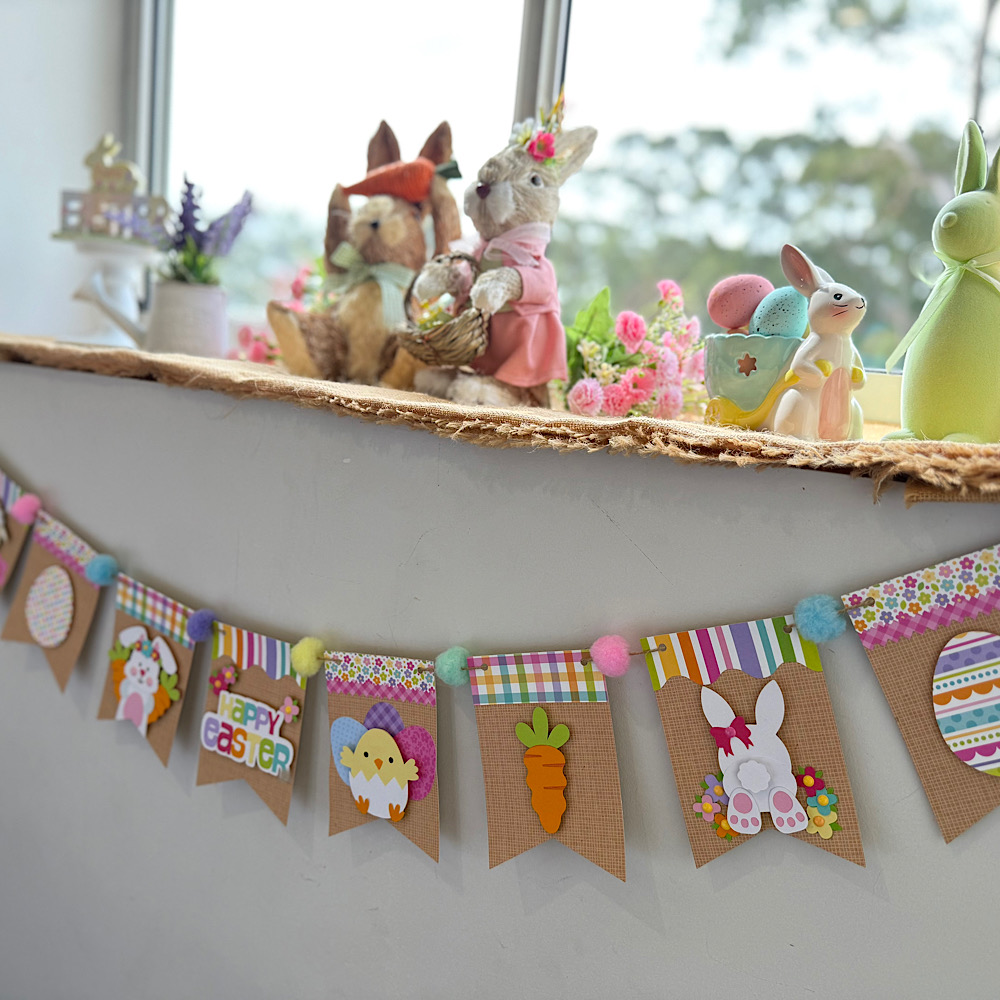
Easter Banner Tutorial

Hello crafty friends. Today I want to share with you how I made this cute Easter banner using 6 Lori Whitlocks Files:
Layered Bunting 2 (Silhouette, SVG)
Easter Purse Topper (Silhouette, SVG)
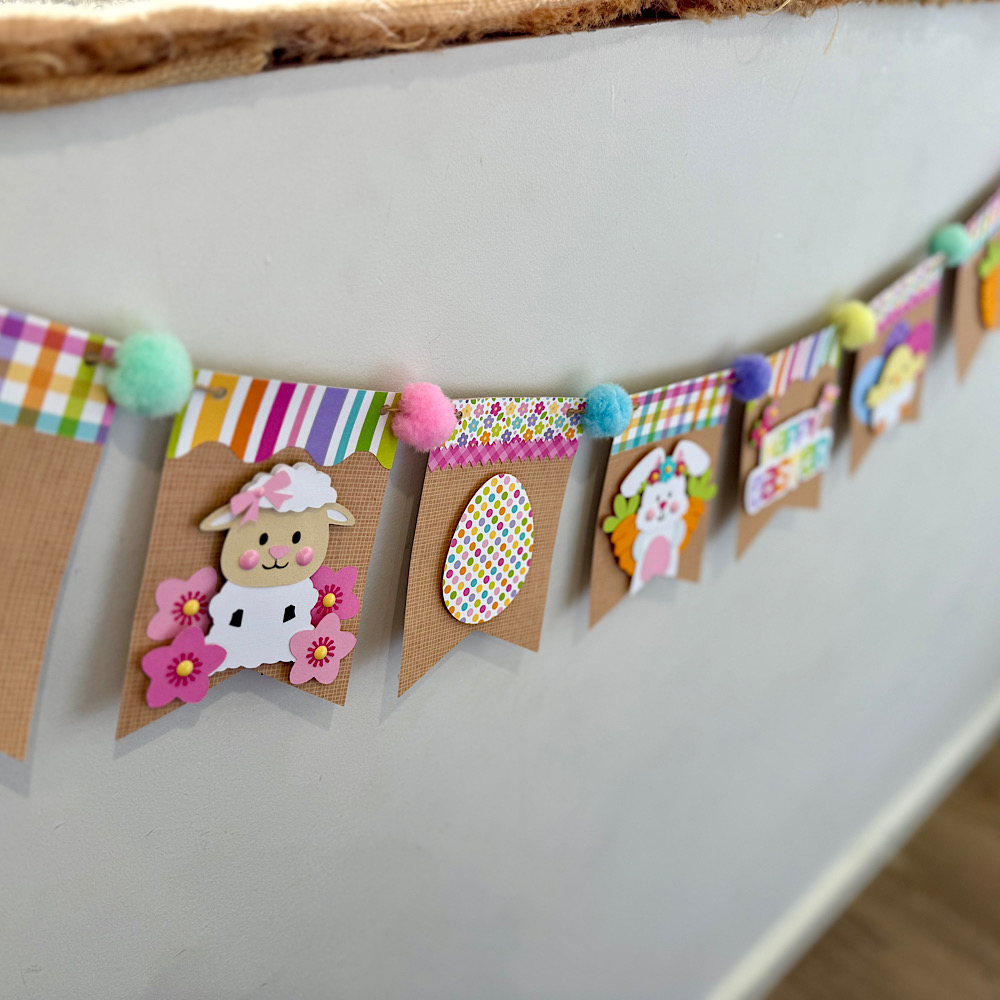
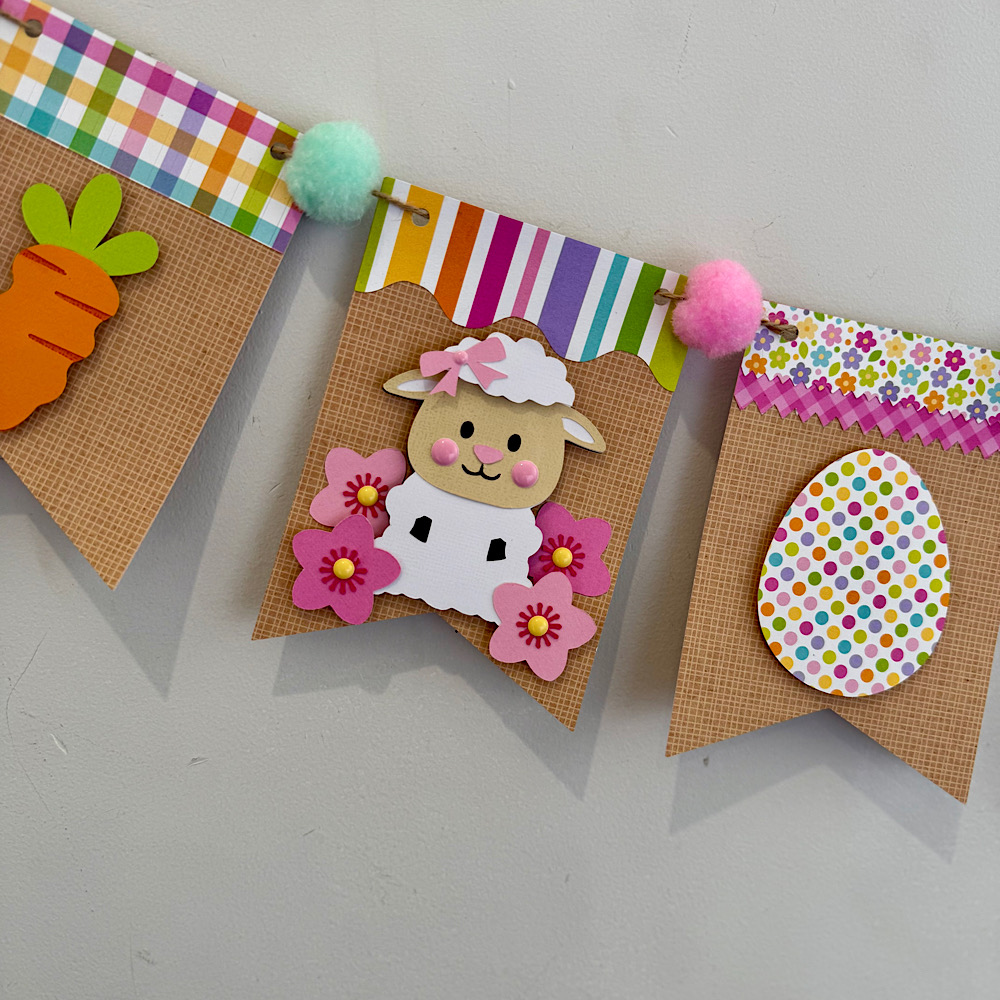
Easter Sheep Car Box Card (Silhouette, SVG)
Easter Bunny Car Box Card (Silhouette, SVG)
5×7 Easter Bunny Card (Silhouette, SVG)
Easter Basket Chick Box Card (Silhouette, SVG)
I wanted my banner to have a pastel rustic feel. I chose some Doodlebug kraft gingham cardstock for my bunting base. Then some coordinating coloured papers to match.
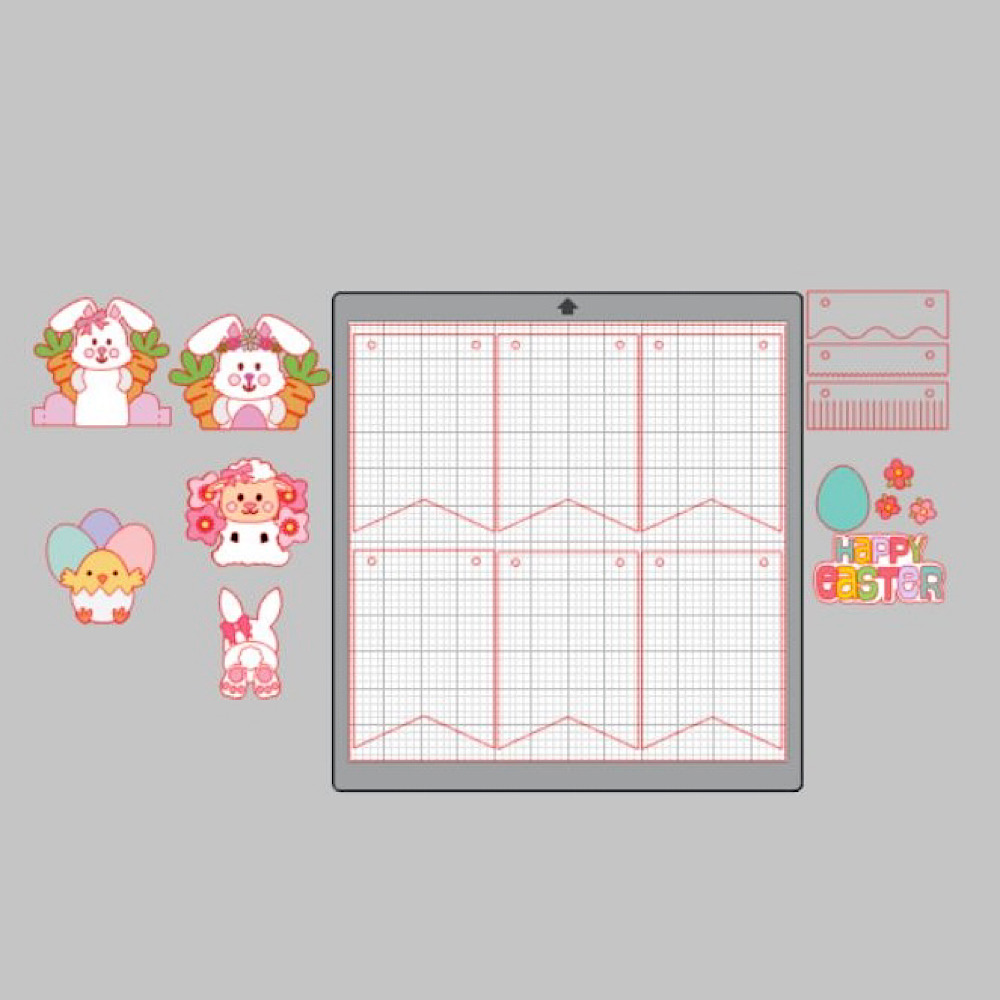
To start my project I opened all the files in Silhouette that I wanted to use.  I deleted the parts I didn’t need then I copied them onto one page with the bunting.  You will see I have used the similar bunnies from the 5×7 Easter Bunny Card & Easter Bunny Car box card. I did this because the carrots in the box card are whole carrots once you ungroup everything. Also she has more of a body. I omitted her bow & used the floral head piece from the 5×7 card. You can just use the Bunny from the Easter Bunny Car box Card if you wish. I also took the extra step of using the egg from the topper to give the bunny a belly like the one in the 5×7 card. To do this I used the same step below by sizing it onto the bunny.
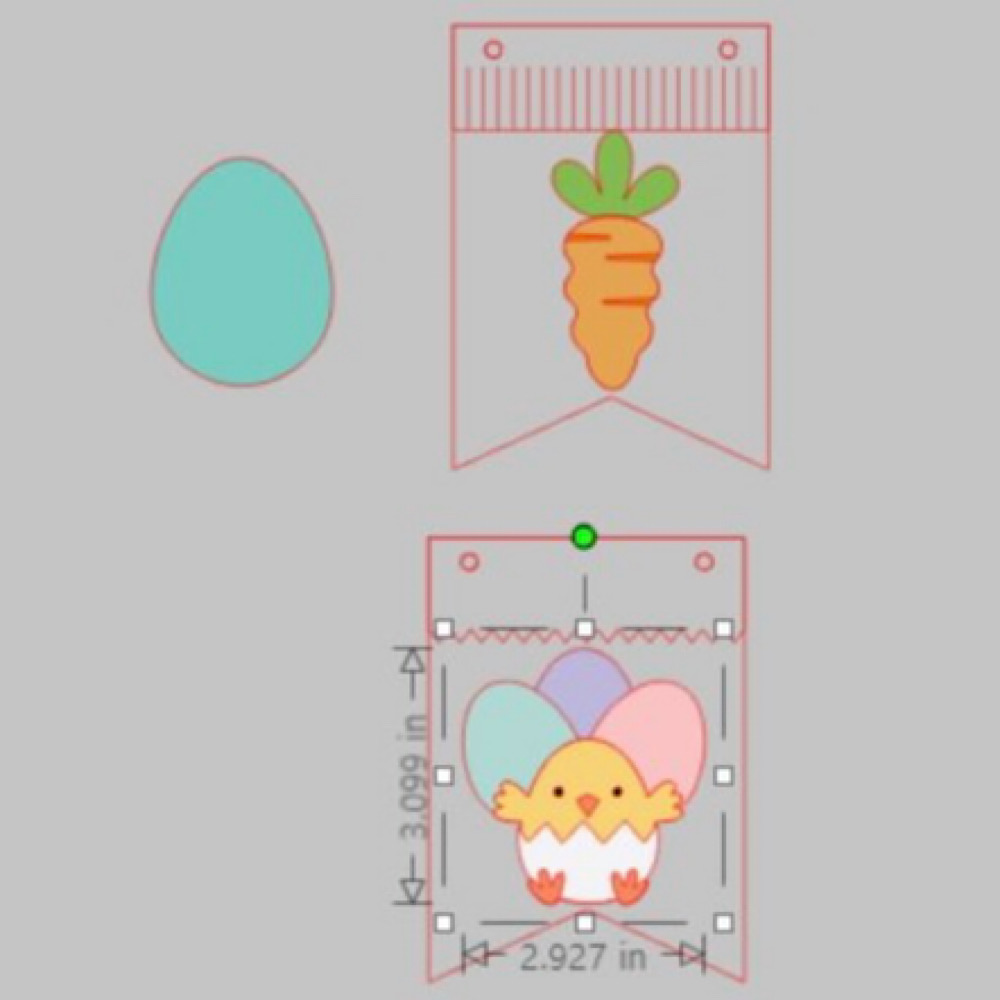
When you open the Bunting file it will have 3 bunting shapes across the page. I right clicked over all 3 & enlarged by dragging the corner just enough so that all 3 bunting pieces fit across my page. I then coppied all 3 & pasted another row. You can make yours bigger or smaller however you please. I did mine this way as it will give me the most bunting pieces, (6 in total per page), without too much scrap. I cut 9 bunting panels in total. Next I sized my images one by one. To do this I copied a bunting panel to the side of my page. I then placed my image piece inside & enlarged or reduced the size making sure it fit inside. Make sure you place the little panel across the top of the bunting as well as I did in my image below.  Do this step for all your pieces.
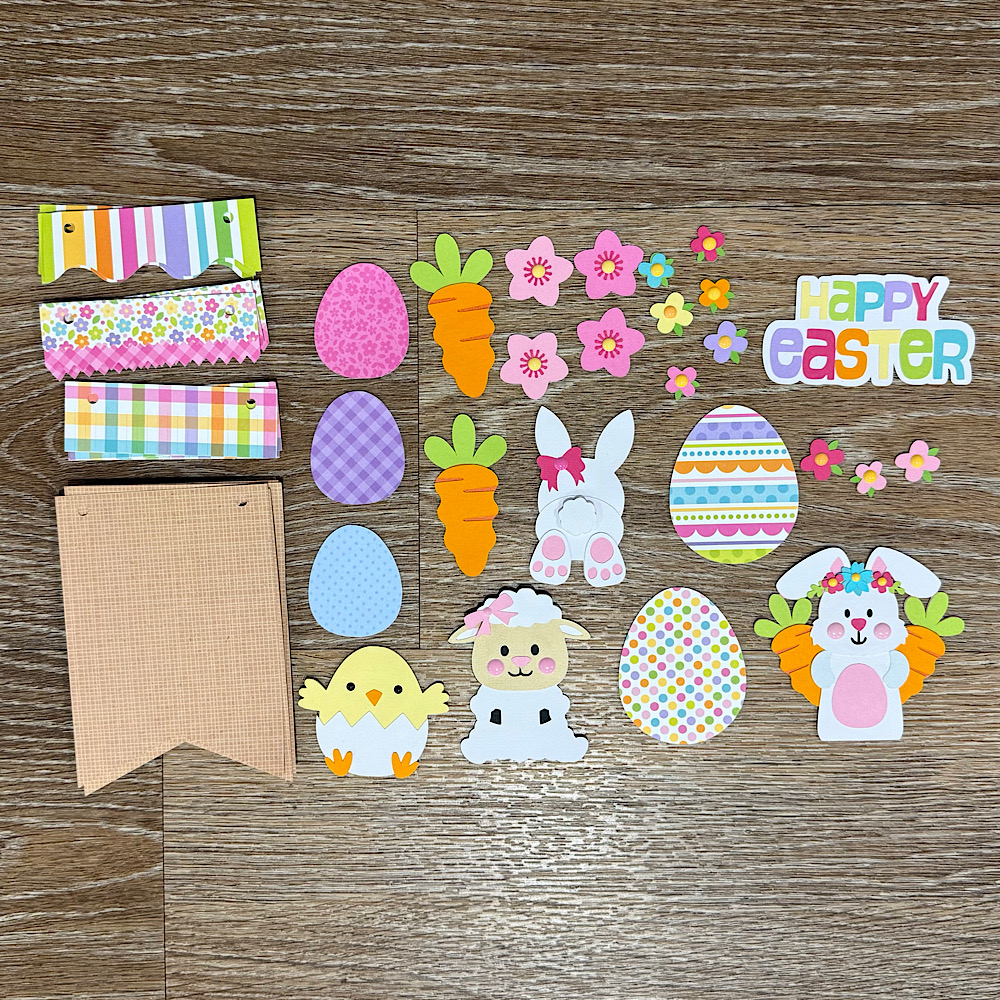
Now once you have all the sizes correctly cut out all your pieces & glue together all your image pieces.
Then just place everything onto the panels to see what order you want everything to sit. Once you are happy with it, it helps to take a photo so that you remember where to glue everything.
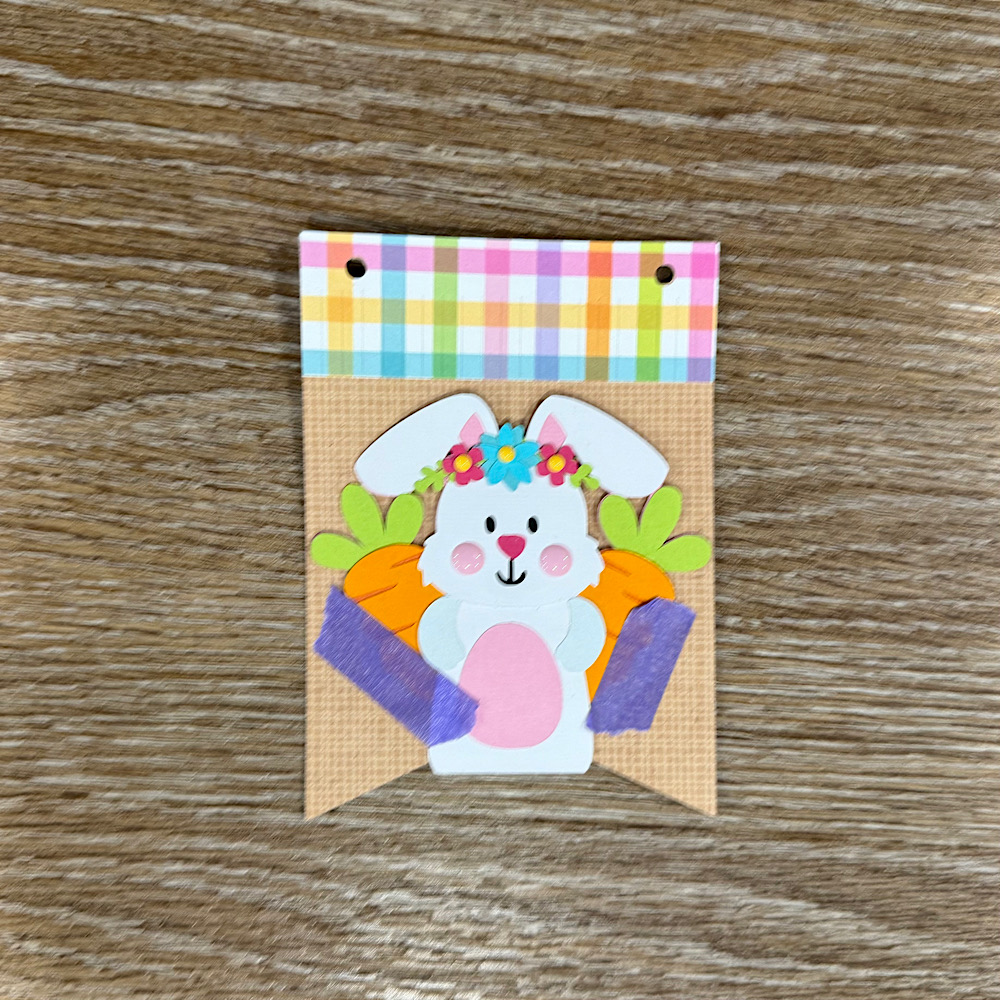
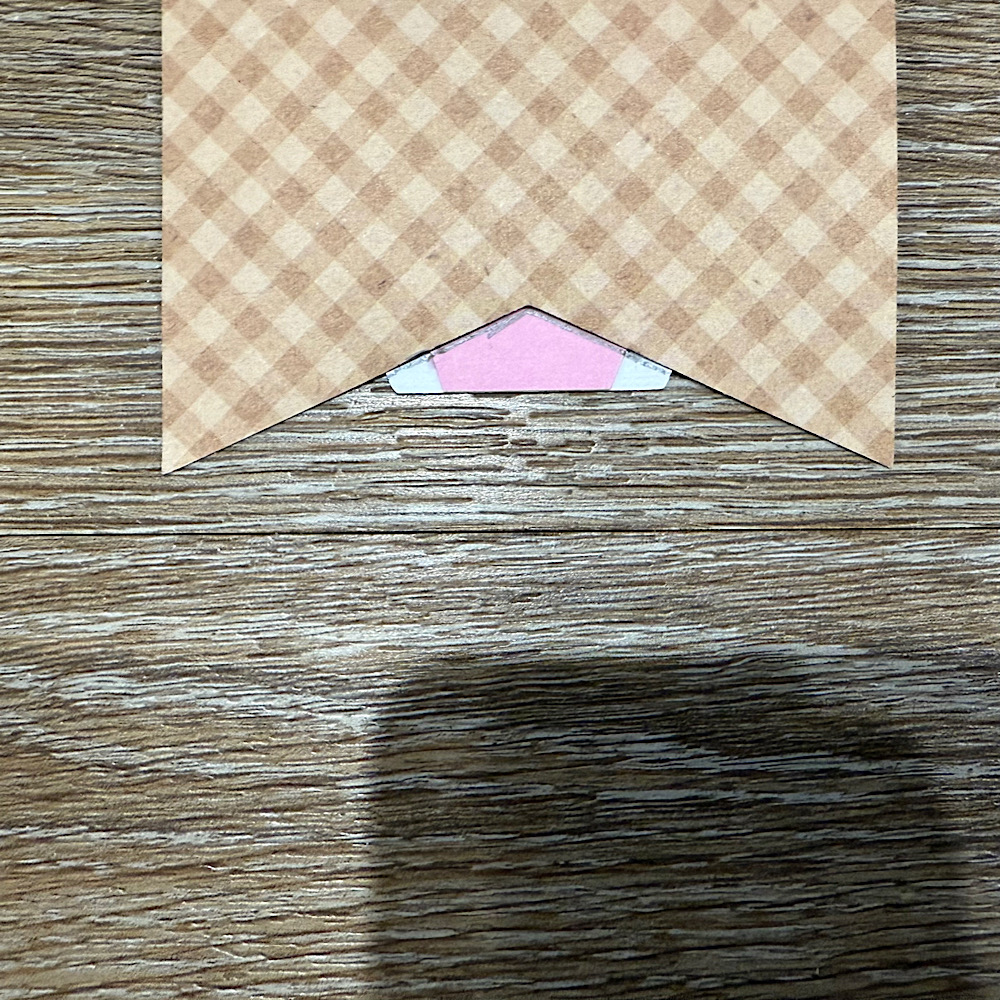
Now glue the panels onto the bunting base. You will notice that the body on the bunny is a little long. Before I stuck down the bunny I placed her onto the bunting with washi tape, then I turned the bunting over & traced the edge with pencil along the back of the bunny. I then cut along the pencil trace & proceeded to stick the bunny onto the front of the bunting.
 
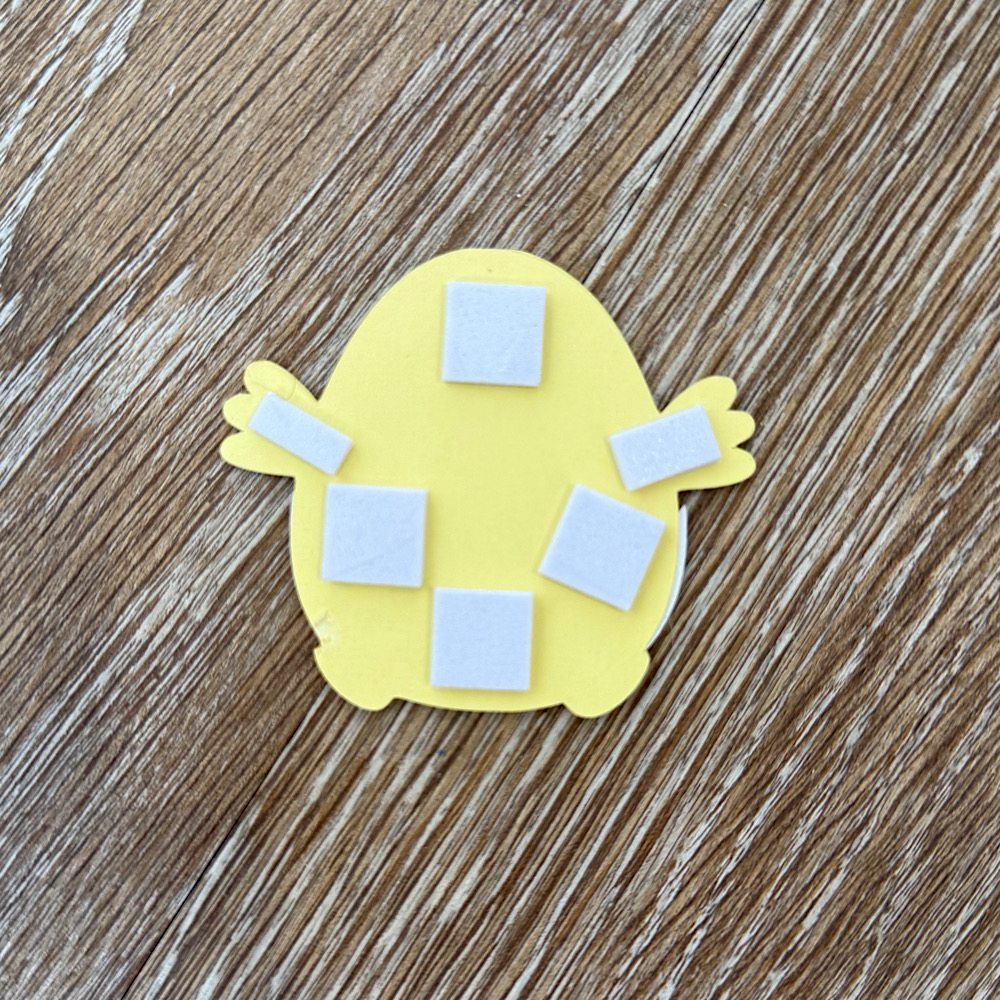
I used foam squares to stick down my image pieces. This gives them a raised look.
Once you have all the bunting pieces ready the last step is to thread some twine & pastel pom poms through to finish the banner.
You can use as little or as many files as you wish. The possibilities are endless. I just love Lori’s files & couldn’t resist the temptation.
I hope I have given you some inspiration today to create an easter bunting banner!
For more inspiration, check out my Instagram!
Thanks for stopping by!
Hugs
Noelene 🙂

Two Peas in a Pod Album

Hey friends! Traci here and today, I’m sharing a pea pod shaped mini album that I made using one of Lori’s adorable cutting files called Valentine Pun Stickers (SVG, Silhouette).
This file has lots of cute images and sayings
. I chose the two peas in a pod and made the peas removable! What a perfect little scrapbook for photos of best friends, twins, a parent and their “mini me” child, or a sweet couple.

Ha! How cute is this? I love the little peas!! To start, I sized the shape to 14″ wide x 5″ high and cut the front and back covers out of white acrylic. But, you could use white card stock or chipboard instead.

Next, I cut the peas and pod shapes out of green cardstock by Bazzill (guacamole) and Doodlebug Design (limeade and citrus).

I added pink enamel dots to their cheeks and used black card stock for their eyes and smiles. For the title, I chose black Alphabet Soup stickers (Doodlebug) and added red heart puffy stickers on either end.

I wanted the little peas to be removable so, I left space in between the pod’s green papers to tuck them into. You could always add more peas if you’d like and change the title to Three (or Four) Peas in a Pod.


The backside of the peas can be used as a photo mats. Add pictures of mom or dad and their little mini me, best friends who finish each other’s sentences, twins or siblings who share the same looks or mannerisms, a couple, or your sweet pets that can’t live without each other.


Inside the album, I made 4 white card stock pages. To cut these, I had to turn the shape diagonally on the 12×12 inch piece of
paper in order for it to fit.

Here are a couple of pictures of the inside …

I covered each white page in colorful papers and added different shaped photo mats for interest

Then, I had fun embellishing the pages with lots of cute die cuts and stickers. To see ALL of the pages in this mini album, visit my blog at Artsy Albums.


Be sure to
check out Lori’s Valentine Pun Stickers Cutting File (SVG, Silhouette). These super cute designs can be used in so many ways … like fun shaped mini albums! Have a crafty day. 😊

Blog * Shop * Facebook * Instagram * Pinterest

Snowflake Lace Album Tutorial

Hello friends! Traci here and today, I’m sharing a winter mini album that I made with one of Lori’s amazing cutting files called Snowflake Lace (SVG, Silhouette). I used it to create the front and back covers and a few pretty pages inside. I love its intricate design and it made such a beautiful little scrapbook!


Snowflake Lace Winter Scrapbook Mini Album by Artsy Albums


First, I’ll explain how I created the covers, then we can take a look inside.


To start, I resized the Snowflake Lace cutting file to 6×6
inches and duplicated it for a front and back cover.


Since I wanted my back cover to be solid, I removed the
lace from the second shape. To do this, I highlighted the shape, right
clicked, and hit release compound path. 

To start, I resized the Snowflake Lace cutting file to 6×6 and duplicated the file for a front and back cover.


I wanted my back cover to be solid, so I needed to remove the
lace in the second shape. To do this I highlighted the shape, right
clicked, and hit release compound path. 


Now the outside square is removed from the lace snowflakes. I
deleted the design and kept the newly created solid back cover. Then I cut
both pieces out of white acrylic
, but … you could easily use white card stock or chipboard instead.


In the file, there is a perfect spot in the lace for the binding ring to go through. You’ll need to punch a hole in the solid back cover if you’re using card stock or chipboard.


Once the covers were done, I cut the inside pages out of white card stock. I cut 6 solid pages and 2 lace pages. Since the design is a bit intricate, I set the machine to cut
“heavy textured card stock” with 2 passes. Now … time to decorate!


Snowflake Lace Winter Scrapbook Mini Album with snowmen and jewels


Isn’t this lace cover so pretty?!! I added some die cuts, a few sparkling jewels, and a title from the Doodlebug Design, Winter Wonderland Collection.


Snowflake Lace Winter Scrapbook Album Page with a cute yeti and a fox
Inside, I covered each of the white pages with pattern papers, photo mats, stickers, and more die cuts.


Snowflake Lace Winter Scrapbook Album Page with flowers and a ski lift

Here, I created a fold-out page and added a photo mat on the front flap with a ski lift die cut piece.


Snowflake Lace Winter Scrapbook Album Page with a yeti, a pocket, and a snowman

Open that fold-out and there’s a cute pocket inside with a fun snowman flip-up card on the front. I added a die cut in the pocket for journaling but extra photos can also be saved here.


Snowflake Lace Winter Scrapbook Album Page with trees and yetis

This is one of the pretty lace pages that I cut from cardstock. I love it. I added a photo mat to the front and back side. It’s such a beautiful way to highlight your winter photos.


Snowflake Lace Winter Scrapbook Album Page with a pocket, journaling cards, and a cute moose

On this pocket page, I used another one of Lori’s cutting files to create the cute scalloped circle mat.


Snowflake Lace Winter Scrapbook Album Page with a cute moose, trees, and snow


The cutting file is called 4
Scalloped Circles (SVG, Silhouette) and includes the scalloped circle and the plain circle in the center. 


Winter Scrapbook Album Page with a cut-out snowflake lace design
Here’s the 2nd lace page I cut from card stock. Doesn’t it look gorgeous with the pink paper behind it?


Winter Scrapbook Album Page with a cut-out snowflake lace design


I had so much fun creating this winter mini album with Lori’s Snowflake Lace cutting file. The delicate pattern is so lovely and it made such unique album covers and pages. 


I hope you’ll try this project. It could be made with any paper collection and would also make a wonderful Christmas scrapbook. Until next time, happy scrappin’!

Blog * Shop * Facebook * Instagram * Pinterest