Merry Christmas Eve Family Pajama Shirts

Happy Christmas Eve! I hope that you have everything ready for Christmas. And if not, never fear, you have a few more hours of last minute shopping, wrapping, crafting! Today my family will open matching pajamas.  I added reindeer to the shirts to give them that special custom flare.  You can find this reindeer in the SVG shop and Silhouette Design store.
Image 1

The font is Lori’s Longhand Font. In the Silhouette Store.  In Silhouette Studio, you can curve text to a shape.  While you have your text box selected drag the circle to the shape you’d like to curve it to.  Move it around a bit until it’s in the right spot.

I hope that you have a wonderful Christmas Eve and a very Merry Christmas!

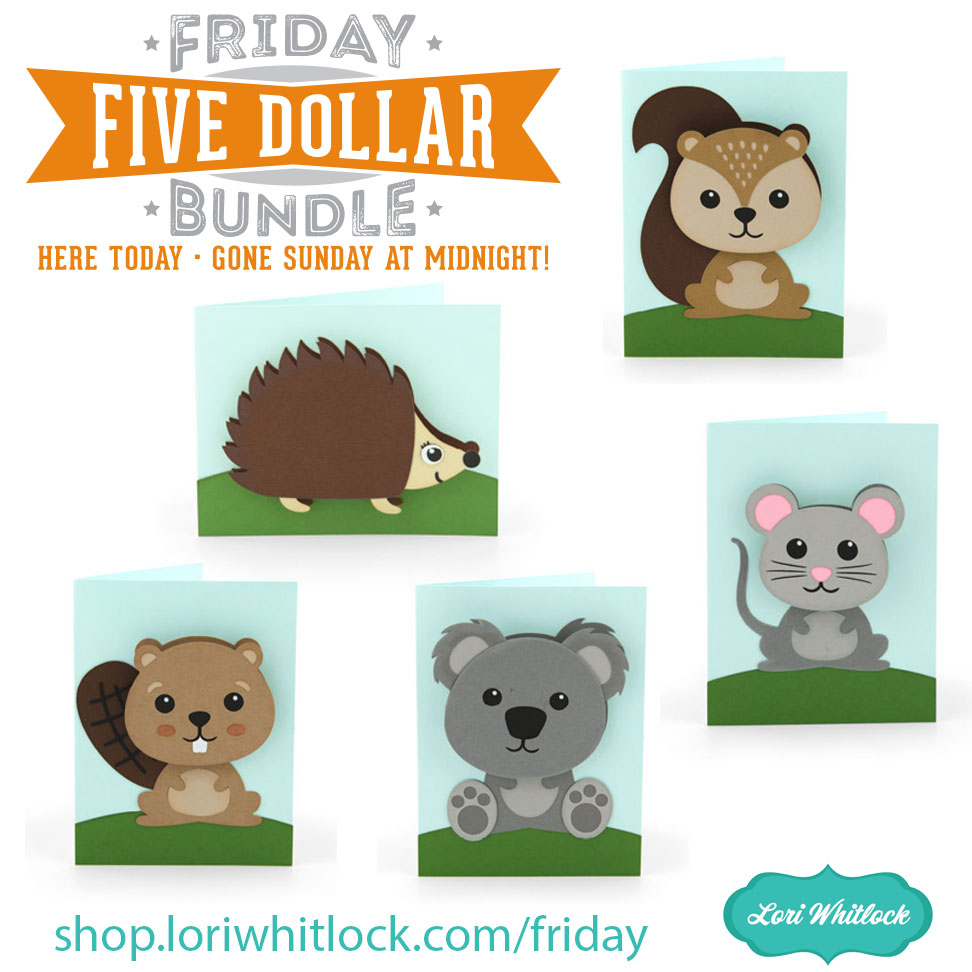
A New Friday $5 Bundle!

Hi Everyone! Today we have a new Friday $5 Bundle! It will ONLY be available until Midnight Sunday and when it’s gone it’s gone. These SVG files can be used with Cricut Explore, Silhouette Studio (with the Designer Edition upgrade), Scan N Cut, and any other cutter that will work with SVG files. Help spread the word by telling your friends and announcing it on social media!

Now through Sunday, you can pick up this Christmas Place Card Bundle including 6 beautiful SVG files for just $5!

The cost of this bundle is $5, for $10.75 worth of SVG files, over a 53% savings! Make it your resolution to never miss a birthday! But don’t wait, this bundle will only be around until Sunday at midnight!

Have a great day!

Box Card Christmas Truck Tutorial with Brigit

Here’s a tutorial of putting together this adorable Box Card Christmas Truck from Lori’s shop. I used Cricut Design Space and my Cricut Maker to cut this out but you can also get this file here at the  Silhouette Design Store.

Here’s my finished truck, I added some snow to the tree and a Santa from Doodlebug’s Christmas Town mini icon sticker sheet. The patterned paper is Doodlebug’s ladybug and limeade dot-stripe petite prints.

I uploaded the truck into Design Space and ungrouped.

Selecting the truck piece with score lines I clicked the Attach button on the bottom right, this keeps the score lines and cut piece together when you cut. I did the same to the other piece with the score lines.

Select the JOY and Flatten, do the same to the Farm Fresh Christmas Trees sign, this is so you can print and then cut.

This is how the print and cut will look, you print this page out, place it on your mat and the machine will scan the black box and cut around each one.

Here are all the pieces cut out, I folded the scoreline pieces and inked the edges of the patterned pieces.

I put together the tree on the middle section first then glued and assembled the main truck piece. Then glued the middle piece flaps to the inside of the main truck. If you want you can use solid cardstock for these pieces to save on patterned paper since the pieces in the next steps below will cover both sides.

I glued down the door first, then the silver running board, the tires on top of that and last pop dotted the fenders. Next, I glued each finished side to the truck base. Last I added the Joy to the back and the lights to the front.

Thanks for stopping by and have a wonderful day!