3D Strawberry Bouquet Tutorial

Hello crafty friends! Noelene here today to share a tutorial of my take of the new 3D Strawberry Bouquet (SVG), (Silhouette). Lori has a few different designs to choose from. They are fun & easy to make!
To start cut out all your pieces. Next I created the small card. Then I valley folded the small piece of the envelope & applied glue to the tabs. I aligned it to the bottom & sides of the larger piece. This creates the pocket.

Next if you want to ink any of your pieces do this before you glue any pieces together. I inked the green stems of the strawberries.

 I wanted some dimension on mine, so I embossed the basket with an embossing folder. Remember to spray a light spray of water on your cardstock before you run it through, so that it makes your cardstock more pliable & not tear. Now glue all your panel pieces. I put some small foam squares on my flowers for dimension. I also put foam squares on the strawberries of the smaller green panel, as this will be on the front.
Now to create the mechanism.
Fold the little tab then fold the mechanism in half & glue the tab down.
For the easel leg glue the single tab to the back, then wrap the rest around going to the back & bringing it to the front glueing each tab. This is to make the easel leg sturdy.
Next valley fold both ends in so that it forms an x.
Now apply glue to the mechanism making sure you do not go past the fold on the easel leg.
Now place the glued mechanism on the inside of one of the pot panels making sure to align the leg to the bottom. It should sit a few millimeters beneath the top. Now, glue the top part of the mechanism only & place the other pot panel on top. Hold down for a minute or so till it dries. Now glue the tabs to the inside. I used paper clips to hold down the tabs until they dried.

Next take the larger foliage panel & turn it over. You want to apply glue on the back of the bottom square part. Now turn it over so you can see your front panels & gently slide it in between the back of your x. The glued square should be stuck onto the back pot panel. Now with the smaller foliage panel you will apply the glue onto the front side of bottom square. This time you will slide it into your x on the front folded part of the mechanism so that the glue adhers to the front pot panel.

Lastly I glued down the bow elements & glued a little flower button to embellish. Lastly I finished off by adding some white gel pen. I didn’t do this before I adhered my pieces, but if you do, it makes it a little easier.
To make your bouquet stand on its own, gently squeeze the sides of the pot & fold in the leg of your mechanism. To fold flat, place it back down again.

I hope you enjoyed my tutorial today! I will be definitely making more of these in the near future.
For more inspiration, check out my Instagram!
Thanks for stopping by!
Hugs
Noelene 🙂

Sweet Berry Basket Treats

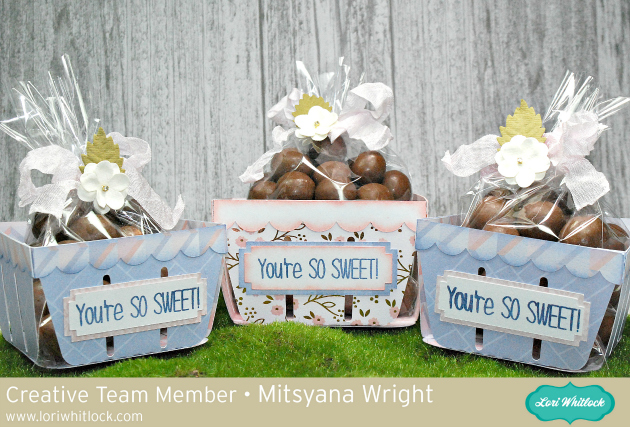
Thank Hello, Crafty Friends!! Design Team Member, Mitsyana, here again! This time to bring you these adorable Berry Bushel Treat Baskets!

I love sweet treats! But what I love even more are sweet friends. So from time to time. I make these sweet friends sweet treats. Whoa, what a tongue twister! Try to say that 5 times fast!

Supplies Used:

Lori Whitlock’s Berry Basket (here in the Silhouette store)

Patterned Cardstock – DCWV’S Peri & Peach Stack

Little Birdie Crafts’ Renae Classic Flowers

Stamped Sentiment- Stamps of Life – Cake2Stamp

Light Pink Crinkle Ribbon

Xyron Mega Runner

VersaMagic Ink- Night Sky, Pink Petunia

Cellophane Bags

CHOCOLATES!!

Stamp Positioner (Optional)

 For my project, I used this adorable Berry Basket file from Lori Whitlock’s SVG shop.

Berry Basket

I downloaded the file. Then extracted the contents of the zipped file onto my computer. Once unzipped and downloaded I can open it using my electronic cutter software.

In my ecal software, I clicked on the SVG/ Import icon to open/add the file onto my virtual cutting mat.

Once the file is open it’ll look the picture below.

Lori pre-sizes the files so there’s no guess work to how big the file should cut. But if you’re like me you like to resize your boxes because sometimes you don’t want a one sizes fits all deal. Which is totally fine too.

To resize a file make sure you file is set to “Keep Proportions”. This will option will be located in the ‘Portion & Size’ panel on the right.

I set the width to 8.75″. With the “Keep Proportions” box checked it automatically sets the height in proportion to the width.

As always, also changed the color of the pieces. This helps me to remember which pieces I’m going to cut in what paper. I sort them by color so that all pieces being cut out the same paper are grouped together.

I load my mat with my paper choices and cut all the pieces at the same time.

Once all my box pieces were cut, I inked the edges of the scalloped tops with Pink Petunia chalk ink. Then used my Xyron Mega Runner to attach them to the tops of the main panels. It’s easier to attach these pieces while the panels are laying flat.

Then I folded the flap on the crease lines. I used a dollop of glue on the tiny side tab and adhered the two side panels together. Then ran glue along the bottom flaps and attached the bottom rounded square piece.

The berry basket file also comes with the little label you can add to the front. It’s optional whether or not to use it. But it does give it a nice little touch.

I used a stamp from Stephanie Barnard’s Cake2Stamp set that reads ” You’re SO Sweet” onto the label in Night Sky chalk ink. The sentiment fits perfectly onto the label (even when resized). I knew I may have needed to re-stamp my sentiment a few times so I placed my label in a stamp positioning tool and stamped it about 3 times. This helps to ensure that I get exact placement each time.

I placed a bag of chocolates (you can use your fave) and tied it off with crinkle ribbon. Then attached these adorable pre-made paper flowers from Little Birdie Crafts’ Renae Collection.

And here is my finished box…

Here are the 2 different sizes I made standing side by side…

These are absolutely beautiful.

These treats are sure to wow all the sweet people in your life!

Hope you enjoyed today’s project!

Until next time…

Happy Crafting!

~Mitsyana Wright