Cards by Christine

Today I want to show you how you can make a card using the same die cut shape and the same paper collection and have it turn out completely different.  For both of my cards, I used  the banner shaped card from Lori Whitlock’s die cut card file, A2 Card Base Set 1. This simply shaped card can be used vertically or horizontally, though vertically it needed a little coaxing to get it to stand up straight for pictures.  To decorate the pictures, I used Lori Whitlock’s new Reflections paper and embellishment collection created for Echo Park.
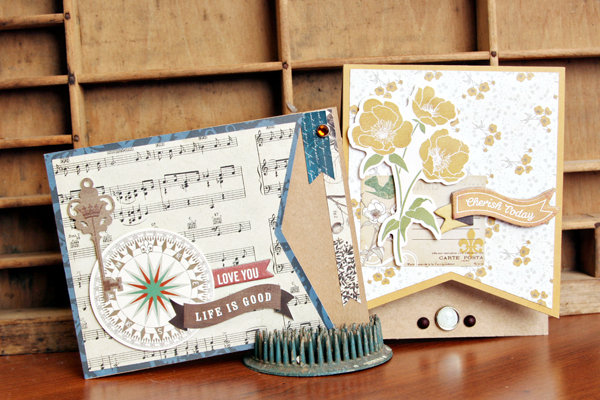
My first card is a little more masculine.  There are so many papers and elements in this collection to choose from, I was able to pick colors and shapes that were better suited for a card for a woman or a man.  I used the card base horizontally for this card and decorated it with cardstock stickers that I popped up with foam adhesive.

I also adhered a bit of stickers to the inside of the card that shows when closed to add an interesting element.  The gem, in this space, is also from the collection. On my cards, I like to use the brads a little bit differently.  I really don’t like to see the prongs, so I will bend and break them off and then adhere them to the card with a little foam adhesive.  Works great every time!
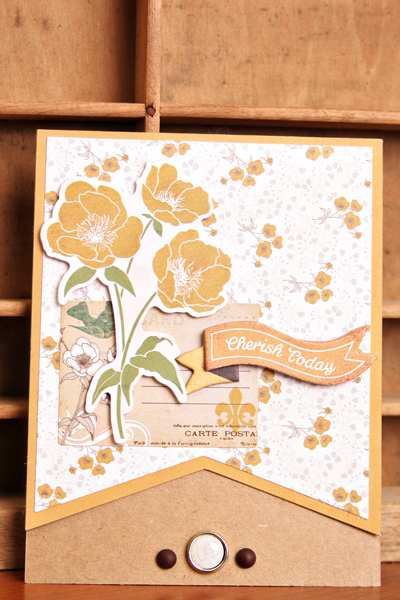
My second card is definitely more feminine.  I took advantage of the floral papers and the yellow monochromatic color scheme to change the look entirely.  This time I rotated the card so that it is opened vertically.  I used the beautiful floral arrangement sticker as my focal point and topped it off with a Layered Chipboard sentiment.  The brad in this card was adhered again with foam adhesive.
Thank you for stopping by today and I want to challenge you to use card bases in different ways with just a few flips and paper changes.  You’ll find a whole bunch of die cut card base files in Lori’s store, I bet!
Lori Whitlock Supplies:
Reflections  paper collection and embellishments by Lori Whitlock for Echo Park

Silhouette Tutorial by Brigit: Polygon Tool

Hi everyone, Brigit here, Today I have a tutorial using the polygon tool to create cutouts from the acorn box to make this luminary.  It’s a fun and easy project that looks so pretty when done!

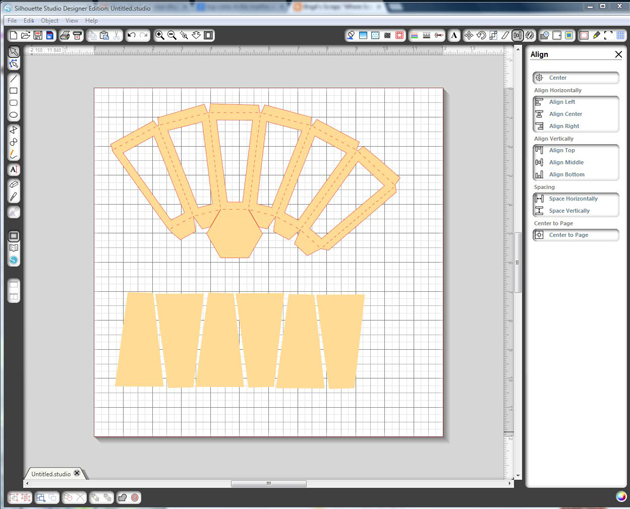
Import the acorn and resize it to 15.5″w with aspect ratio checked. Now ungroup, you can move the other pieces off the mat, (the hole on the lid ungroups also so make sure you group it together again with the lid before you move.)

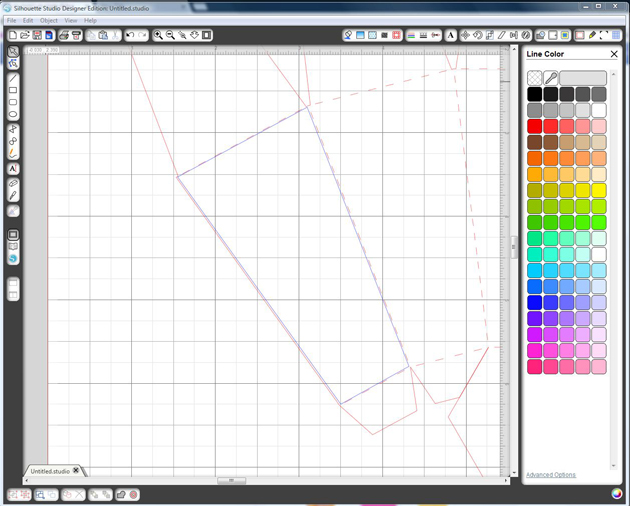
On the first panel zoom in close, select the Polygon tool, click in one corner then the second, third, forth and back to the first to form your shape like I did here in blue, don’t worry about being precise.

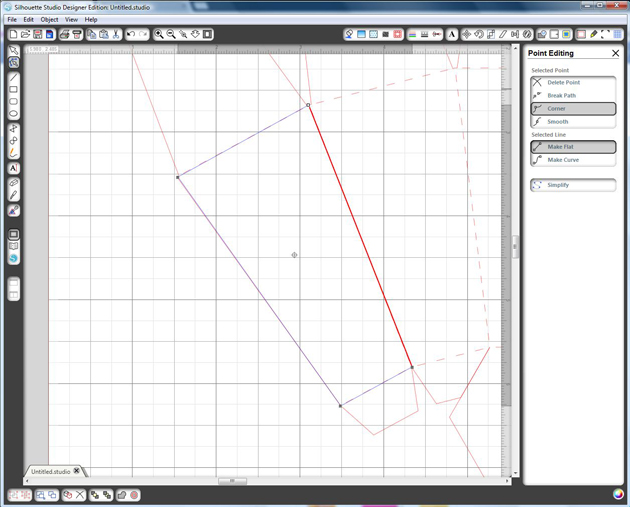
If you double click on the shape you will see 4 dots in the corners, click on them and you can easily adjust the lines if need be.

Now select the shape you just created, go to the offset window and select internal offset, I used a .250 offset distance.  Delete your original shape, you just want the internal one.

Continue and repeat the same steps with the next 5 panels.  After you finish the last one, select the whole acorn including the shapes you just made, go to the modify window and select Make, you can do this after each one if you don’t want to worry about moving it but I just use the undo if that happens.  This is how it looks filled.

With the knife tool I cut leaving just enough to folder over at the top and some off the side flap, you don’t have to be exact, leave more you can trim with a scissor if you have too.  Tip, when I was cutting the flaps after the third one from the left I lost one of the bottom lines, so I ctrl z (undo) selected the whole shape again, and used make a compound path.  I could continue cutting the other flaps without losing the cut line.

The last thing you need to do is make the vellum pieces so use the polygon tool again and draw inside the score marks on one of the panels, you’ll need 6 of them.

Here’s how the body of the luminary looks with the vellum pieces.  Make sure you glue the vellum on first and then fold over the top flaps before you assemble.  Follow Lori’s video here for the instructions on putting the rest of the acorn together.

To decorate I used the flowers from the 3D Flower Set 5 and the leaf that came with the acorn.  I embossed the vellum and rubbed a little distress ink over. Paper is from Echo Park’s Reflections Fall Collection designed by Lori, it’s so beautiful, love the stickers and chipboard pieces too!  Finished with some Thanksgiving Orange Truffle Trendy Twine, a cute little button and sentiment from the paper collection.

Hope you enjoyed this tutorial, you can visit me at http://www.brigitsscraps.com

Blog Hop + Promo + Giveaway + $1 Wednesday

Welcome to our Creative Team Blog Hop, today! Our FABULOUS Creative Team is at it again and has some amazing projects to share with you. Keep reading because we have a Silhouette Promo and GIVEAWAY below. Check out their fun projects by following the links here:

Lori Whitlock
Brigit Mann 
Christine Ousley 
Corri Garza 
Mendi Yoshikawa 
Traci Penrod 
Chrissy Guido
Haley Ney
Kim Lund 

Have you seen the new stamp material from Silhouette? Yep, that’s right I said STAMP MATERIAL!!! With this amazing product you can cut your own stamps with your Silhouette machine! This is a brand new product and it’s AWESOME! I had a chance to play with it this week and I have to say… I’m in LOVE!! Up until now, there was not a great way to create your own rubber stamps… well, now there is! I created this apple tag with stamping in mind. I was able to create a custom shaped tag and apple with coordinating stamp images! How fun is that? Keep reading because I’m giving away this apple tag set with a stamp material purchase below. 

Here are a couple of informative videos that that show you a little more about the stamping material and how to use it:

http://www.youtube.com/watch?v=dwRl9B8x-pw
http://youtu.be/hkvDkvDZ-hY

Right now Silhouette is offering my readers some incredible prices on stamping products, both with and without a machine. And, to top it off, here’s my special offer to you…  Anyone who purchases one of the deals below I’ll send you the Apple Tag Stamping Set FREE (SVG & Studio files). Simply email your order # to me at info@loriwhitlock.com and I’ll email you a link to download this cute set.

To shop be sure you follow THIS LINK (www.silhouetteamerica.com/stamping) and use code LORI at checkout to get these great prices and the FREEBIE offer.

And, don’t forget it about our $1 Wednesday at Jessica Sprague… (keep reading… there’s a Silhouette Portrait Giveaway at the bottom you won’t want to miss!)

One Dollar Wednesday at JessicaSprague.com!

It’s Wednesday again and that means TODAY ONLY you can snag two digital kits for an amazing deal…
TODAY for JUST $1 you can grab this awesome set: Everyday Stamps

EVERYDAY STAMPS

And, you can get the following awesome product for HALF OFF, 4×6 and 3×4 Template Set 2

4×6 AND 3X4 TEMPLATE SET 2

While you are at jessicasprague.com getting your kits, be sure to check out the samples made with each of these kits at the bottom of each listing.

And, last but least… we have a Silhouette Portrait to GIVE AWAY!!! One lucky winner will be announced on Monday, September 9, 2013! Enter through the form below. Good luck everyone!!!


a Rafflecopter giveaway

And, don’t forget to finish the blog hop!


New in Shop + Tuesday Freebie

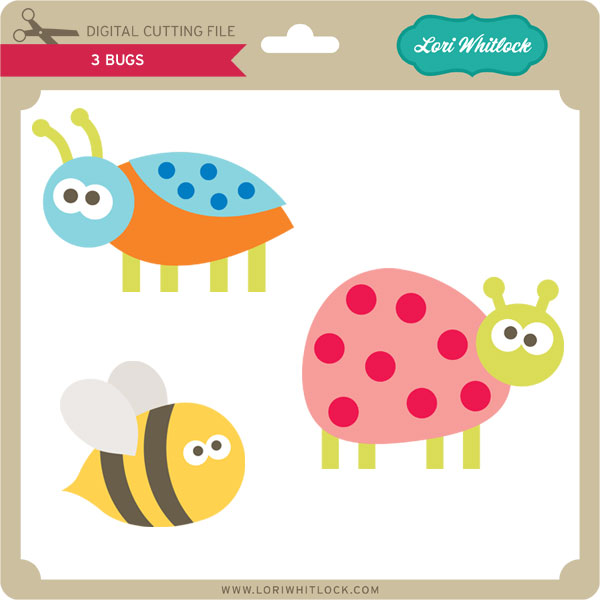
TODAY ONLY, the BUGS SVG file is FREE with purchase.

Before coupon code total should be $5.00 or higher. Just add coupon code: BUGS at checkout and the cost ($2.99) will be deducted from your purchase making your purchase price $2.01. This freebie is good until midnight tonight!

Here are some of Lori’s newest shapes added to the SVG shop and her Silhouette Portfolio! Thanks for stopping by… Lisa

Only a purchase in Lori’s SVG shop will qualify for the free cutting file.