30% Off SVGs + Feb Blog Hop + FREE File!

Happy Valentine’s Day, everyone! Welcome to our February 2023 Creative Team Blog Hop! The creative team has been working hard on some new projects to share with you that will get you excited to make some projects this month. We also have a FREE FILE for you! 
This week we have a 30% OFF SALE going on at Lori’s SVG SHOP including ALL digital files and commercial licenses now through Saturday, February 18th ! Be sure to use coupon code: FEB2023 (case sensitive) at checkout in the SVG SHOP
 
To thank you for joining us in the hop today and sharing the hop with your friends, we have a gift for you! TODAY ONLY, You can download this Be My Valentine 6 file by Jillibean absolutely FREE! Be sure to go grab it while you can.  (Simply add the file to your cart, it will be FREE at checkout.)
 
We have some fun new files this week and they are all 30% off this week when you use code JAN2023 in our SVG Shop!  And, as always, my new files are available in the Silhouette Design Store as well. This week I have two new 5×7 Grid Pop Up Card bundles! Customers have been loving this card style because they are super easy to assemble. We have spring and easter designs that I think you’ll enjoy.
We also have new files from Bella Blvd, Jillibean, Dresden, and Quietfire.

***CLICK HERE TO SEE NEW FILES***

And, last but not least… would you like to see what our amazing team has created? Click the links below for some wonderful inspiration. If you get lost come back here to get on track Lori Whitlock, Traci Penrod, Anita Mulcahey, Brandie AdamsAshley Cook.  Thanks again for dropping by! Don’t forget to use coupon code: FEB2023 for 30% off your orders in the Lori Whitlock SVG Shop through Saturday. Have a GREAT day!

Hexagon Pop Up Card Wedding Cake

I have reached an age where all of my friend’s children are getting married!  It’s so fun to watch these kids I saw grow up and move on to this next stage.  Last week I had a bridal shower… so I decided to make a fun Hexagon Pop-Up Card Wedding (SVGSilhouette) for the bride.  Take a peek….

I love that you can customize these cards in the wedding colors!  I also added some glitter and enamel dots for some dimension.  The sentiment is a sticker.


Such a fun card! Now off to make a few more for all the other weddings!  That’s it for me today, thanks for stopping by!
Kathy

Last Chance – $5 Bundle!

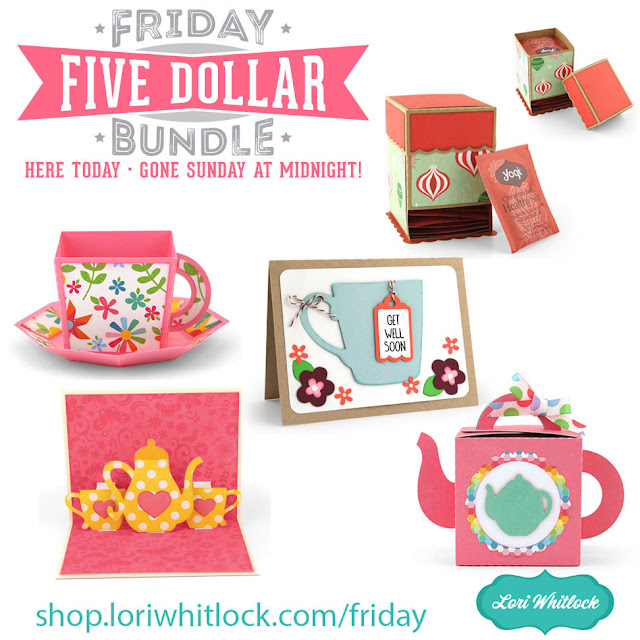
Today we have a new Friday $5 Bundle! It will ONLY be available until tonight at midnight and when it’s gone it’s gone. These SVG files can be used with Cricut Explore, Silhouette Studio (with the Designer Edition upgrade), Scan N Cut, and any other cutter that will work with SVG files. 

Now through Sunday, you can pick up this Valentine Project Bundle including 5 SVG files for just $5**!


The cost of this bundle is $5, for $12.45 worth of SVG files, over a 59% savings! But don’t wait, this bundle will only be around until midnight!
 
** Because Friday $5 Bundles are already heavily discounted they are not eligible for further discounts including monthly, seasonal and flash sales.

Have a great day!

Friday $5 Bundle!

Hi Everyone! Today we have a new Friday $5 Bundle! It will ONLY be available until midnight on Sunday and when it’s gone it’s gone. These SVG files can be used with Cricut Explore, Silhouette Studio (with the Designer Edition upgrade), Scan N Cut, and any other cutter that will work with SVG files. 

Now through Sunday, you can pick up this Valentine Project Bundle including 5 SVG files for just $5**!

The cost of this bundle is $5, for $12.45 worth of SVG files, over a 59% savings! But don’t wait, this bundle will only be around until Sunday at midnight!
 
** Because Friday $5 Bundles are already heavily discounted they are not eligible for further discounts including monthly, seasonal and flash sales.

Have a great day!

Vinyl Application Tutorial on a Travel Mug

Happy Thursday Everyone:

Anita here with a tutorial on the application of vinyl to a travel mug.  I wanted to make this for one of my friends for Valentine’s Day as one of her true loves is coffee.  I used Lori’s SVG called I Only Need Coffee on Days with “Y” (SVGSilhouette).  I used some Cricut silver matte vinyl for my project.  I selected matte vinyl for my cutting surface.  You do not need to mirror the design when using regular vinyl on a project.

Here are the materials that I used for my project.  You will want to pick up some transfer tape if you don’t have any as it makes these vinyl projects so much easier.

Here is the design cut out and that is my weeding tool from Cricut which is next to the design.  It has a hook on the end which makes fishing out those tiny little pieces so easy.  You can use a pin and I have used a seam ripper in the past too.  You are going to want to remove all of the pieces of design that you don’t need to be there.  I started in one corner and slowly peeled the excess away from my design.  If there are fine elements to your design you might need to hold onto the design with one hand as you pull the excess away so that your design doesn’t tear.

Here is what my design looked like after I peeled away all of the excess piece which came off in one piece,  Next, I needed to go in and grab those extra little bits to help define my design more.  I used my weeding tool for this.  You can use a pin as well.

.

My design is now all weeded and ready for the transfer tape to be applied directly on top of the design.  I cut a piece of transfer tape a little larger by 1/2″ or so around your design.  Then I peeled off the white piece on the transfer paper leaving the sticky side exposed and then stuck that down on top of my design.  I leave my design on my mat through these steps as it is easier to work with.  At this point, you need to burnish the transfer tape onto your design.  Essentially you want the tape to pick up just the vinyl from the backing paper so that you can adhere it directly to your mug and see exactly where it will go.  I used my Cricut scraper that I bought but you can certainly use a popsicle stick for this step.  Check to see if you successfully got the vinyl to adhere to the transfer tape.  If not, continue to burnish until it all comes off the backing paper.

This photo shows the transfer tape on and the tool that I used to burnish the vinyl onto the transfer tape. And my well-loved mat, lol.

Lastly, I placed my transfer tape onto the mug.  I started carefully at one edge laying it on and let it gently fall where it wanted to given that the cup is rounded.  I then used my fingers to smooth out the transfer tape.  Once I was happy with the placement, it was time to again burnish the design to get it to adhere to the cup.  It came out great and I’m sure that she will love it.

Thanks for looking and have a great day.

Hugs,

Anita