Tuesday Freebie Summer Titles

Good morning. Thank you so much for all of the support and love we received last week during our blog party. We wish we had a Cameo for each of you as we love all of our dedicated readers.  Incase you missed it on Facebook, we would like to share our Cameo winner with you, Kris S! Congrats on winning this fabulous machine. Please contact Lori at lori@loriwhitlock.com with your snail mail address so we can get this sent out to you! Thank you again to ALL that entered!

~ Lori and Lisa 

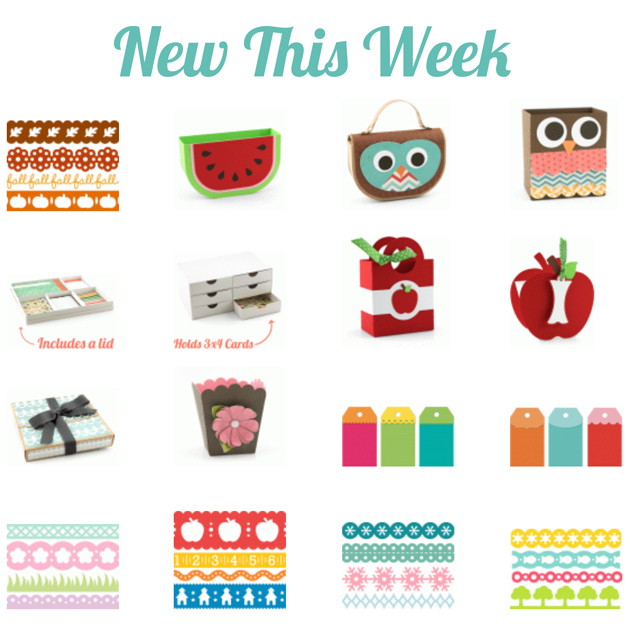
I’ve decided to extend the 30% OFF sale in Lori’s SVG SHOP one more day!! Today is the last day!! There are some awesome new shapes in the store including the cutest little owl purse, life card storage projects, & school projects. Be sure to stock up while you can get them on SALE! Enter code: SUMMER at checkout.


And, TODAY ONLY, this SUMMER TITLES SVG file is FREE with any purchase.

Before coupon code total should be $4.98 or higher. Just add coupon code: SMRTTLES at checkout and the cost ($3.99) will be deducted from your purchase. This freebie is good until tomorrow. If you have trouble combining coupon codes, please use the 30% OFF code, make your purchase, email me (or put it in the notes at checkout) for your freebie and I’ll email it to you. (info@loriwhitlock.com)

Here are some of the new shapes added to the SVG shop and her Silhouette Portfolio! Thanks for stopping by!

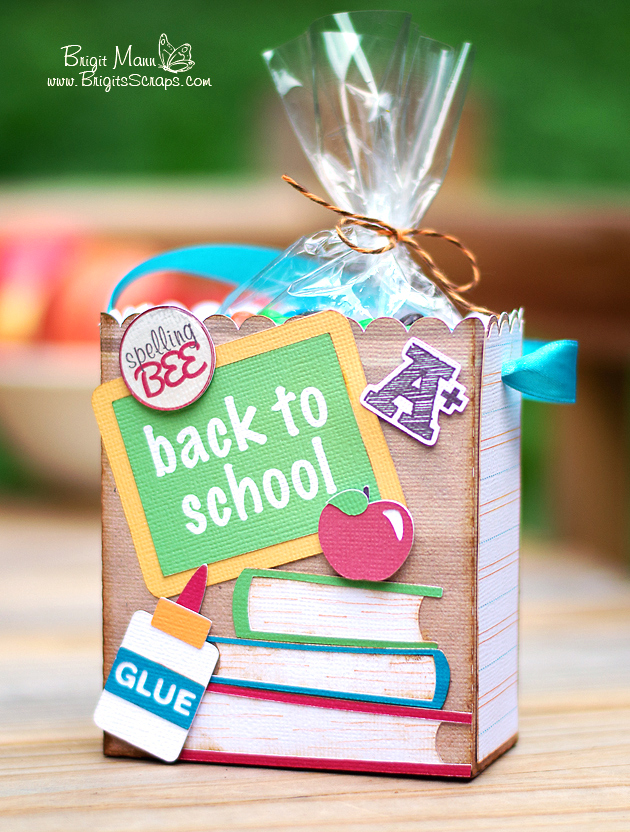
Back To School Gifts by Brigit and Corri

Check out these beauties by Brigit and Corri. They have both shared some great back to school gifts with us. I was in love and kind of wished my kids were still in Elementary.
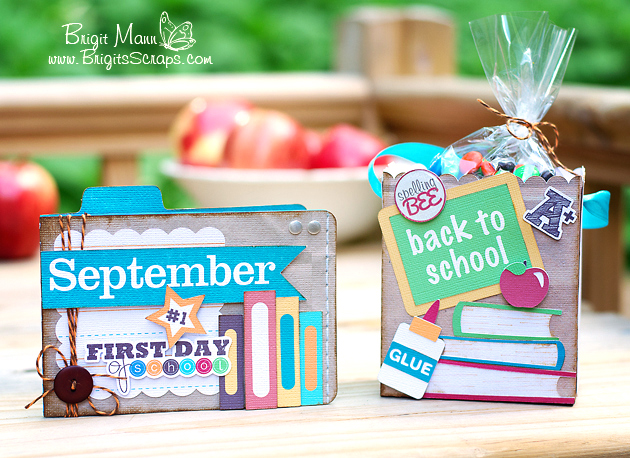
Hi everyone!  School is right around the corner, so I thought I’d make a cute back to school gift set.


Just a little something to brighten a child’s first day of school or maybe some treats for the teacher.

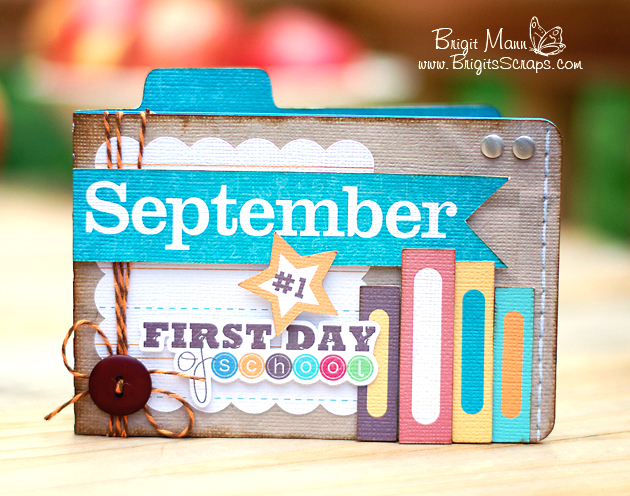
I used Lori’s A2 Tab Card and decorated it with the books from the Back to School Icons set.  For the September, which is one of Lori’s files too from the September Art set in the Silhouette Online Store, I did a print n cut.  I used a couple of digital elements from Echo Park’s School Days Mini Theme collection.

The cute bag comes as a set of two that fits on a 12 x 12 piece of paper.  You can fill it with some treats or smaller school supplies like paper clips, some post-it notes, etc.  I also used some files from the Back to School Icons and September Art sets.

Check out this beautiful set by Corri.

 Hi everyone!  I have an adorable gift for the teacher that I made using Lori Whitlock’s Stationary Box.  This would be perfect  on the first day of school.  It’s full of tags and note cards…great for labeling items in the classroom and communicating with parents.

I decorated the outside of the box with Lori’s Graduation Owl (without the cap).

Here a picture of the box open.  I included a few tags, note cards and envelopes. I added some buttons and wooden veneer speech bubbles.

Last but not least we would like to share with you our Cameo winner.  Congrats goes out to Kris S who has won herself my favorite tool of all time, a Silhouette Cameo. Please contact Lori at lori@loriwhitlock.com with your snail mail address so we can send this out to you! Thank you to ALL of you that entered! We wish we had one for each of you as we love ALL of our dedicated readers.  

~ Lori and Lisa 

Blog Party + Vinyl Tutorial + Freebie

It’s Day 3 of our Blog Party! We have another FREEBIE at the end of today’s post so be sure to keep reading…
We have a fantastic vinyl tutorial today by CT member, Mendi. Thank you Mendi for sharing your expertise with all of us!
Here’s what Mendi has to say:
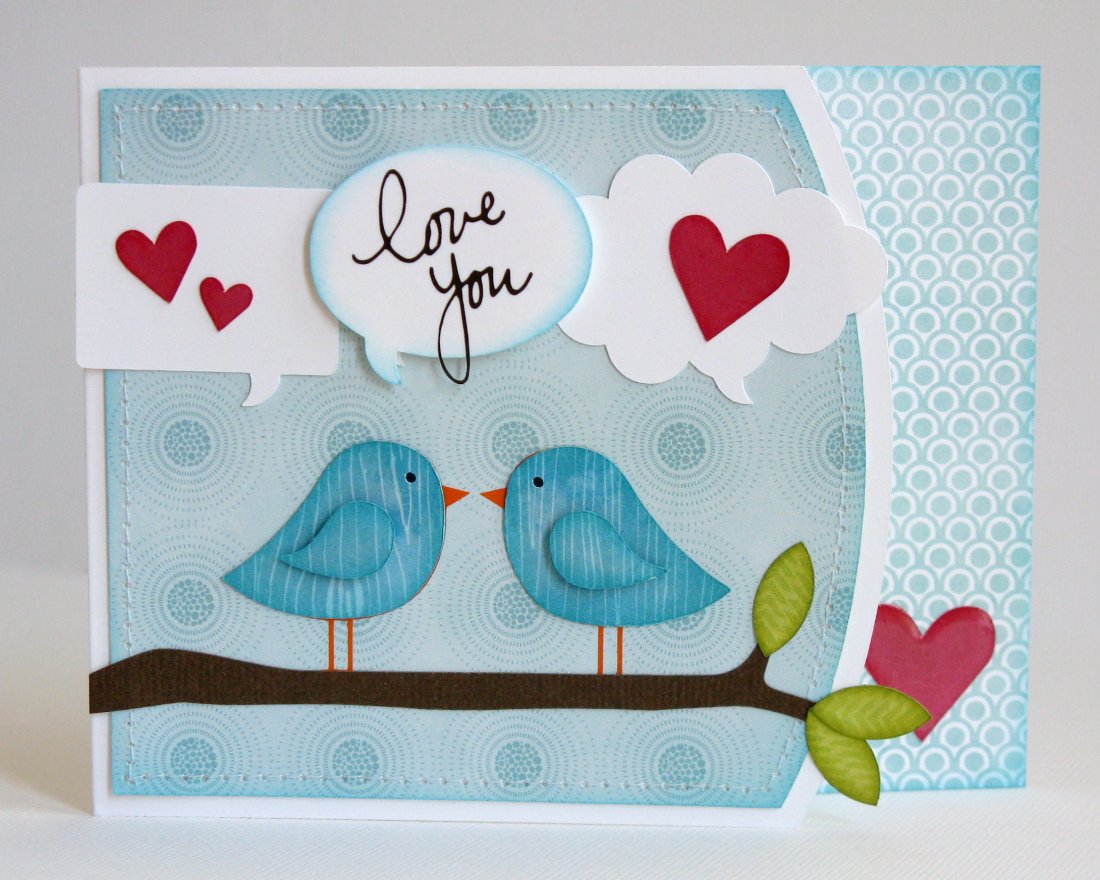
“Today I have an easy step-by-step tutorial sharing how to cut and use vinyl which I used on a simple little card (featuring Lori’s super fun Here & Now collection which she designed for Echo Park).  While vinyl is perfect for so many home decor projects, I  personally adore using it for my cards and scrapbook layouts.  It’s the perfect medium for cutting delicate files that would ordinarily shred cardstock.”

“I started off by planning the basic layout of my card by assembling it visually in my Silhouette software, changing the fill colors to get a feel for what papers I might want to use to cut it out.  I changed a couple things along the way (like my sentiment color since I was sad to discover that my hot pink vinyl was not a good match for my paper).”
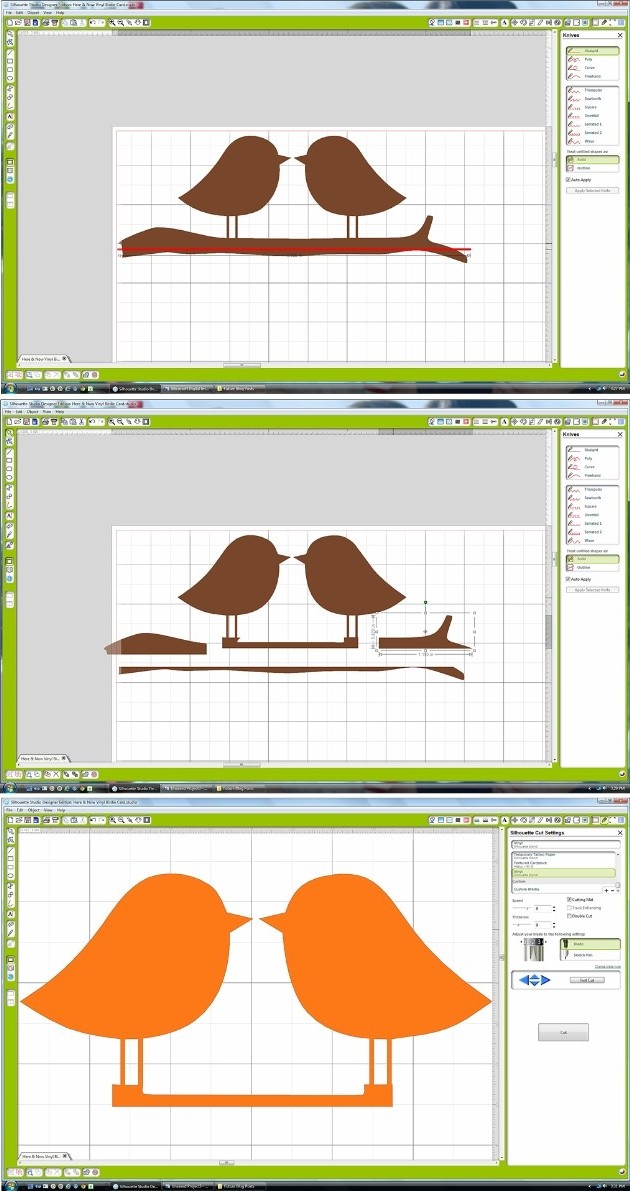
“I knew I wanted to cut the teeny-tiny bird legs and beaks out of orange vinyl, but they were all one piece with the branch so to get around that I made a duplicate and used my knife to isolate the birds and cut out part of the branch.  I could have cut it all off, but I decide to leave a portion to help me line up my birds just right during assembly.  The following screen shots show the steps I took to do this, deleting the extras portions I didn’t need.”

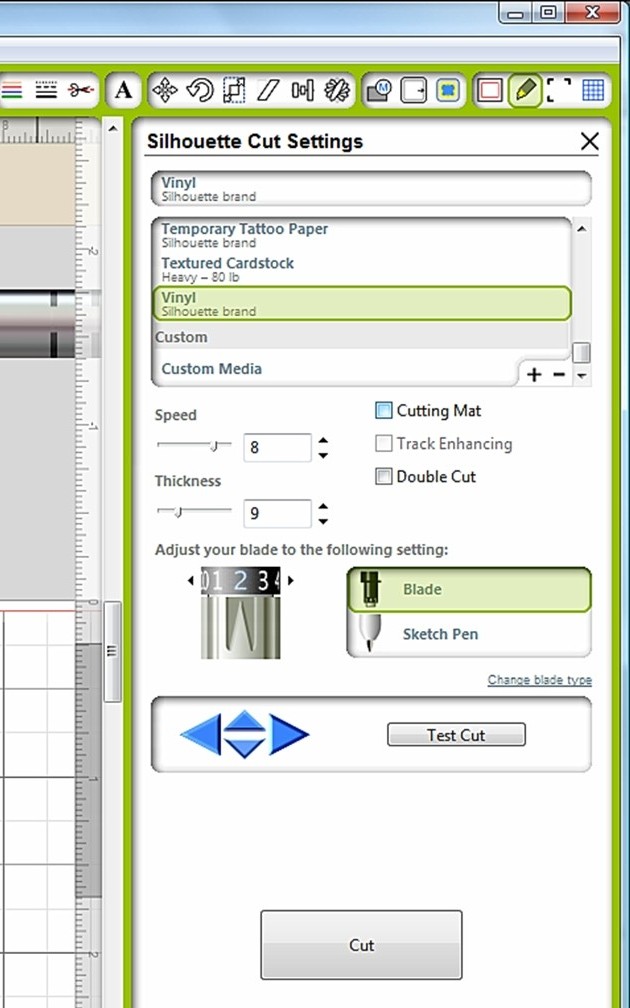
“I was now ready to cut my birds from the orange vinyl.  To do this I selected the vinyl cut setting from the menu.  With vinyl you have the option to adhere it to your cutting mat like you would cardstock or to insert it directly into your machine.  Personally I like to use my mat and use up small scraps of vinyl (and not mess with changing settings), but for the purpose of today’s tutorial I thought I would share another option. 

When using your vinyl without a mat you need to make sure to uncheck the box next to “cutting mat” within your cutting settings window.”


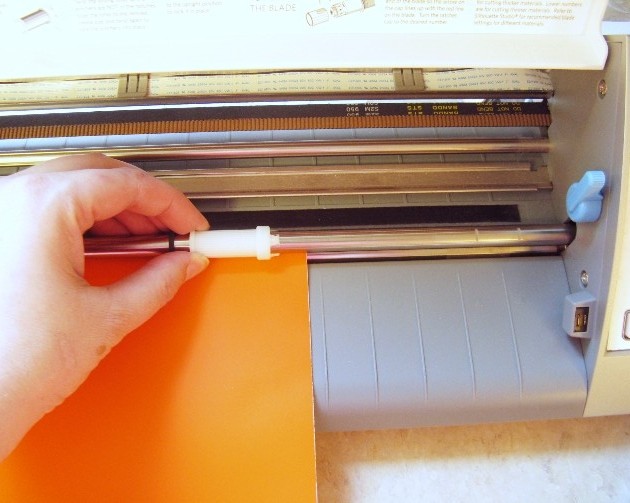
“If you’re using a Cameo, depending on the width of your vinyl, you will also most likely need to slide the rollers by following the directions on the inside cover of the machine.”


“Also make sure to change your setting from ‘load cutting mat’ to ‘load media’ and hit enter.”


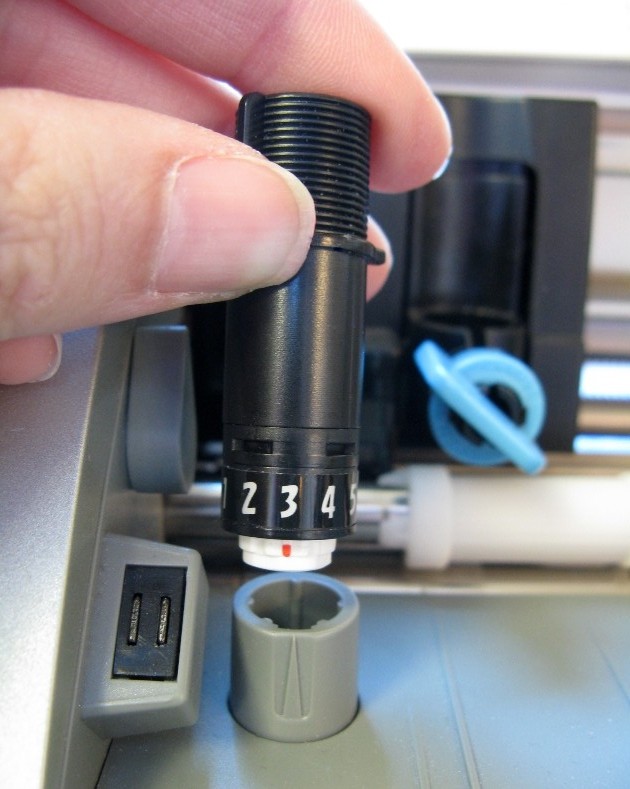
“Change your blade setting to 2 (or in my case I accidentally took a picture of mine set to 3 which also works if your blade is getting dull).”


“After pulling my full-sized vinyl from the machine, I cut around the image to avoid waste and peeled off and threw away the negative portion of the image.”


“I then cut a small piece of transfer paper that was similar in size and peeled it from the glossy paper backing (if you’re thrifty like me, this can be saved and reused though so make sure to keep the backing it comes on to hold onto for another project).”


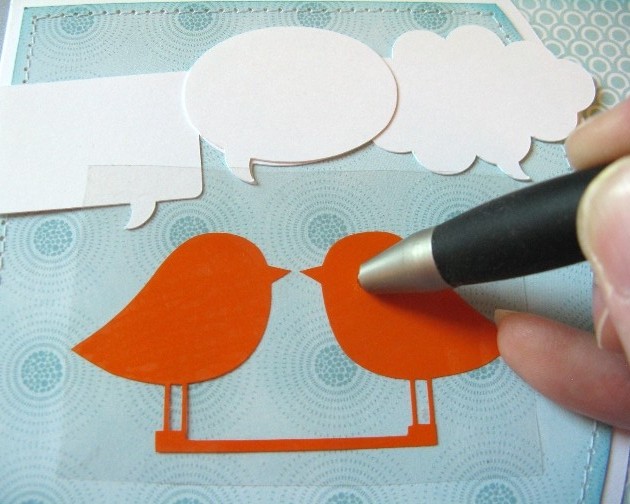
“Lay the clear transfer paper over your vinyl image (sticky side down) and rub with the popsicle stick it comes with (or bone folder or stylus).”


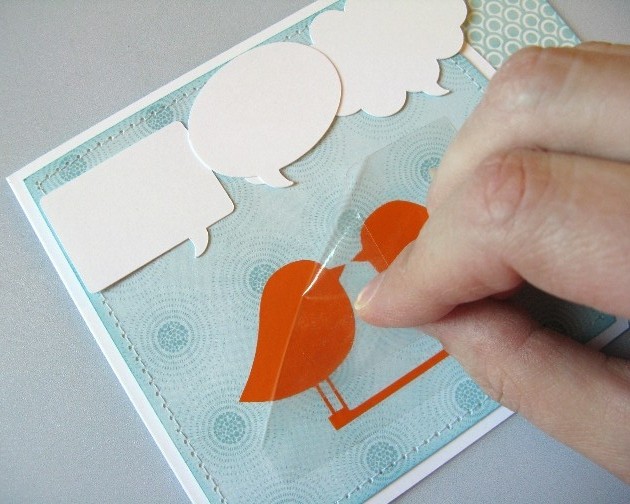
“Peel back the transfer paper and your image should now be clinging to the clear transfer paper.  If not you can help it along by rubbing stubborn areas again or sticking a fingernail in there to encourage it.”


“Now you are ready to adhere it to your actual project.  Once again your rub-it with your popsicle stick or stylus (and once again you repeat as necessary or stick a fingernail in between the transfer paper and your vinyl cutout to help it along).” 


“When images are not fragile or easily warped in their shape it’s possible to skip the transfer paper all together, but I personally love the transfer paper because it helps me line it up perfectly every time just the way it was on my computer screen.” 🙂


“I repeated these same steps to cut out the sentiment “love you” on my card.  With the small size I chose, this was even more fragile than the bird legs and would have been nearly impossible to do with any material other than vinyl.  I completed my card with more cute papers from the Here & Now collection.”


To create my card today I used the following cutting files designed by Lori Whitlock:

“For all those new Silhouette owners out there I hope I’ve taught you something new and for everyone else, I hope I’ve managed to inspire you to play with vinyl more and give it a try for your next intricate cutting project!”

If you’re interested in giving vinyl a try we have a super promotion going on right now!

You can BUY ONE GET ONE FREE on all Silhouette vinyl now through August 14! Here are the two deals you can cash in on…

(1)    Silhouette CAMEO®, 2 rolls of vinyl (chalkboard and white) and 1 roll of transfer paper: $269.99
(2)    Buy one get one free deals on all Silhouette vinyl (including transfer paper and stencil vinyl, too)

Be sure to shop using this link: www.silhouetteamerica.com/vinyl and use the coupon code LORI at checkout.

Are you ready for ANOTHER freebie? TODAY ONLY we have another FREE shape for you! This saying from Kolette Hall is perfect for cutting out of vinyl! Just incase you were not aware, Kolette Hall offers her SVG shapes in our online shop along with her Commercial use licenses for her SVG and Silhouette cutting files. Thank you, Kolette for sharing this beautiful FREEBIE today!

EXPIRED

Just a reminder… ALL SVG cutting files and fonts in Lori’s Shop are on sale, use coupon code SUMMER to get 30% OFF your entire order!

Be sure you ENTER TO WIN the Silhouette Cameo that we’re giving away!! The winner will be announced on Monday!

THANK YOU for joining our Blog Party this week! It’s been fun having you here with us! I thoroughly appreciate your support! My goal is to bring outstanding cutting files, paper, fabric, etc. to you! Just knowing that you enjoy working with the things I’m designing keeps me going! Thank you!


Layout by Traci and Cake Explosion Box by Christine

Traci is on the blog today sharing this beautiful layout with us… Hi everyone! I’m back today to share a sweet layout with you.  This is my darling niece back in 1997 (I’m just a tad behind on my scrapbooking).  She was at such a cute age back then that even though each of these photos wasn’t from the same day or event, I wanted to use them together.  (How cute is that hat)??  Every time I saw Taylor back then, she made me laugh — so Lori’s title was perfect for this layout.  I’ve also been wanting to use one of Lori’s 12×12 backgrounds and I fell in love with the honeycomb pattern.  Using my cameo, I was able to cut the entire 12×12 background out of a sheet of pink pattern paper.  Then, I clipped parts of the inside away, so that the pattern was left on the bottom and up one side.
I also cut a few of the hexagons out of other pattern papers to give the layout some random pops of color.  I cut a hexagon shaped card in half to layer under some embellishments in the top right corner, and I finished up the page with twine around the edge and a few flowers.
Here are the cutting files that I used…thanks for letting me share with you today!
Lori Whitlock Geometric Lace, also available in the Silhouette store as Honeycomb Background Lace
and check out what Christine made today
It just so happens that my day to share on Lori’s blog is also my daughter’s 21st birthday so I thought that it would be fitting to share something birthday related.  This birthday explosion box is new in Lori Whitlock’s store and I had a lot of fun putting it together and adding my own personal touches.

On the top of the box, I added a bow that comes with the Birthday Box file.  Just cut a couple of strips of paper and secure with a brad.  When you lift the top off the box, the sides fall open and the cake inside is revealed.

I made the little 21 myself by typing the numbers out first and ungrouping them.  Then I drew a small rectangle the width of the numbers and welded it to the bottom of the numbers.  This created a little tab that I was able to use to attach it to the top of the box.  If I had thought about it before I cut out the box, I would have put an extra slit in the top of the box like the others have, so that I could just slide the tab in and secure it underneath.  Next time I make this, it will be easier to make it look nice.  Make sure that you can fold the number over, or the lid won’t fit on the box.
I used October Afternoon’s CakeWalk collection to cut out my box and added a few sticker embellishments here and there.
This way a really fun box to create.  I am excited to try it again in different colors.
So, if I may, a big Happy 21 Birthday Wish to my daughter.  I hope this day brings you joy and happiness!
Lori Whitlock Supplies used:

Layout by Mendi and Card Set by Corri

Welcome Mendi and Corri to the blog today with their adorable projects. First up is Mendi.

I’m back today to share another layout using more from the “Perfect Summer” collection Lori designed for Echo Park along with several of her cutting files!

I ended up utilizing a couple 6×6 papers from the coordinating paper pad for my background.  I love how the prints are reduced in size which was perfect for what I had in mind.  For my title I paired Lori’s “adventure” phrase with some Ali Edwards stamps and a fish sticker from the collection.
I also used the smaller prints from the 6×6 pad to cut my flip flops which worked well.  I wanted the water flourish to stand out against the background so I chose to journal on vellum which gave a subtle washed out look to the patterned paper below.  As a finishing touch I added Stickles glitter to the water flourish and openings in my diecut border.
To create my layout I used the following cutting files designed by Lori:
Don’t Bother Me (flip flops)
4 Seasons Layout: Spring (flower for flip flops)
Cute Umbrella (for splashes- Silhouette Store only)
‘Water’ Flourish (Silhouette store only)
‘Big Adventure’ Phrase (Silhouette store only)
3 Borders (Silhouette store only)
Next up we have Corri…

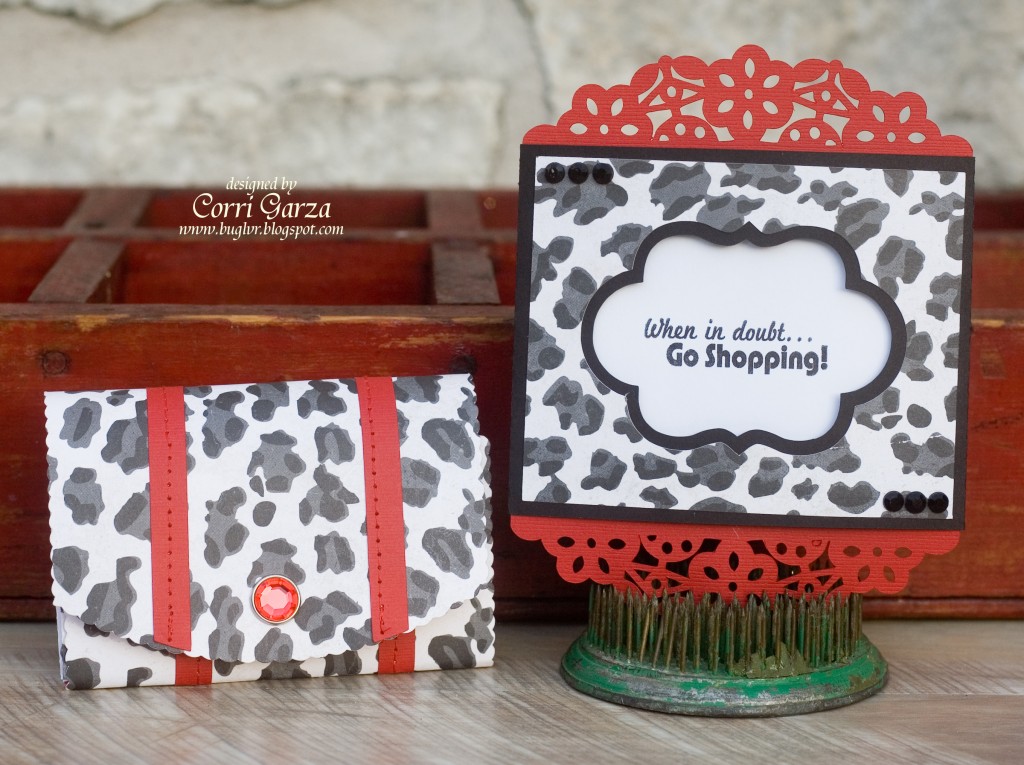
I have a cute gift set to show you today that would be perfect for a friend or a teenage girl.

 I just love Lori’s new Accordion Gift Card Wallet.


The wallet is perfectly sized for a gift card or two and is very durable.  You could easily carry this around in your purse.   I made the Ornate Pull Out Card 2 to match using paper from the Echo Park – Love Story Collection that Lori designed.  This card is so beautiful and looks like you put a lot of work in when it actually goes together very quickly.