3D Pickup Truck with Flowers

Hello crafty friends! Have you all seen the adorable 3D Pickup Truck with Flowers (Lori’s SVG Shop, Silhouette)? Maybe you’ve seen it but passed it by so I’m here today to give you another look. IMO this is so stinking adorable! How cute would this be sitting on a mantle with some Summer décor? Now that I’ve just typed this I realized I can add this to my Summer décor in my tiered trays!!

It doesn’t take much time at all to put this little guy together. Maybe it’s because I pulled out my A Slice Of Summer collection and it all kinda fell into place. I used the Solids papers for the truck and the flowers and some of the enamel dots for a little pizzazz on the wheels and headlights.  For an assembly tutorial see Lori’s YouTube Channel here.

And all of these adorable rolled flowers that complete this summery truck of goodness are all included in the file! I can almost envision my grandfather driving this around but without the flowers LOL!!


Hope everyone is having a lovely day and thank for stopping by!

Aimee

Friday $5 SVG Bundle Ends at Midnight!

This awesome Friday $5Bundle is available until midnight and when it’s gone it’s gone.  These SVG files can be used with Cricut Explore, Silhouette Studio (with the Designer Edition upgrade), Scan N Cut, and any other cutter that will work with SVG files. Help spread the word by telling your friends and announcing it on social media!

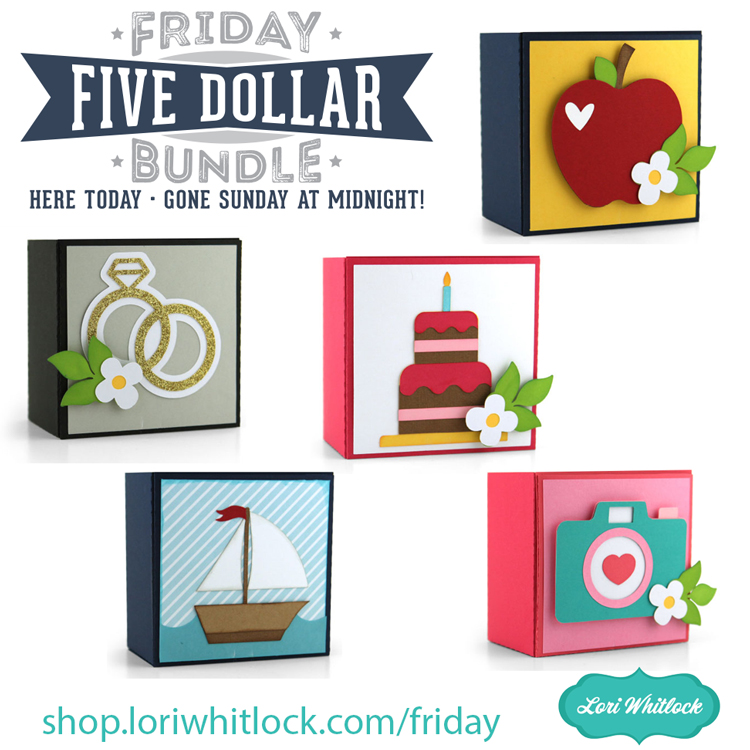
Be sure to pick up this Spring Box Card Bundle including 5 SVG files for just $5**!

The cost of this bundle is $5, for $14.95 worth of SVG files, over a 66% savings! But don’t wait, this bundle will only be around until TODAY at midnight!

** Because Friday $5 Bundles are already heavily discounted they are not eligible for further discounts including monthly, seasonal and flash sales.

Have a great day!

A New Friday $5 SVG Bundle

Hi Everyone! Today we have a new Friday $5 Bundle! It will ONLY be available until Midnight Sunday and when it’s gone it’s gone. These SVG files can be used with Cricut Explore, Silhouette Studio (with the Designer Edition upgrade), Scan N Cut, and any other cutter that will work with SVG files. Help spread the word by telling your friends and announcing it on social media!

Now through Sunday, you can pick up this Spring Box Card Bundle including 5 SVG files for just $5**!

The cost of this bundle is $5, for $14.95 worth of SVG files, over a 66% savings! But don’t wait, this bundle will only be around until Sunday at midnight!

** Because Friday $5 Bundles are already heavily discounted they are not eligible for further discounts including monthly, seasonal and flash sales.

Have a great day!

Button Card Tutorial

Lori has some fun new button cards in her shop.  The whole collection can be found here. They are also available individually in the Silhouette Design Store.


This card is called the Flower Card Button (SVG, Silhouette).  I’m going to share a quick tutorial using Cricut Design Space.  You can create this card with the Silhouette as well.  When you upload and open the image in Design Space, it looks like this:

Ungroup the pieces of the card.  Now let’s look at the button sentiment.  Lori has included a circle that is the size of  the medium We R Memory Keepers button (37 mm).  A smaller circle is also included that could be used instead of a button if you did not have a button maker.  Both Mom and Mum are included in the file.


If you want to change any of the colors on the button, this is the time to do that.  Once you have the colors, it is time to flatten the image for Print then Cut.  Select one of the circles and all the pieces in it like shown, and click Flatten (bottom right of screen).

You know you have the file flattened correctly when it looks like this on your screen:

And in your layers, the image looks like this.

Sometimes when flattening files, you might need to ungroup before you flatten. This file is ready to print then cut.  After printing and cutting, you have all your pieces:

The flower parts are easy to assemble on the card.   If you have a Button press, make a button.

You can make the button with the pin in the back so it can be worn or attached to something else.  Or you can take the pin out, so it will just be an embellishment on the card. I made both to show you.

I decided to use the button without the pin back for the card.  I love the dimension it adds.  If you don’t have a button press, you can use the included smaller circle and mount it to chipboard and/or a pop dot.

I used papers from Lori’s Our Wedding Collection. I hope you enjoy this tutorial for the Button card.  The real question is, Do you call the item in this file a button or badge? Or something else?

Have a great day!

Flower Tricycle Box Card

Hello everybody, Marcia here today. I spent last weekend cleaning out my flower beds, uncovering the green sprigs poking their way up through the dirt and getting the beds ready for planting some new annuals. I think Spring has finally arrived to Minnesota! Maybe the long winters make me appreciate the flowers more. Anyway, I was in the mood to create some flowers and this Flower Tricycle Box Card (SVGSilhouette) made me smile. I love the profusion of bright, colorful flowers. I used the Lori Whitlock A Slice Of Summer solid color papers along with some American Crafts cardstock.

I used an embossing folder to create a woodgrain appearance on the baskets. Some Nuvo drops add dimension to the centers of the flowers. This card adds a definite Spring vibe sitting on my desk and it folds flat in case you want to mail it off to someone.

This fun card will fit into a 5×7 envelope for mailing.   Don’t worry… there is a YouTube tutorial to walk you through the assembly. There are lots more Spring card designs in the shop. Be sure to check them all out. Thanks so much for stopping by. Have a great week.

~Marcia